

SharePoint Mentor Curated Articles
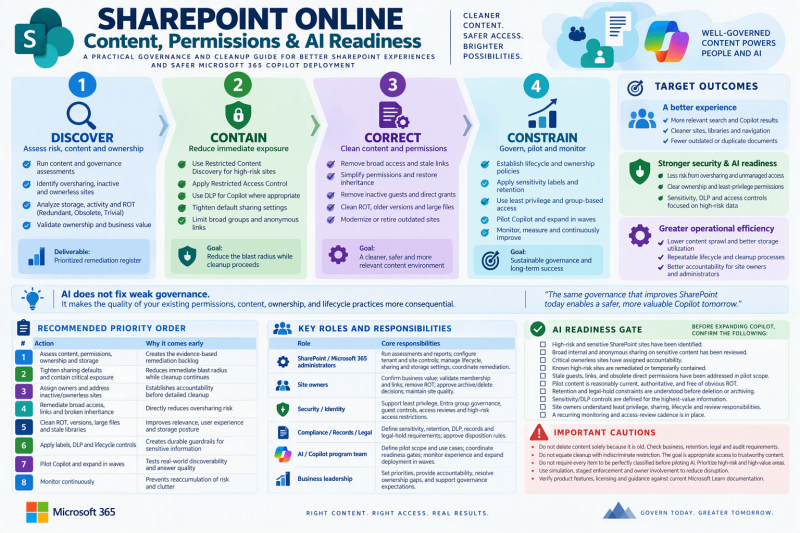
Content, Permissions & AI Readiness
A PRACTICAL GOVERNANCE AND CLEANUP GUIDE FOR BETTER SHAREPOINT EXPERIENCES AND SAFER MICROSOFT 365 COPILOT DEPLOYMENT

AI does not fix weak governance. It makes the quality of your existing permissions, content, ownership, and lifecycle practices more consequential.
Summary
A strong SharePoint Online experience and a responsible AI rollout are the same governance problem viewed from two angles. Users need current, well-organized content and predictable access. Microsoft 365 Copilot and related AI experiences work best when the same environment is intentionally governed, because they can surface and summarize information users already have permission to access.
This combined approach therefore treats storage cleanup, content quality, permissions remediation, lifecycle management, and AI readiness as one coordinated program. The recommended operating model is: discover risk and clutter, contain high-risk exposure, correct permissions and content, then constrain future sprawl through repeatable governance.
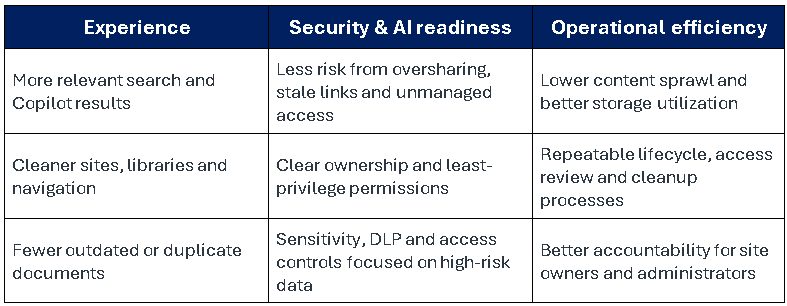
Target outcomes
Phase 1: Discover | Build the Inventory and Risk Picture
Start with visibility. Do not begin by deleting content or redesigning permissions at random. Build a prioritized inventory that combines content condition, sensitivity, ownership, access exposure, activity, and storage impact.
1. Run a SharePoint content and governance assessment
- Use the Content Management Assessment in SharePoint Advanced Management to identify oversharing indicators, inactive or ownerless sites, broken inheritance, and related readiness signals.
- Review Data Access Governance reporting for broad internal access such as Everyone Except External Users, permissive sharing links, external or guest access, and permission-state concerns.
- Use Microsoft Purview capabilities, where licensed and applicable, to identify sensitive information that is broadly accessible or otherwise presents elevated risk.
- Export or record the findings so sites can be triaged consistently rather than handled ad hoc.
2. Add content and storage signals
- Sort active sites by storage used, growth, and last activity to identify large or stale areas that deserve attention.
- Identify version-heavy libraries, oversized files, obvious duplicates, temporary files, abandoned project artifacts, and other ROT content: Redundant, Obsolete, or Trivial information.
- Review recycle-bin usage and libraries whose content no longer has active business value.
- Treat Preservation Hold Library content carefully. Retention or legal-hold requirements must be evaluated before attempting deletion.
3. Validate ownership and business value
- Confirm an accountable owner for every site and, where practical, establish at least two active owners for resiliency.
- Identify ownerless and single-owner sites, including Teams-connected sites.
- Flag sites containing HR, finance, legal, customer, regulated, or other sensitive content for higher-priority review.
- Review OneDrive content for departed employees and stale guest access as part of the broader information-governance program.
Deliverable from Phase 1: a prioritized remediation register. Rank sites by a combination of sensitivity, breadth of access, business value, inactivity, content quality, and storage impact.
Phase 2: Contain | Reduce High-Risk Exposure While Cleanup Proceeds
Do not wait for a perfect tenant before introducing AI. Apply targeted, temporary protections to the highest-risk areas while permanent remediation is underway, and communicate those controls to site owners.
- Use Restricted Content Discovery on appropriate high-risk sites to limit discovery in Copilot, agents, and organization-wide search while underlying permissions are reviewed.
- Use Restricted Access Control where a site should be limited to approved Microsoft Entra security groups or Microsoft 365 groups.
- Use Microsoft Purview data-loss-prevention controls for Copilot where appropriate for sensitive or labeled information.
- Consider Restricted SharePoint Search only as a short-term bridge when a constrained search scope is necessary, not as the long-term governance model.
- Tighten default sharing settings. Prefer Specific people links for sensitive scenarios and reduce the use of Anyone or broad organization-wide links.
- Where appropriate, reduce discoverability of broad groups such as Everyone Except External Users in sharing experiences.
Phase 3: Correct | Remediate Permissions, Access and Sharing
Prioritize items with the largest blast radius first: sensitive content combined with broad, persistent, or poorly understood access.
Permission remediation checklist
- Remove or replace broad access such as Everyone, Everyone Except External Users, or overly large organization-wide groups on sensitive sites, libraries, folders, and files.
- Prefer role-based group membership over repeated individual grants. Keep membership understandable and reviewable.
- Revoke or expire stale Anyone and organization-wide sharing links, prioritizing high-sensitivity locations and high-usage links.
- Review broken inheritance and excessive unique permissions. Restore inheritance where it matches business intent and simplify structures that have become difficult to govern.
- Remove obsolete direct permissions and inactive guest access. Reassign or archive departed-employee content according to business and compliance requirements.
- Use site access reviews or owner attestations so accountable owners validate members, links, sharing settings, and continued business need.
- Use Microsoft Entra access reviews and privileged-access controls for sensitive groups where they fit the organization’s identity-governance model.
Phase 4: Correct | Improve Content Quality, Structure and Storage
Permission cleanup protects information. Content cleanup improves the experience that people and AI have with that information. The objective is a smaller, clearer, more authoritative corpus.
A. Reduce ROT and improve findability
- Work with site owners to remove or archive redundant, obsolete, and trivial files, especially on high-value or high-traffic sites.
- Retire outdated policies and duplicate reference material so users and Copilot are less likely to encounter conflicting answers.
- Use consistent naming, metadata, content types, navigation, hub design, and deliberate folder structures to improve context and retrieval.
- Modernize or retire legacy sites and solutions where they no longer support current business processes.
B. Reclaim storage safely
- Review version history on high-storage libraries. Use supported version-trimming capabilities and a what-if assessment before large-scale deletion, then establish suitable automatic or intelligent versioning policies where appropriate.
- Empty first-stage and second-stage recycle bins only after confirming deleted material is no longer required.
- Identify large files, duplicates, abandoned libraries, and expired project artifacts for deletion or archival with owner approval.
- Use Microsoft 365 Archive for inactive sites that retain business or compliance value but no longer need to remain active.
- Delete sites only after confirming business, retention, legal, records, and audit requirements.
Phase 5: Constrain | Establish Lifecycle, Data Protection and Ongoing Governance
Site lifecycle and ownership
- Create site ownership policies and use simulation before enforcement when available.
- Define inactivity criteria appropriate to the organization, notify owners, request attestation, and establish outcomes for non-response such as further review, read-only treatment, archive, or approved deletion.
- Review inactive sites and storage regularly rather than treating cleanup as a one-time project.
Information protection
- Apply sensitivity labels first to the most confidential and business-critical data rather than trying to label everything before AI deployment.
- Combine labeling with appropriate DLP, sharing restrictions, access controls, and retention policies.
- Confirm that retention and legal-hold requirements are understood before changing or removing protected content.
Permission design principles
- Use least privilege as the default.
- Favor group-based access that reflects roles or business responsibilities.
- Keep site-level access simple and avoid unnecessary item-level exceptions.
- Make owners accountable for periodic membership, sharing-link, and content reviews.
- Use time-bound access for guests and temporary collaboration when practical.
Phase 6: Pilot AI and Expand in Controlled Waves
AI deployment should validate the cleanup effort rather than bypass it. Begin with a controlled user population and a well-understood SharePoint footprint, observe what information is surfaced, correct unexpected access or low-quality content, and then widen deployment in measured waves.
- Select pilot users and sites with active owners, reasonable permissions, and useful current content.
- Confirm high-risk sites have been remediated or temporarily contained.
- Validate representative Copilot scenarios against expected access and content quality.
- Remediate permission surprises, stale information, ambiguous sources, or excessive duplication identified during the pilot.
- Expand to the next wave only after owners and administrators are comfortable with the resulting experience.
- Continue recurring assessments, access reviews, content lifecycle actions, and owner education after broader rollout.
Recommended Priority Order
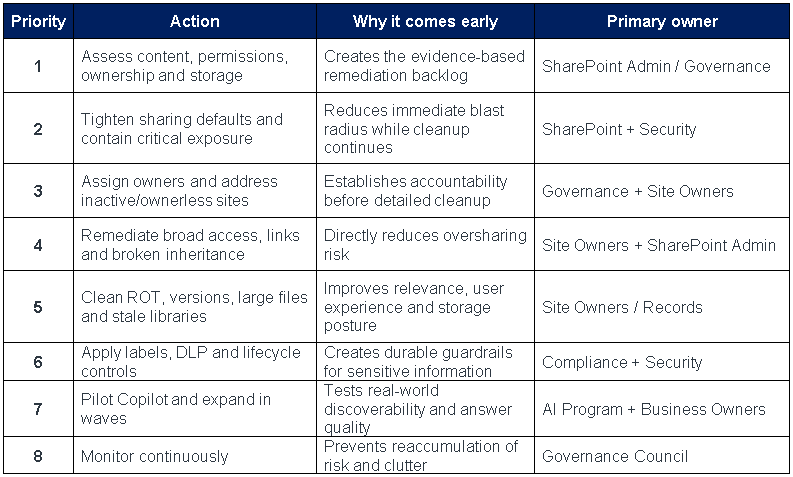
Responsibility Model

AI Readiness Gate
Before expanding Copilot to a broader population, use this short decision checklist. A “No” should trigger a documented exception, containment measure, or remediation plan.
- High-risk and sensitive SharePoint sites have been identified.
- Broad internal and anonymous sharing on sensitive content has been reviewed.
- Critical ownerless sites have assigned accountability.
- Known high-risk sites are remediated or temporarily contained.
- Stale guests, links, and obsolete direct permissions have been addressed in pilot scope.
- Pilot content is reasonably current, authoritative, and free of obvious ROT.
- Retention and legal-hold constraints are understood before deletion or archiving.
- Sensitivity/DLP controls are defined for the highest-value information.
- Site owners understand least privilege, sharing, lifecycle and review responsibilities.
- A recurring monitoring and access-review cadence is in place.
Suggested Program Measures
Use measures that show whether risk and clutter are actually declining. Exact targets should be set by the organization after establishing a baseline.
- Ownerless and single-owner sites remaining.
- Inactive sites awaiting attestation, archive or approved deletion.
- Sites and files with broad internal or anonymous sharing.
- High-risk sites under temporary containment versus permanently remediated.
- Guest accounts, direct grants, and sharing links requiring review.
- ROT or stale content removed/archived and storage reclaimed.
- Libraries operating under approved versioning standards.
- Sensitive locations with appropriate labels, DLP and sharing restrictions.
- Pilot issues found through Copilot and the percentage resolved before the next wave.
Important Cautions
- Do not delete or archive content solely because it is old. Confirm business value, retention, records, legal-hold, audit, and regulatory requirements first.
- Do not equate cleanup with indiscriminate restriction. The goal is appropriate access to trustworthy content, not making SharePoint unusable.
- Do not require every content item to be perfectly classified before piloting AI. Prioritize sensitive, broadly shared, high-value, and high-traffic areas first.
- Use simulation, staged enforcement, communications, and owner involvement to reduce disruption.
- Product features, licensing, report names, UI paths, and cmdlets change. Verify implementation details against current Microsoft Learn documentation before production changes.
Microsoft guidance to verify before implementation
The combined strategy is consistent with current Microsoft guidance that Copilot and agents respect existing permissions and work best with current, well-governed content. Microsoft also positions SharePoint Advanced Management as a set of governance capabilities for content sprawl, lifecycle and oversharing, with Copilot-readiness features available through eligible Copilot licensing.
- Get ready for Microsoft Copilot with SharePoint Advanced Management
https://learn.microsoft.com/en-us/microsoft-365/copilot/get-ready-copilot-sharepoint-advanced-management - Assess your organization’s content management status
https://learn.microsoft.com/en-us/sharepoint/content-management-assessment - SharePoint Advanced Management overview
https://learn.microsoft.com/en-us/sharepoint/advanced-management - Configure a secure and governed foundation for Microsoft Copilot
https://learn.microsoft.com/en-us/microsoft-365/copilot/configure-secure-governed-data-foundation-microsoft-365-copilot - SharePoint Advanced Management features in Microsoft Copilot licenses
https://learn.microsoft.com/en-us/sharepoint/sharepoint-advanced-management-features-copilot-license