SharePoint Mentor Curated Articles
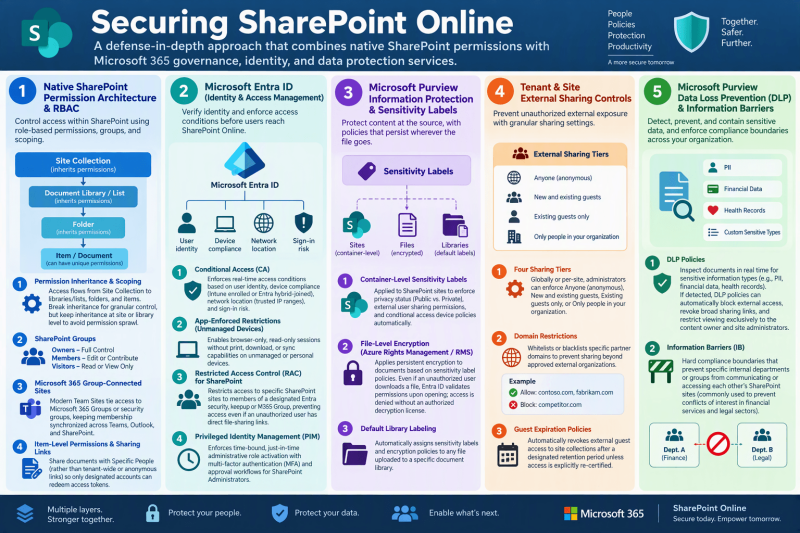
Securing SharePoint Online content relies on a defense-in-depth model that combines native SharePoint permission hierarchies with broader Microsoft 365 governance, identity, and data protection services.
1. Native SharePoint Permission Architecture & RBAC
At the application layer, access is controlled through Role-Based Access Control (RBAC) managed via permission levels, SharePoint Groups, and Microsoft 365 Groups:
- Permission Inheritance & Scoping: Access permissions flow downward from the Site Collection to Document Libraries/Lists, Folders, and individual items/documents. Breaking inheritance allows explicit permission assignments at granular levels, though maintaining inheritance at the site or library level is recommended to avoid permission sprawl.
- SharePoint Groups: Standard out-of-the-box groups map to permission levels—Owners (Full Control), Members (Edit or Contribute), and Visitors (Read or View Only).
- Microsoft 365 Group-Connected Sites: Modern Team Sites tie access directly to Microsoft 365 Groups or security groups, ensuring that membership additions and revocations across Microsoft Teams, Outlook, and SharePoint remain synchronized.
- Item-Level Permissions & Sharing Links: Document-level sharing can be scoped to Specific Peoplerather than tenant-wide or anonymous links, ensuring only designated user accounts can redeem access tokens.
2. Microsoft Entra ID (Identity & Access Management)
Microsoft Entra ID provides the identity verification foundation before any user reaches SharePoint Online:
- Conditional Access (CA): Enforces real-time access conditions based on user identity, device compliance (Intune enrolled or Entra hybrid-joined), network location (trusted IP ranges), and sign-in risk.
- App-Enforced Restrictions (Unmanaged Devices): Enables browser-only, read-only sessions without print, download, or sync capabilities when users authenticate from unmanaged or personal devices.
- Restricted Access Control (RAC) for SharePoint: Restricts access to specific SharePoint sites to members of a designated Entra security group or M365 Group, preventing access even if an unauthorized user holds direct file-sharing links.
- Privileged Identity Management (PIM): Enforces time-bound, just-in-time administrative role activation with multi-factor authentication (MFA) and approval workflows for SharePoint Administrators.
3. Microsoft Purview Information Protection & Sensitivity Labels
Content-level protections persist with files even if they are downloaded or moved outside SharePoint:
- Container-Level Sensitivity Labels: Applied directly to SharePoint sites to enforce privacy status (Public vs. Private), external user sharing permissions, and conditional access device policies automatically.
- File-Level Encryption (Azure Rights Management / RMS): Applies persistent encryption to documents based on sensitivity label policies. Even if an unauthorized user intercepts or downloads a file, Entra ID validates permissions upon opening; access is denied without an authorized decryption license.
- Default Library Labeling: Automatically assigns sensitivity labels and encryption policies to any file uploaded to a specific document library.
4. Tenant & Site External Sharing Controls
Granular external sharing configurations prevent unauthorized external exposure across the tenant:
- Four Sharing Tiers: Globally or per-site, administrators can enforce Anyone (anonymous), New and existing guests, Existing guests only, or Only people in your organization.
- Domain Restrictions: Whitelists or blacklists specific partner domains to prevent sharing beyond approved external organizations.
- Guest Expiration Policies: Automatically revokes external guest access to site collections after a designated retention period unless access is explicitly re-certified.
5. Microsoft Purview Data Loss Prevention (DLP) & Information Barriers
- DLP Policies: Inspect documents in real time for sensitive information types (e.g., PII, financial data, health records). If detected, DLP policies can automatically block external access, revoke broad sharing links, and restrict viewing exclusively to the content owner and site administrators.
- Information Barriers (IB): Hard compliance boundaries that prevent specific internal departments or groups from communicating or accessing each other’s SharePoint sites (commonly used to prevent conflicts of interest in financial services and legal sectors).
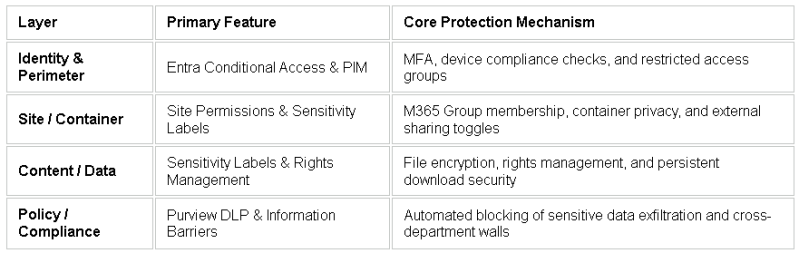
Layered Protection Overview