SharePoint Mentor Curated Articles
PRIMARY PILLARS FOR SUCCESSFUL INFORMATION ARCHITECTURE
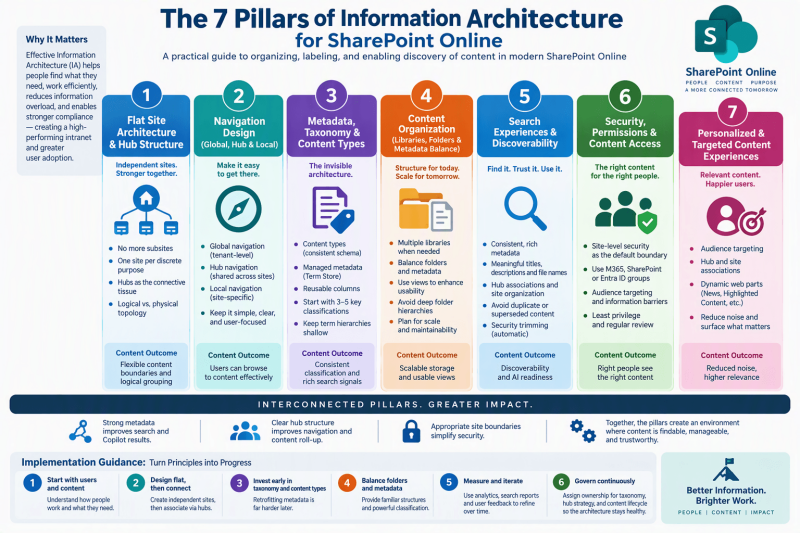
From a SharePoint Online Content Perspective - A practical guide to organizing, labeling, and enabling discovery of content in modern SharePoint Online
Introduction
Information Architecture (IA) is the practice of organizing, structuring, and labeling content so that users can find what they need quickly and complete their work efficiently. In SharePoint Online, effective IA is a prerequisite for a high-performing intranet, strong user adoption, reduced information overload, and better compliance outcomes.
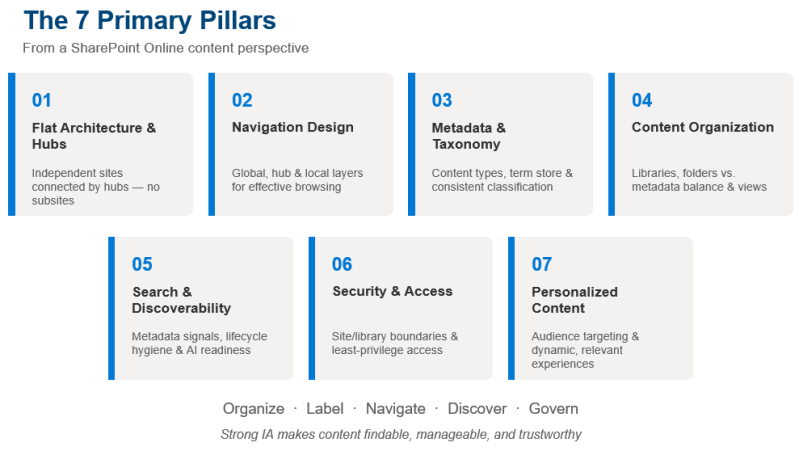
Modern SharePoint is built on a fundamentally different model from classic SharePoint. The hierarchical site-collection-and-subsite approach has been replaced by a flat architecture of independent sites connected through hubs, navigation, metadata, and search. From a content perspective, success depends on deliberate decisions across several interdependent pillars.
This document outlines the primary pillars of successful SharePoint Online Information Architecture with a focus on content: how it is structured, classified, navigated, discovered, and governed.
1. Flat Site Architecture & Hub Structure
Why it matters for content
In modern SharePoint, every site is an independent entity at the same level. There is no parent-child hierarchy of subsites. Content lives in discrete sites—one site for each discrete topic, task, or unit of work—and logical relationships are created through hub associations rather than physical nesting.
Key principles
- No more subsites. Avoid classic hierarchical models. They create rigid permission inheritance, difficult re-organization, and maintenance overhead.
- One site per discrete purpose. Create a separate site when content has unique security needs, ownership, lifecycle, or audience.
- Hubs as the connective tissue. Hub sites group related sites under shared navigation, branding, and content roll-up (news, highlighted content). A site can belong to only one hub at a time.
- Logical vs. physical topology. Physical storage is flat; logical presentation (how users see and navigate content) is shaped by hubs, navigation links, and web parts.
Content impact
This model makes content easier to reorganize, archive, or delete without breaking inheritance chains. It also enables clearer ownership and more flexible security boundaries around content collections.
2. Navigation Design (Global, Hub, and Local)
Why it matters for content
Navigation is the primary way users browse to content. Poor navigation makes even well-organized content hard to find. SharePoint provides three complementary navigation layers that should be designed together.
The three layers
- Global navigation: Tenant-level wayfinding, typically enabled via the SharePoint app bar on the home site. It provides a consistent top-level story across the intranet (Home, News, Resources, Policies, etc.). Keep labels broad and test with users.
- Hub navigation: Shared across all sites associated with a hub. Appears above local navigation. Use it to surface the family of related sites and key entry points. Limit depth and use audience targeting for restricted links.
- Local navigation: Site-specific (quick launch on team sites; top navigation on communication sites). Supports exploration of the content and pages within that site.
Best practices for content discoverability
- Keep top-level items limited (typically 5–7) and avoid deep nesting (ideally no more than two levels).
- Use clear, user-oriented labels rather than internal jargon or pure org-chart names.
- Combine navigation with roll-up web parts (News, Highlighted Content, Sites) so content surfaces dynamically.
- Treat navigation as living: review analytics and user feedback regularly and adjust as the organization evolves.
3. Metadata Architecture, Taxonomy & Content Types
Why it matters for content
Metadata is the invisible architecture that makes content findable, filterable, and governable at scale. While site structure organizes content by location, metadata classifies content by attributes that cross organizational boundaries. It is foundational for search quality, compliance, retention, and modern experiences such as Copilot.
Core components
- Content types: Define the schema for documents and items (fields, workflows, retention labels). Publish a small set of enterprise content types from a Content Type Hub for consistency across sites.
- Managed metadata (Term Store): Provide controlled vocabularies for consistent tagging. Design term sets around business concepts (document type, department, project, information classification), not purely the org chart.
- Site and library columns: Apply reusable columns so users can filter, sort, and group content. Prefer managed metadata columns over free-text where consistency matters.
Design principles
- Start with a small number of high-value classification dimensions (typically 3–5).
- Keep term hierarchies shallow (ideally no more than three levels).
- Use language that users actually understand and test vocabularies with real users.
- Plan for governance: assign clear ownership for taxonomy maintenance so terms stay current.
4. Content Organization: Libraries, Folders & Metadata Balance
Why it matters for content
How documents are stored and structured inside sites directly affects findability, permissions, sync behavior, and long-term maintainability. The classic “deep folder hierarchy” model often fails at scale.
Key decisions
- Number of document libraries: Create additional libraries when you need different security, different content types/metadata, or when volume and performance considerations warrant separation. Avoid a single monolithic library for everything.
- Folders vs. metadata: Folders remain useful for simple grouping, OneDrive/SharePoint sync, and familiar user mental models. Metadata is superior for multi-dimensional classification, filtering, search ranking, and avoiding deep nested paths. Most organizations benefit from a hybrid approach: light folder structure plus meaningful metadata.
- Views as the user interface: Invest in filtered, sorted, and grouped views so users can work with content without relying solely on folder navigation.
Content impact
Over-reliance on deep folders creates brittle paths, duplicate content, and poor search experiences. Over-reliance on metadata without training or governance leads to incomplete tagging. Balance and user enablement are essential.
5. Search Experiences & Discoverability
Why it matters for content
Search is how users consume information architecture when they do not know (or do not want to browse) the structure. Modern SharePoint search is personalized and Graph-driven; it surfaces content based on relevance, activity, and relationships rather than pure hierarchy.
Content-side enablers of good search
- Consistent, rich metadata and content types so the index has structured signals.
- Meaningful titles, descriptions, and file names that use natural language.
- Hub associations and site organization that create logical content families for scoped search.
- Avoidance of near duplicate or superseded content that pollutes results (lifecycle hygiene).
- Proper security so users only see content they are entitled to (security trimming is automatic but depends on correct permissions).
Copilot and AI readiness
As Microsoft 365 Copilot and other AI experiences retrieve content, the quality of the underlying IA becomes even more critical. Content relevance—whether the right version of the right document is returned—depends on clear classification, ownership signals, and lifecycle management. Strong metadata and reduced sprawl directly improve AI answer quality.
6. Security, Permissions & Content Access
Why it matters for content
Information architecture is incomplete without a clear model for who can see and act on content. Over-sharing and under-sharing both undermine trust and productivity.
Content-focused practices
- Site-level security as the default boundary. Prefer unique sites (or libraries) for unique permission needs rather than complex item-level or folder-level breaking of inheritance.
- Microsoft 365 Groups, SharePoint groups, or Entra ID groups. Choose the model that fits your governance and identity strategy; keep membership manageable.
- Audience targeting and information barriers. Use these features to surface the right content to the right people without relying solely on permissions.
- Least privilege and regular review. Align permissions with content sensitivity and ownership; treat access reviews as part of ongoing IA maintenance.
7. Personalized & Targeted Content Experiences
Why it matters for content
Not every user needs to see every piece of content. Personalization reduces noise and increases relevance.
Key mechanisms
- Audience targeting: Show specific news, pages, or navigation links only to defined groups.
- Hub and site associations: Create logical families of content that different audiences naturally inhabit.
- Dynamic web parts: Highlighted Content, News, and similar web parts that respect permissions and targeting so users see what is relevant to them.
Summary: The Primary Pillars at a Glance
From a SharePoint Online content perspective, successful Information Architecture rests on these interdependent pillars:
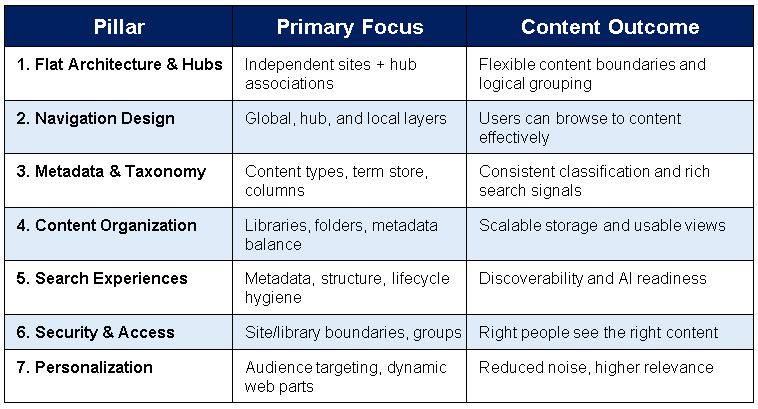
These pillars reinforce one another. Strong metadata improves search and Copilot results. Clear hub structure improves navigation and content roll-up. Appropriate site boundaries simplify security. Together they create an environment where content is findable, manageable, and trustworthy.
Implementation Guidance
Treat Information Architecture as an ongoing practice rather than a one-time project:
- Start with users and content. Understand how people work and what content they need before designing structure.
- Design flat, then connect. Create independent sites for discrete purposes, then associate them via hubs and navigation.
- Invest early in taxonomy and content types. Retrofitting metadata is far harder than establishing it before large-scale content migration.
- Balance folders and metadata. Provide both familiar structures and powerful classification.
- Measure and iterate. Use site analytics, search reports, and user feedback to refine navigation, hubs, and classification over time.
- Govern continuously. Assign ownership for taxonomy, hub strategy, and content lifecycle so the architecture remains healthy as the organization changes.