

SharePoint Mentor Curated Articles
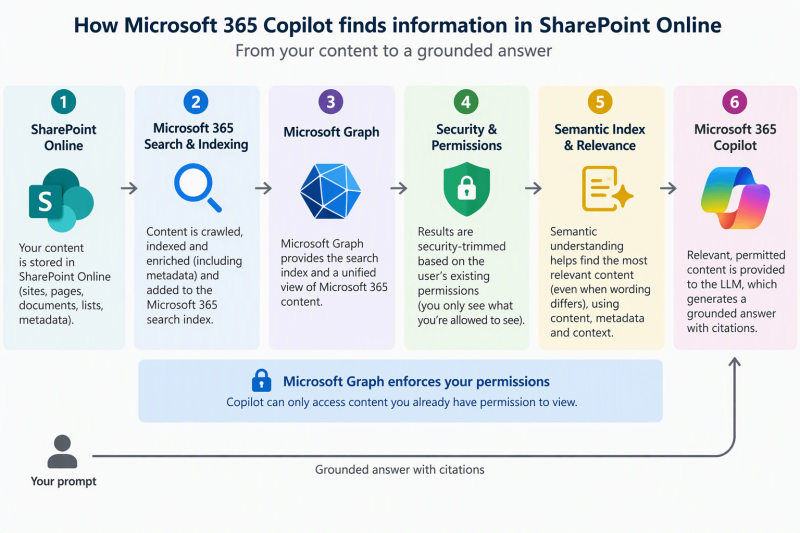
When Copilot is searching for information located on SharePoint Online, what is it looking at?
When Copilot searches for information stored in SharePoint Online, Microsoft Graph is a major part of the retrieval and security layer, but it is more accurate to think of Copilot as using Microsoft Graph together with Microsoft 365's search and Semantic Index capabilities. Microsoft states that Copilot accesses Microsoft Graph and the semantic index during processing, and that the Graph acts as a gatekeeper that enforces the user's existing permissions.
A useful way to picture it is:
SharePoint Online content
↓
Microsoft 365 search/indexing + Semantic Index
↓
Microsoft Graph
↓
Permission/security trimming
↓
Relevant content retrieved for your prompt
↓
Copilot / LLM
↓
Grounded answer + citations
What is Copilot actually looking at?
For SharePoint Online, Copilot can retrieve information from text-based SharePoint content through Microsoft Graph and its associated indexes. Microsoft specifically documents semantic indexing support for Word, PowerPoint, PDF, ASPX pages, OneNote, and other supported content. [Semantic i...ft Copilot]
It isn't limited to exact keyword matching. The Semantic Index adds conceptual or semantic understanding, helping Copilot find information related in meaning even when your prompt doesn't exactly match the wording in a document. [Semantic i...ft Copilot]
And there's an increasingly important role for metadata. When a SharePoint document library or folder is specifically scoped in Copilot, Microsoft says associated SharePoint column metadata can be incorporated as additional signals to constrain and rank retrieval results. [Semantic i...ft Copilot]
And permissions still matter
This is probably the most important governance point. Copilot does not simply search everything residing in SharePoint and decide what you should be able to see. Microsoft Graph enforces the existing security permissions, so Copilot can access content that the requesting user already has permission to access.
So, conceptually:
Copilot doesn't create a new permission model for SharePoint. It exposes the strengths and weaknesses of the permission model you already have. That's why oversharing in SharePoint becomes such an important Copilot-readiness issue.
One important distinction
It's easy to say: "Copilot searches Microsoft Graph." That's broadly correct, but slightly oversimplified.
A better explanation for your SharePoint Mentor material would be:
Microsoft 365 Copilot uses Microsoft Graph, Microsoft 365 search/indexing, and Semantic Index capabilities to retrieve relevant SharePoint content that the user is already authorized to access.
- Microsoft explicitly describes Microsoft Graph as containing the search index and controlling access to customer content, while Semantic Index adds natural-language and conceptual understanding to improve retrieval.
- Interestingly, Microsoft's Copilot Retrieval API makes this relationship very visible: it retrieves relevant text extracts from SharePoint, OneDrive, and Copilot connector content through a Microsoft Graph endpoint while security-trimming the results for the calling user. [learn.microsoft.com]
In short:
SharePoint stores it → Microsoft 365 indexes it → Microsoft Graph provides the security/context layer → Semantic Index helps find what's relevant → Copilot reasons over the retrieved information.
That architecture is also why SharePoint information architecture, permissions, metadata, content quality, and governance become significantly more important when deploying Copilot.