

SharePoint Mentor Curated Articles
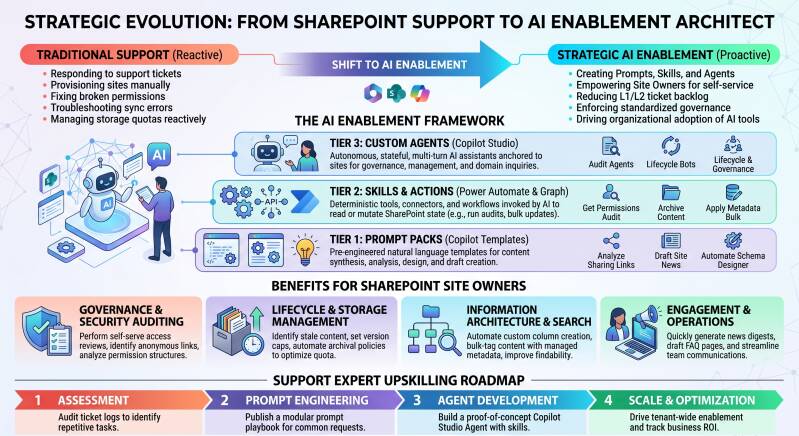
Progressing from SharePoint Support Expert to AI Enablement Professional
A practical, step-by-step guide for moving from traditional SharePoint support into AI enablement roles (helping organizations adopt, implement, govern, and get value from AI tools).
Understand the Target Role
An AI Enablement Professional typically:
- Helps business users and teams adopt AI tools productively and safely
- Designs training, change management, and adoption programs
- Advises on AI governance, data readiness, security, and responsible use
- Integrates AI into existing workflows (often Microsoft 365 / SharePoint-centric)
- Measures impact and drives continuous improvement
Common job titles: AI Adoption Specialist, AI Enablement Lead, Microsoft 365 Copilot Specialist, AI Change Manager, Digital Workplace AI Consultant. Your SharePoint background is a strong foundation because most enterprise AI (especially Microsoft Copilot) lives inside the same Microsoft 365 ecosystem you already know.
Leverage What You Already Know
You already bring valuable skills:
- Deep understanding of SharePoint sites, libraries, lists, permissions, and content structure
- User support and troubleshooting experience
- Knowledge of Microsoft 365 admin centers, security & compliance basics
- Change management and end-user training experience
- Understanding of information architecture and governance
These translate directly into AI readiness work (data quality, permissions hygiene, site structure for Copilot, user adoption).
Core New Skills to Build
Focus on these high-impact areas:

Recommended Learning Path (Practical Order)
- Microsoft Learn (free)
- Microsoft 365 Copilot fundamentals
- Responsible AI principles
- SharePoint + Copilot best practices
- Introduction to generative AI
- Hands-on Practice
- Use Copilot daily in your current role (Word, Excel, Teams, SharePoint).
- Experiment with custom GPTs / Copilot Studio agents.
- Clean and organize a SharePoint site specifically for better Copilot results.
- Certifications (in roughly this order)
- Microsoft Certified: Azure AI Fundamentals (AI-900) – quick win
- Microsoft 365 Certified: Fundamentals or relevant Copilot-related learning paths
- Later: Power Platform or more advanced AI certifications if needed
- Practical Projects (build a portfolio)
- Create a “Copilot readiness checklist” for SharePoint sites.
- Design and deliver a short internal training session on effective prompting.
- Build a simple Power Automate flow that uses AI Builder or Copilot.
- Document before/after examples of AI improving SharePoint-related work.
Experience-Building Steps You Can Take Now
- Volunteer to be the AI/Copilot champion in your current team or organization.
- Create internal resources: prompt libraries, best-practice guides, FAQ for SharePoint + Copilot.
- Shadow or partner with digital workplace, collaboration, or innovation teams.
- Track and share small wins (time saved, better search results, faster document creation).
- Join Microsoft 365 / Copilot communities (Microsoft Tech Community, LinkedIn groups, local user groups).
Typical Transition Path
Short-term (3–6 months): Become the go-to SharePoint + Copilot person in your organization.
Medium-term (6–12 months): Move into a formal AI adoption / digital workplace enablement role (internal or consulting).
Longer-term: Specialize further (Copilot Studio, AI governance, industry-specific AI solutions, or broader AI strategy).
Mindset Shifts
- From “fix it when it breaks” → “Help people get value and stay safe.”
- From pure technical support → technical + change management + education.
- From reactive tickets → proactive enablement and continuous improvement.
Quick Start Checklist
- Start using Microsoft Copilot daily and document what works.
- Complete AI-900 or equivalent free learning path.
- Audit 1–2 SharePoint sites for Copilot readiness (permissions, content quality, metadata).
- Create one simple internal enablement resource (prompt guide or training deck).
- Update your LinkedIn profile and résumé to highlight AI-related experiments and impact.
Your SharePoint expertise gives you a real advantage in enterprise AI enablement, especially in Microsoft environments. Focus on combining that domain knowledge with practical AI tools, responsible use, and strong enablement skills. Progress is mostly about deliberate practice and demonstrating value rather than starting from zero.