

SharePoint Mentor Curated Articles
As a SharePoint Online support expert, what are the best steps you can take to prepare yourself for the impact that AI will have on your job?
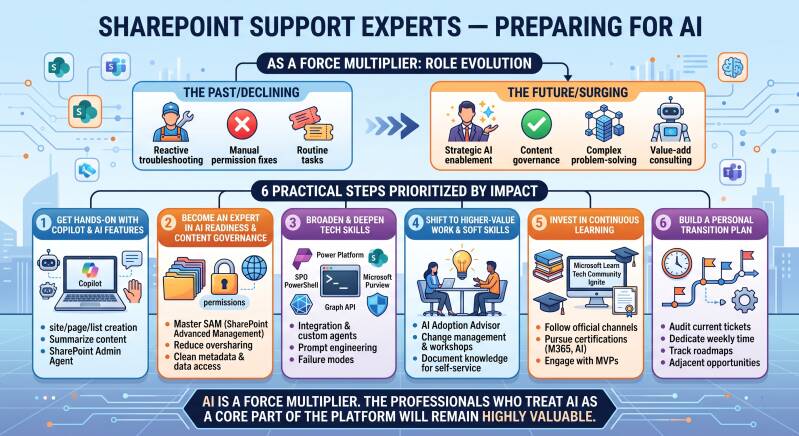
Prepare by treating AI as a force multiplier that shifts your role from routine troubleshooting toward higher-value governance, enablement, and complex problem-solving. SharePoint Online is now Microsoft’s primary grounding source for Microsoft 365 Copilot and agents, so demand for basic “how do I…?” support is declining while needs around AI readiness, content hygiene, security, custom agents/skills, and strategic advice are rising.
Here are the best practical steps, prioritized by impact:
1. Get hands-on with Copilot and AI features in SharePoint immediately
- Obtain or request a Microsoft 365 Copilot license and actively use Copilot in SharePoint (rolling out more broadly as an opt-out capability). Practice natural-language site/page/list creation, content summarization, comparisons, FAQ generation, live dashboards from lists, and Skills (reusable multi-step workflows grounded in your content and policies).
- Explore the SharePoint Admin Agent in the SharePoint admin center for governance tasks: analyzing permissions and oversharing risks, site lifecycle insights, inactive/ownerless sites, and remediation recommendations.
- Build simple custom Skills or agents on real sites (using site-level context files like SHAREPOINT.md and Agent Assets libraries). Experiment with grounding, permissions respect, and output quality.
- Use AI tools daily in your own support work (summarizing tickets, drafting responses, generating scripts or reports) so you experience both the power and the limitations firsthand.
This turns you from a reactive expert into someone who can advise on, configure, and troubleshoot the AI features users will increasingly rely on.
2. Become an expert in AI readiness and content governance
AI amplifies existing problems—poor metadata, duplicates, outdated content, and oversharing become much more visible and risky. Focus here:
- Master SharePoint Advanced Management (SAM) capabilities that support Copilot readiness: Content Management Assessment, Data Access Governance reports, Restricted Content Discovery (RCD), Restricted Access Control, site lifecycle/ownership/attestation policies, and archiving.
- Practice the practical sequence organizations follow: assess current state → structure content and metadata → manage lifecycle → control oversharing → enforce access → build resiliency (backup, versioning, sensitivity labels).
- Learn how to make content “AI-ready”: consistent folder structures, content types, managed metadata, cleanup of legacy/duplicate content, and proper permissions so Copilot and agents return accurate, permission-respecting answers.
Admins and support staff who can quickly diagnose and remediate these issues will be in high demand.
3. Broaden and deepen complementary technical skills
- Strengthen Power Platform (Power Automate, Power Apps, Copilot Studio), Microsoft Graph, PowerShell (especially SharePoint Online Management Shell for AI controls), and Microsoft Purview for compliance/security.
- Understand how SharePoint content powers broader Copilot experiences, agents, and RAG (retrieval-augmented generation) patterns.
- Learn basic prompt engineering, evaluation of AI outputs, and common failure modes (hallucinations, permission leaks, poor grounding).
Routine configuration and ticket resolution will be increasingly automated; complex integrations, custom agent design, and security/compliance edge cases will not.
4. Shift toward higher-value work and soft skills
- Position yourself as an AI adoption advisor: help business units prepare content, design Skills/agents for their processes (e.g., proposal drafting, policy checks, project status), train users, and measure impact.
- Develop stronger consulting, change-management, and communication skills. Explain risks/benefits, run workshops, and translate technical AI capabilities into business outcomes.
- Document and share internal knowledge (playbooks, best practices) so self-service agents and Copilot can leverage it—this also raises your visibility.
5. Invest in continuous learning and credentials
- Follow official channels closely: Microsoft Learn (SharePoint, Copilot, admin center modules), Tech Community SharePoint blog, Message Center, and Ignite/Community calls.
- Pursue relevant certifications: Microsoft 365 fundamentals/admin paths, AI-related credentials (e.g., Azure AI or Copilot-focused), and keep SharePoint-specific knowledge current.
- Engage communities (Microsoft 365 & Power Platform community calls, MVPs, LinkedIn/X SharePoint groups) to see real-world patterns and emerging roles such as Copilot-focused solution architects or governance specialists.
6. Build a personal transition plan
- Audit your current ticket mix: identify what is likely to be automated soon versus what requires judgment, architecture, or relationship skills.
- Dedicate regular time (e.g., a few hours weekly) to experimentation and learning.
- Track Microsoft’s roadmaps and internal pilots so you can anticipate changes rather than react to them.
- Consider adjacent opportunities: SharePoint AI readiness consulting, agent development, or broader Microsoft 365 Copilot enablement roles.
AI will not eliminate strong SharePoint Online support experts, but it will reward those who evolve from “I know how to fix X” to “I help the organization use SharePoint and AI safely and productively at scale.” Start with hands-on use of the current Copilot and Admin Agent features plus governance tooling—these deliver the fastest, most relevant preparation. The professionals who treat AI as a core part of the platform (rather than an optional add-on) will remain highly valuable.