

SharePoint Mentor Curated Articles
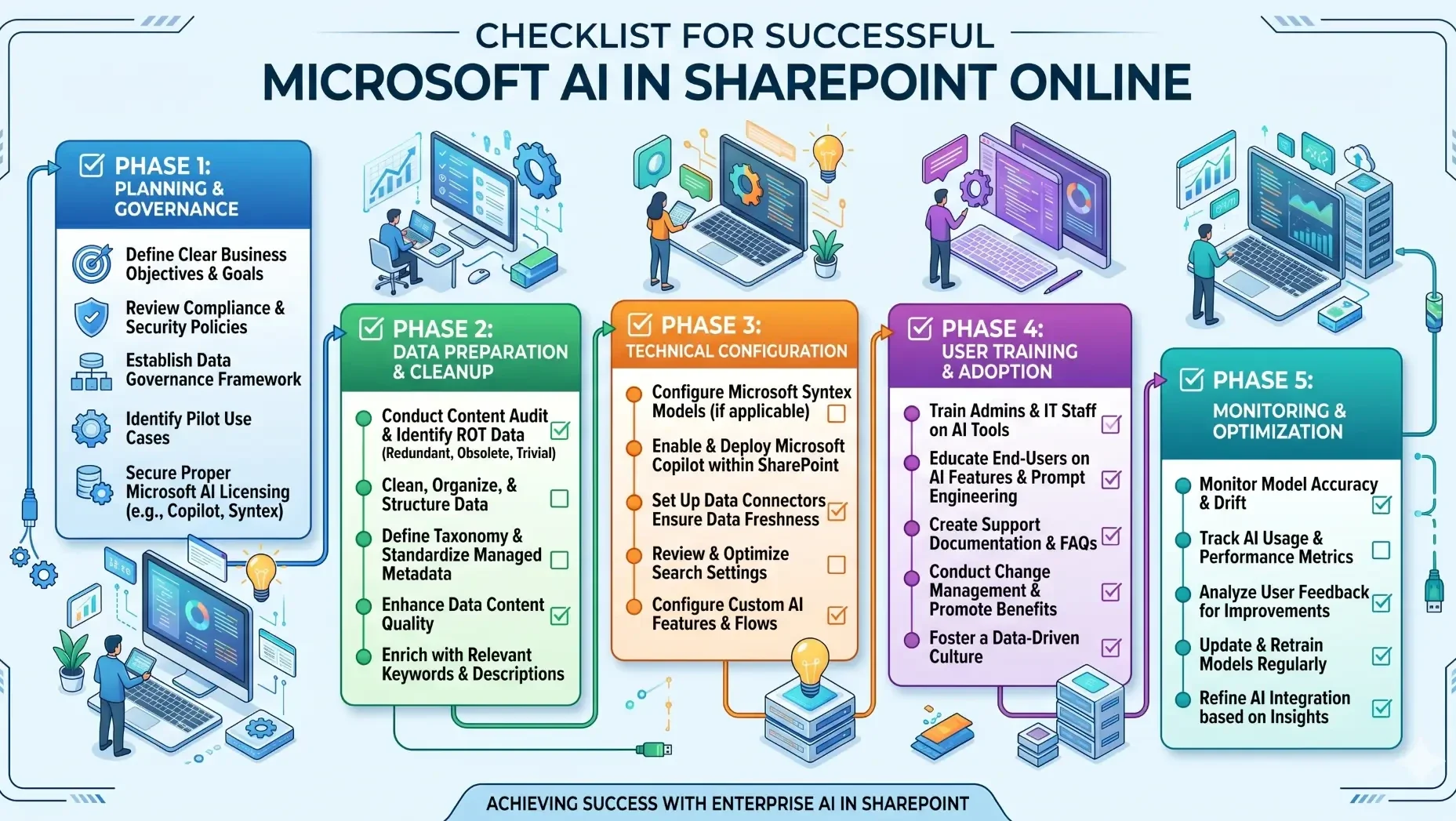
Conceptualize and Implement Microsoft AI Tools and Features in SharePoint Online
Preparing to deploy AI within SharePoint Online marks a fundamental shift from traditional document management to an active, "agentic" ecosystem. The success of tools like Microsoft 365 Copilot and SharePoint Premium depends less on the AI's raw power and more on the structural health of the underlying data.
Organizations need to move away from a "store-and-forget" mentality to a rigorous data-hygiene model.
Phase 1: Planning and Governance
- Define Business Objectives
- Identify specific challenges (e.g., knowledge discovery, search, automation) and set measurable goals for AI implementation.
- Assign Roles & Responsibilities
- Appoint a project sponsor, system administrator, data owner(s), and business ambassadors.
- Review Compliance & Licensing
- Assess data privacy requirements (GDPR, HIPAA) and verify you have the proper M365/AI licensing (e.g., Copilot, Microsoft Syntex).
- Develop AI Governance Policies
- Establish rules for acceptable AI use, data retention, and how AI will affect existing permissions.
- Identify Pilot Use Cases
- Choose one or two high-impact, low-complexity scenarios to test the technology first.
Phase 2: Data Preparation and Organization
- Conduct Content Audit
- Review existing SharePoint data to identify obsolete, duplicate, or irrelevant content (ROT data).
- Clean and Structure Data
- Delete ROT data, re-organize folder structures, and standardize file naming conventions.
- Implement Modern Taxonomy
- Define standardized managed metadata, content types, and columns to organize information for AI consumption.
- Verify & Adjust Permissions
- Ensure that sensitive data is only accessible to authorized users. (AI cannot see data that the user cannot already access).
- Review SharePoint Search
- Verify search is indexing key content properly and that modern search experiences are optimized.
Phase 3: Technical Configuration
- Set Up Microsoft Syntex
- Configure Content Assembly, Content Understanding models, and imaging features in the admin center.
- Enable/Deploy Copilot
- If licensed, activate Copilot features within your M365 tenant and allocate licenses to users.
- Configure Term Store & Metadata
- Ensure the global managed metadata service is active and available for AI classification.
- Integrate with Power Platform
- If automation is required (e.g., Power Automate based on classified documents), connect Power Platform.
- Establish Monitoring
- Set up usage reporting and feedback loops (e.g., Copilot usage reports, M365 audit logs).
Phase 4: Training, Launch, and Adoption
- Train Pilot Users
- Provide specialized training to the small group of pilot users. Include prompt engineering for Copilot.
- Gather Feedback & Iterate
- Collect detailed user feedback during the pilot. Adjust governance or data structure as needed.
- Create Support Documentation
- Develop guides, FAQs, and record training videos for the organization.
- Execute Communication Plan
- Inform the wider organization about the upcoming rollout, highlighting benefits and usage policies.
- Organization-Wide Rollout
- Gradually or simultaneously enable AI features for all licensed users.
Phase 5: Ongoing Optimization
- Monitor Content Drift
- Periodically check that AI classifications remain accurate as content and priorities change.
- Retrain Models
- If using custom Syntex models, retrain them periodically to adapt to new content.
- Analyze Adoption Metrics
- Use M365 analytics to track user adoption and usage. Target low-usage groups for extra training.
- Review Microsoft Updates
- Stay informed about new Microsoft 365 AI releases and features that can be incorporated.