

SharePoint Mentor Curated Articles
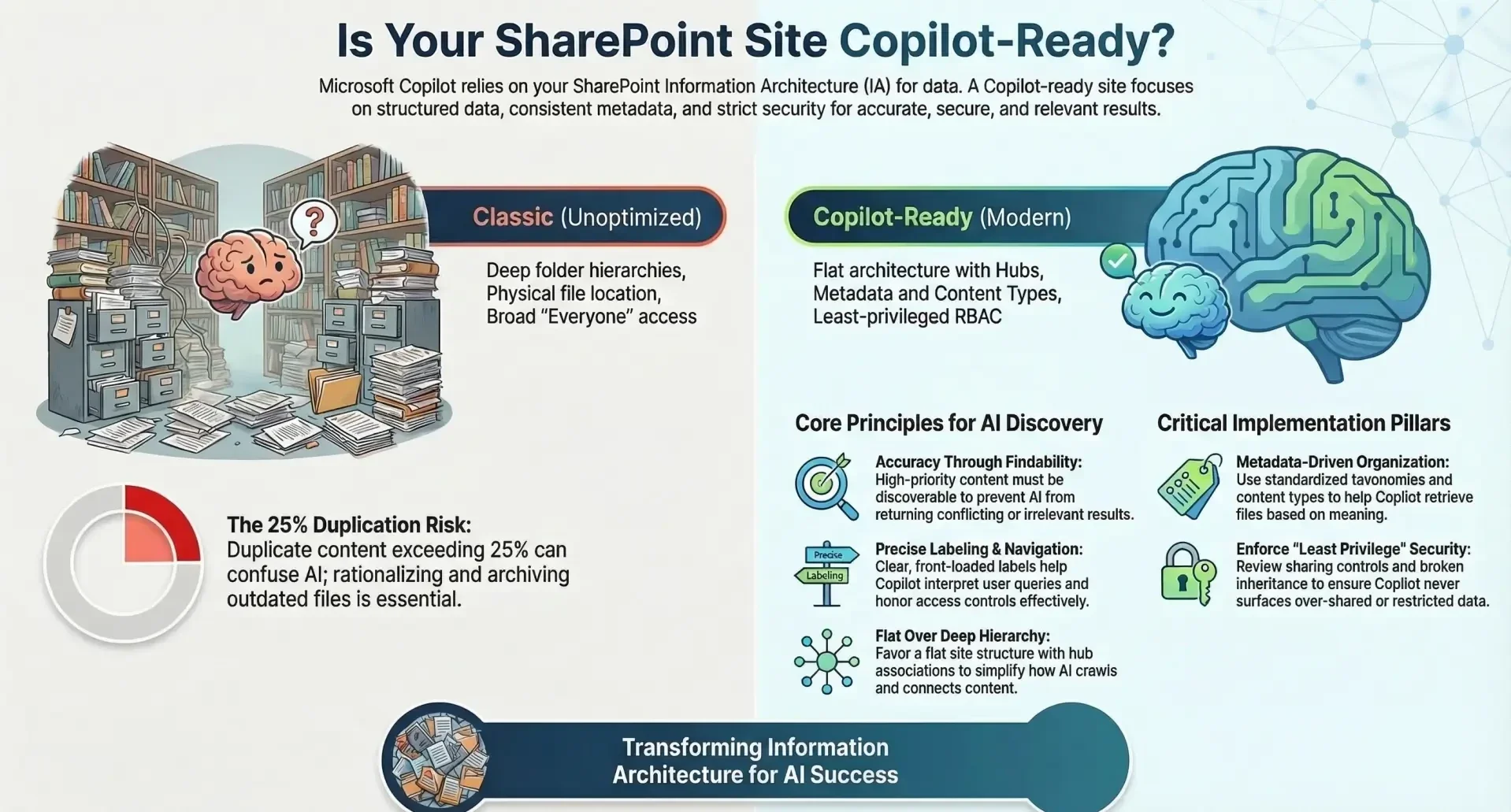
Information Architecture in SharePoint refers to the strategic organization, labeling, and navigation of content to ensure users can efficiently find, use, and manage information.
- In the context of modern SharePoint, IA extends beyond basic usability to support intelligent features like Microsoft Copilot, an AI-powered assistant that leverages Microsoft Graph signals, search indexing, and metadata to provide context-aware responses, summaries, and content generation.
- Preparing SharePoint sites to be "Copilot-ready" means optimizing IA to enhance AI accuracy, reduce ambiguity, respect permissions, and improve retrieval precision. This is crucial because Copilot relies on structured data, consistent metadata, and secure access to deliver reliable outputs without surfacing irrelevant, outdated, or unauthorized content.
- A well-designed IA minimizes risks such as data leaks, compliance violations, and inaccurate AI responses while boosting productivity. Key benefits include faster content discovery, better collaboration, and seamless integration with tools like Copilot. This article includes guidelines and expert recommendations to outline principles, elements, best practices, and examples for building Copilot-ready SharePoint environments.
Key Principles of Information Architecture in SharePoint
Effective IA is grounded in principles that prioritize user experience and content discoverability. These principles are especially vital for Copilot, as they enable the AI to interpret user queries accurately and retrieve relevant information.
- Usability: Design navigation from the user's perspective to reduce cognitive load. Organize links to align with mental models, prioritizing common tasks and relevant information. For Copilot, this ensures intuitive structures that support natural language queries, allowing quick decision-making and task completion.
- Findability: Make content easily discoverable by presenting high-priority items first and minimizing unrelated material. Use testing methods like card sorting, tree testing, and usability sessions with real users to validate. In a Copilot-ready setup, enhanced findability prevents the AI from returning conflicting or irrelevant results, improving response reliability.
- Navigation: Structure around user needs and business requirements (e.g., by services, products, or audiences). Incorporate hierarchy to provide a comprehensive "story" of available content. Copilot benefits from clear navigation by guiding users through complex structures and surfacing contextually appropriate data.
- Labeling: Use specific, comprehensive, concise, familiar, front-loaded, clear, and targeted labels. Avoid ambiguity and employ audience targeting to show relevant links. For Copilot, precise labeling reduces misinterpretation, ensuring the AI honors access controls and delivers personalized, accurate outputs.
These principles create a foundation where Copilot can operate efficiently, minimizing errors from poor organization.
Core Elements of SharePoint Information Architecture
Modern SharePoint IA comprises six interconnected elements that facilitate wayfinding and compliance. Optimizing these for Copilot ensures the AI can access, interpret, and present content securely and effectively.
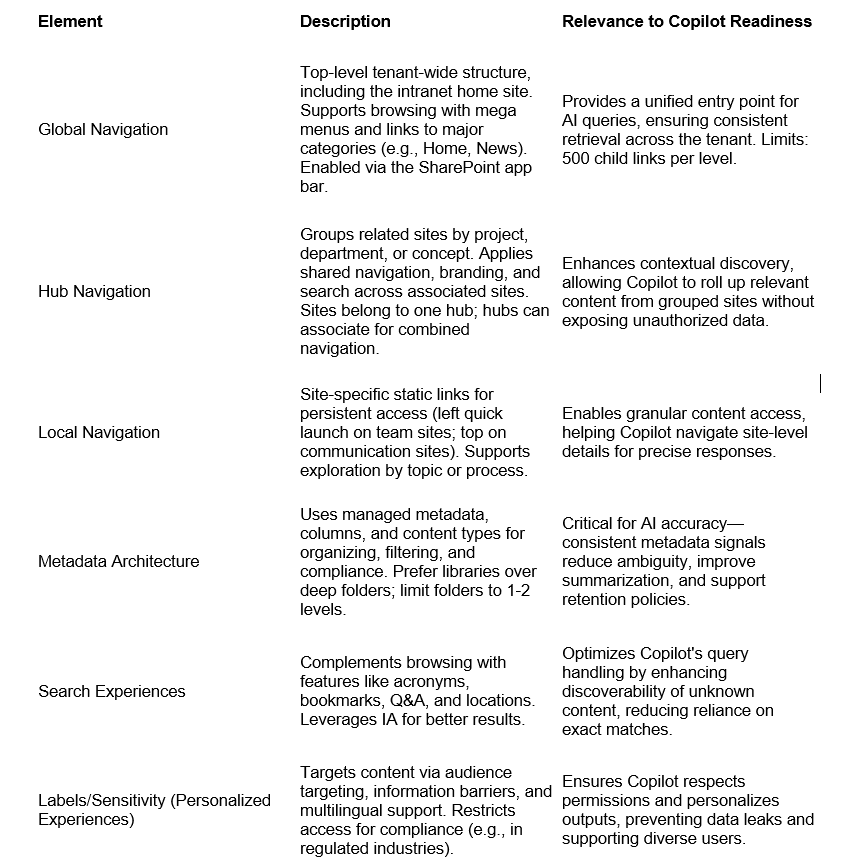
These elements form an iterative framework that adapts to changes, making SharePoint more resilient and Copilot-friendly.
Best Practices for Copilot Readiness - To make SharePoint sites Copilot-ready, focus on practices that address structure, security, and sustainability. These build on the principles and elements above, emphasizing AI-specific optimizations.
Metadata and Taxonomy
- Standardize metadata models using a disciplined taxonomy strategy, including term sets, content types, and classification. Backfill metadata during implementation to improve retrieval precision.
- Use metadata to organize content by meaning rather than location (e.g., avoid deep folders). Define relevant fields like document type, author, department, or confidentiality level.
- Apply metadata consistently for filtering, sorting, and dynamic web parts. This strengthens AI summarization by providing contextual signals and reducing ambiguity.
- Integrate with compliance tools for retention and sensitivity labels, ensuring Copilot handles regulated content appropriately.
Consistent metadata is foundational, as Copilot retrieves based on meaning—rates of duplication above 25% in large environments can confuse AI if not addressed.
Governance and Ownership
- Align with a maturity model to sustain improvements, defining standards for site creation, design, and structure. Clarify content ownership to avoid ambiguity in AI outputs.
- Establish enforceable policies covering site requests, templates with default permissions, and external sharing. Use sensitivity labels and automation for consistency.
- Monitor trends like content growth, taxonomy drift, permission exceptions, and AI adoption metrics. Regular reviews prevent degradation over time.
- Define authoritative sources (e.g., HR policies) to ensure Copilot serves accurate information, integrating with broader Microsoft 365 governance.
Governance ensures long-term discipline, as Copilot amplifies issues in unstructured environments.
Permissions and Security
- Review site-level sharing controls: Remove "Everyone Except External Users" from people pickers; set default links to "specific people."
- Correct broken inheritance and align boundaries to prevent inconsistent AI outputs. Validate security trimming during testing.
- Identify overshared content using Data Access Governance reports; revoke broad links and apply least-privilege principles.
- Set restricted access and block download policies on critical sites; enable MFA and monitoring for unusual access.
- Use role-based access control (RBAC) and audience targeting to ensure users (and Copilot) see only relevant content.
Security ties directly to IA by enforcing granular controls, reducing risks of internal leaks in Copilot responses.
Content Organization and Rationalization
- Rationalize by addressing redundant libraries, deep hierarchies, inconsistent naming, and over-permissioned sets. Reduce duplication and archive outdated content.
- Organize intuitively: Use flat structures with hubs for grouping; consolidate overlapping sites.
- Implement policies for creation, storage, and deletion; automate workflows for metadata application.
- Conduct audits to remove inactive sites, duplicates, and irrelevant files, improving search efficiency.
Rationalization declutters, ensuring Copilot accesses clean, relevant data sources.
Navigation and Site Structure
- Use flat, metadata-driven architectures: Avoid classic hierarchies; favor one site per topic with hub associations.
- Optimize hierarchy to reflect workflows; group by department, location, task, or portfolio.
- Ensure cohesive navigation: Roll up content from associated sites; use labels like "restricted" for private areas.
- Transition from classic to modern: Inventory sites, plan hubs, and use analytics for refinements.
Strong navigation aids Copilot in guiding users and retrieving contextually linked content.
- Refine managed properties and test Copilot prompts across roles to validate consistency.
- Leverage features like Q&A and locations to complement IA.
- Integrate with metadata for better relevance ranking.
Optimized search enhances Copilot's ability to handle complex queries.
Auditing and Maintenance
- Assess structural realities: Map permissions, orphans, and duplicates pre-implementation.
- Post-launch: Monitor exceptions, track metrics, and iterate based on user feedback.
- Use tools like Syskit Point or SharePoint Advanced Management for reports on sharing and sensitivity.
- Schedule regular audits to maintain compliance and usability.
Ongoing maintenance keeps the environment Copilot-ready amid changes.
Models and Examples - SharePoint supports various navigation models, adaptable for Copilot by emphasizing flat structures and personalization.
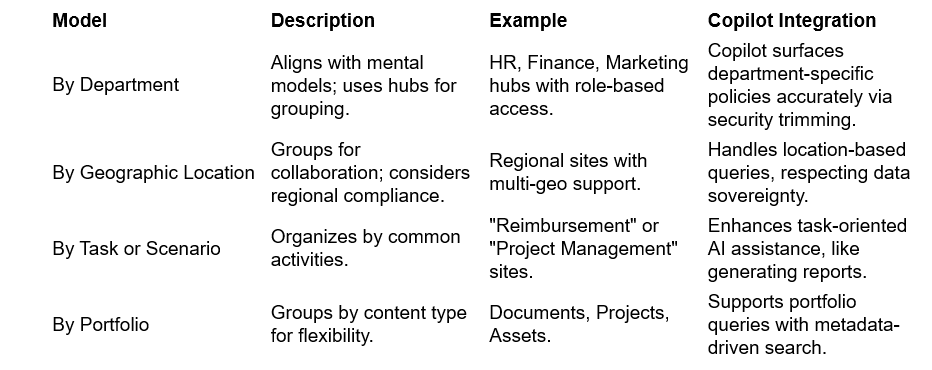
Transition scenarios: From classic to modern, pilot hubs, and refine with analytics. For instance, associate sites without displaying in navigation to roll up private content securely.
Conclusion
Building Copilot-ready SharePoint sites requires a holistic approach to IA, blending principles, elements, and practices to create secure, discoverable, and efficient environments. By prioritizing metadata consistency, governance, and regular audits, organizations can harness Copilot's full potential while mitigating risks. Start with an assessment of your current setup, implement iteratively, and monitor adoption. This not only enhances user productivity but also positions SharePoint as a scalable foundation for AI-driven collaboration. For further guidance, consult Microsoft Learn resources and tools like SharePoint Advanced Management.