

SharePoint Mentor Curated Articles
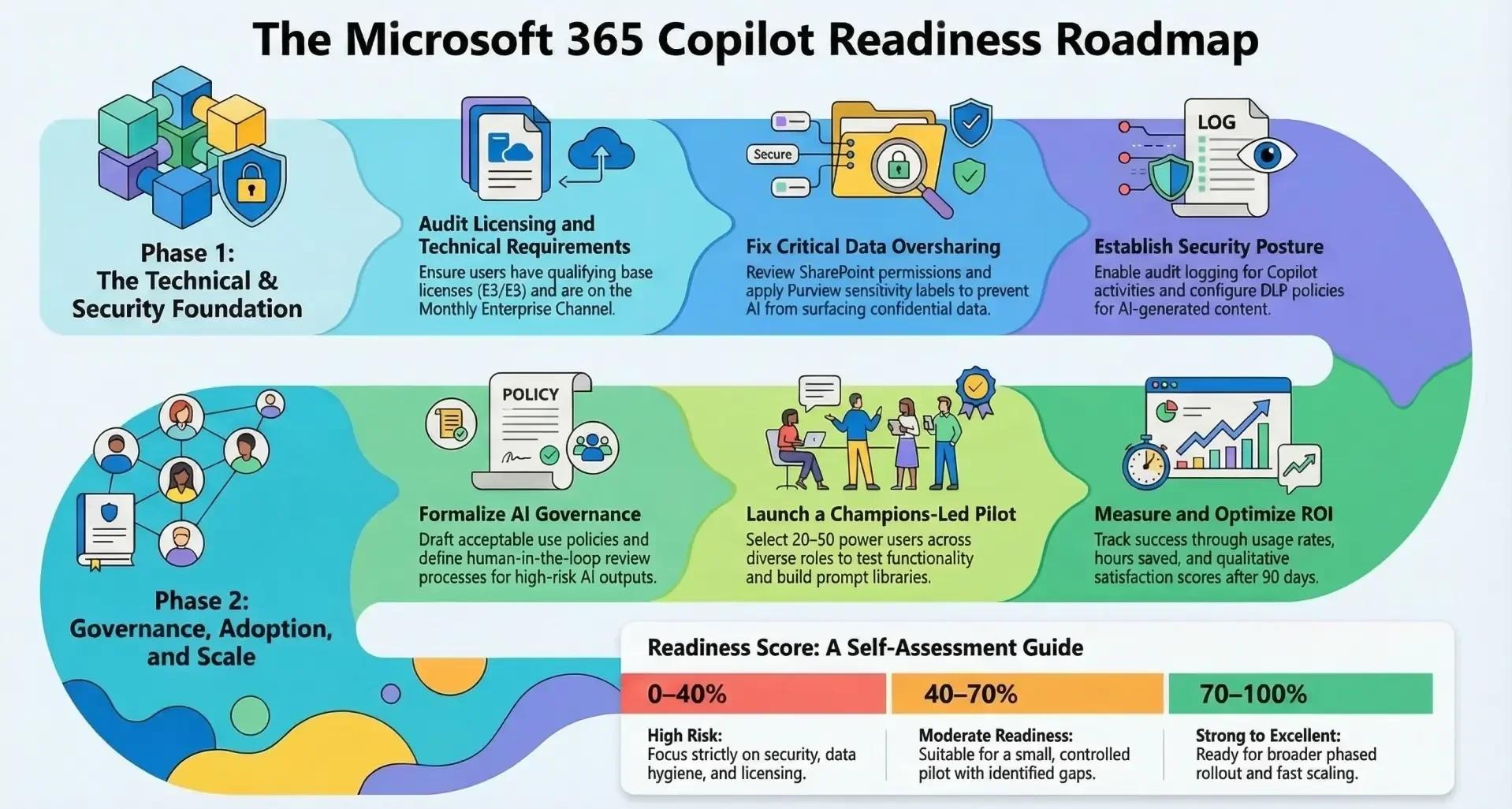
Here is an extensive Copilot Readiness Checklist for M365 Copilot (the enterprise AI assistant integrated across SharePoint, Teams, and more).
This checklist is structured into major categories and draws from official Microsoft guidance, admin center reports, and widely recommended best practices as of early 2026.It covers technical, security, data, governance, adoption, and optimization aspects to help organizations prepare for a secure, effective, and high-ROI deployment.
1. Licensing & Subscription Readiness
- Organization has qualifying base licenses: Microsoft 365 E3/E5, Office 365 E3/E5, Microsoft 365 Business Standard/Premium (or equivalent)
- Microsoft 365 Copilot add-on licenses ($30/user/month) purchased or committed for pilot + phased rollout
- Number of available / assignable Copilot licenses visible in Microsoft 365 admin center > Billing
- Users targeted for Copilot already have a qualifying base license assigned (not just available in the tenant)
- License assignment method decided: direct user assignment vs. group-based (recommended for scale)
- Plan exists for license reclamation / re-assignment after pilot or churn
2. Technical & Platform Readiness
- Microsoft 365 tenant is on current channel or monthly enterprise channel (not semi-annual) for Office apps
- Users are on supported versions of desktop/web/mobile apps (latest updates recommended)
- Copilot availability confirmed in at least one app (Teams, Word, Excel, PowerPoint, Outlook, Loop)
- Web search / Bing grounding enabled if desired (review cloud policy settings)
- Multi-account access to work files in Copilot configured appropriately (if personal + work accounts used)
- Test environment / pilot tenant segment created (separate users/licenses for validation)
- Network connectivity to required Copilot endpoints verified (no blocking proxies/firewalls)
3. Data Hygiene & Information Architecture
- Audit of SharePoint / OneDrive oversharing completed (Everyone except external, "All Users", excessive "Anyone with link")
- Inactive / orphaned sites and libraries identified and archived or deleted
- Excessive permissions reviewed (e.g., >500 users per site, many groups granting broad access)
- Sensitivity labels widely applied to documents with confidential / highly confidential content
- Old versions / major document sprawl cleaned (focus on top 20–30% most accessed content)
- Teams channels / chats with sensitive content audited (private vs. public channels)
- Mailbox hygiene (large/shared mailboxes, forwarded emails containing sensitive data)
4. Security & Compliance Posture
- Microsoft Purview sensitivity labels configured and auto-labeling policies in place where appropriate
- Data Loss Prevention (DLP) policies cover AI-generated / AI-summarized content
- Microsoft Defender for Cloud Apps (or equivalent) monitoring enabled for Copilot usage
- Audit logging enabled for Copilot interactions (Purview → Audit → Copilot activities)
- Restricted SharePoint Search enabled if needed to limit Copilot grounding scope
- Conditional Access policies block legacy authentication and enforce MFA / compliant devices
- External sharing settings reviewed (limit to specific domains if Copilot external data risk is high)
- eDiscovery / Content Search tested to confirm Copilot-generated content is discoverable
- Data residency / sovereignty requirements met (multi-geo, specific regions)
5. Governance & Responsible AI
- Internal AI usage policy / acceptable use guidelines for Copilot drafted and approved
- Human review process defined for high-risk outputs (legal, HR, financial decisions, external comms)
- Prompt engineering guidance / prompt library created for key roles
- Change management & communication plan includes Copilot dos/don’ts, hallucination awareness
- Executive sponsor and AI governance committee (or equivalent) established
- Process to handle inappropriate / biased / hallucinated outputs reported
- Plan for periodic Copilot access reviews (quarterly license + permission audits)
6. Adoption & Change Management
- Executive sponsor identified and visibly engaged
- Copilot Champions / early adopters program launched (20–50 power users first)
- Pilot group selected (diverse roles, high Microsoft 365 usage, good data hygiene)
- Training resources prepared (Microsoft Learn paths, internal quick-start guides, prompt cheat sheets)
- Communication campaign timeline ready (teaser → launch → 30/60/90-day check-ins)
- Success metrics defined (usage rate, time saved, satisfaction score, business outcome examples)
- Feedback collection mechanism in place (surveys, Teams channel, champions syncs)
7. Monitoring, Optimization & Scale
- Microsoft 365 Copilot readiness report reviewed in admin center (Reports → Usage → Copilot)
- Prerequisite license coverage, app usage patterns, and recommended actions checked
- Copilot usage dashboard activated and reviewed weekly during pilot
- ROI tracking plan created (hours saved × hourly rate, quality improvements, etc.)
- Plan for license optimization after 60–90 days (expand, maintain, reduce)
- Process to monitor new Copilot features / agents / plugins as released
- Schedule for quarterly Copilot governance review established
Quick Scoring / Self-Assessment Tiers (approximate)
- 0–40% items checked → High risk – focus on security, data hygiene, and licensing first
- 40–70% → Moderate readiness – good for controlled pilot, but gaps remain
- 70–90% → Strong readiness – ready for broader phased rollout
- 90%+ → Excellent readiness – positioned for fast scaling and maximum value
Recommended starting sequence (most organizations):
- Licensing audit + purchase
- Run Microsoft 365 Copilot readiness report
- Fix critical oversharing & apply sensitivity labels
- Set up pilot group + governance basics
- Launch small pilot → measure → iterate → scale