

SharePoint Mentor Curated Articles
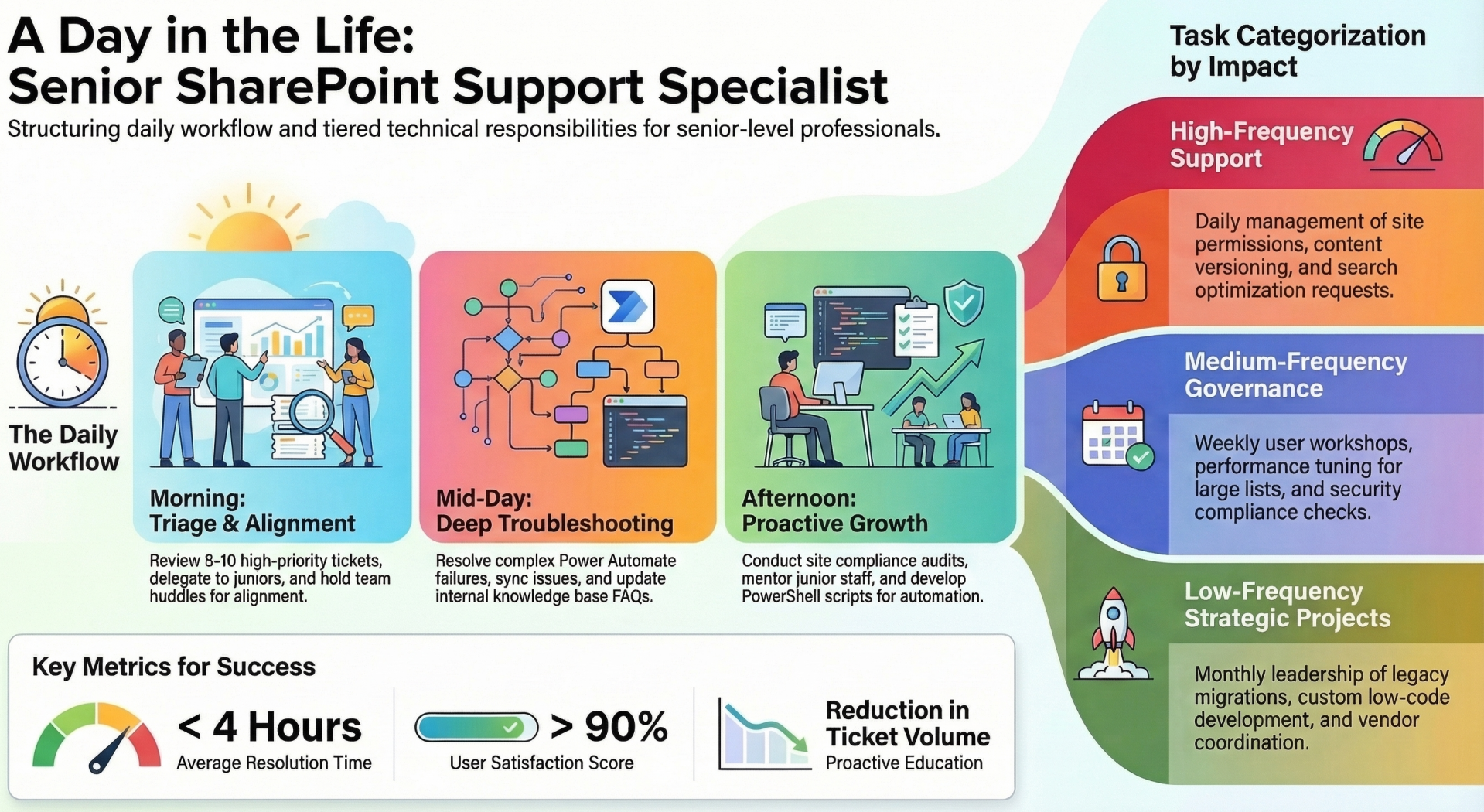
As a senior-level team member, you play a critical role in ensuring that end-users can effectively leverage Microsoft SharePoint.
- SharePoint is a versatile platform that integrates with Microsoft 365 tools like Teams, OneDrive, and Power Automate, making it essential for productivity in modern workplaces.
- Your role involves providing advanced technical support, troubleshooting complex issues, mentoring junior staff, and contributing to process improvements.
As a senior-level team member, you play a critical role in ensuring that end-users across the organization can effectively leverage Microsoft SharePoint for collaboration, document management, and workflow automation.
- SharePoint is a versatile platform that integrates with Microsoft 365 tools like Teams, OneDrive, and Power Automate, making it essential for productivity in modern workplaces. Your role involves providing advanced technical support, troubleshooting complex issues, mentoring junior staff, and contributing to process improvements.
- Unlike entry-level support, senior positions emphasize strategic problem-solving, user education, and cross-functional collaboration. This article outlines your daily responsibilities, key tasks, team interfacing, and best practices to help you hit the ground running. This outline is based on standard practices in enterprise environments using SharePoint Online. Expect a mix of reactive support (e.g., ticket resolution) and proactive initiatives (e.g., training sessions).
Daily Responsibilities
- A typical day as a senior SharePoint user support specialist is dynamic, balancing immediate user needs with longer-term projects. You'll likely work in a hybrid or remote setup, using tools like Microsoft Teams for communication and Azure DevOps or ServiceNow for ticketing.
Here's a breakdown of what a standard 8-hour day might look like:
- Morning Routine
- Review and Prioritize Tickets: Start by logging into the ticketing system (e.g., Zendesk, Jira, or Microsoft Dynamics). Scan for high-priority issues from overnight or early submissions. As a senior, focus on escalated tickets involving site permissions, custom workflows, or integration failures. Aim to triage 5-10 tickets, assigning simpler ones to juniors.
- Team Huddle: Participate in a stand-up meeting. Discuss ongoing issues, share quick wins from the previous day, and align on priorities. This is your chance to mentor by highlighting common pitfalls, like improper list configurations.
- User Consultations: Schedule or handle ad-hoc calls with users reporting urgent problems, such as access denials or slow page loads. Use screen-sharing tools to diagnose in real-time.
- Mid-Morning to Lunch
- Troubleshooting and Resolution: Dive into complex tickets. For example:
- Investigate why a document library isn't syncing with OneDrive.
- Debug Power Automate flows triggered by SharePoint lists.
- Restore deleted items or sites using the SharePoint Admin Center.
- Documentation Updates: Maintain internal knowledge bases (often hosted on SharePoint itself). Update FAQs or create how-to guides based on recent resolutions, ensuring they're searchable and user-friendly.
- Troubleshooting and Resolution: Dive into complex tickets. For example:
- Afternoon Core Work
- Proactive Support Initiatives: Dedicate time to non-ticket tasks, such as:
- Auditing site collections for compliance (e.g., checking for orphaned permissions).
- Developing custom scripts using PowerShell for bulk operations, like migrating content between sites.
- Collaborating on user adoption campaigns, like creating demo sites showcasing new features.
- Mentoring Sessions: Guide junior team members through challenging cases or conduct informal training on advanced topics, such as metadata management or hub site configurations.
- Proactive Support Initiatives: Dedicate time to non-ticket tasks, such as:
Late Afternoon Wrap-Up
- Follow-Ups and Reporting: Close resolved tickets with detailed notes for analytics. Generate reports on common issues (e.g., using Power BI integrated with SharePoint data) to identify trends, like frequent permission errors.
- Knowledge Sharing: Post updates in team channels or contribute to weekly newsletters. End the day by preparing for the next, such as flagging potential escalations to IT admins.
- On-Call Duties: If rotating, monitor after-hours alerts via mobile apps, responding to critical incidents like site outages.
Expect flexibility
- Days may shift based on project deadlines or major updates from Microsoft (e.g., rolling out new features like Viva Connections).
Key Tasks - Your tasks span technical support, administration, and strategic contributions. As a senior, you'll handle escalated issues and lead initiatives. Here's an extensive list categorized by frequency and complexity
- User Issue Resolution: Respond to support requests via email, chat, or phone. Common issues include:
- Permission management: Granting/revoking access, setting up sharing links, or resolving "Access Denied" errors.
- Content Management: Helping users with document versioning, check-in/check-out, or co-authoring conflicts.
- Search Optimization: Configuring metadata, content types, and search scopes to improve findability.
- Site and Page Customization: Assist in creating or modifying sites, lists, libraries, and pages using no-code tools like the SharePoint Designer interface or Power Apps.
- Integration Support: Troubleshoot connections with other M365 tools, such as embedding Power BI reports or syncing with Planner tasks.
Weekly/Medium-Frequency Tasks
- Training and Workshops: Lead sessions for users or departments. Topics might include:
- Best practices for site governance (e.g., avoiding sprawl by using site templates).
- Advanced features like conditional formatting in lists or creating forms with Microsoft Forms integrated into SharePoint.
- Security awareness, such as data loss prevention (DLP) policies.
- Performance Tuning: Analyze and optimize site performance, e.g., reducing load times by managing large lists (over 5,000 items) with indexed columns or views.
- Compliance Checks: Ensure sites adhere to organizational policies, like retention labels or sensitivity classifications using Microsoft Purview.
Monthly/Low-Frequency but High-Impact Tasks
- Migration Projects: Lead or support content migrations from legacy systems (e.g., file shares) to SharePoint using tools like ShareGate or the SharePoint Migration Tool.
- Custom Development: Collaborate on low-code solutions, such as building adaptive cards for notifications or automating approvals with Power Automate.
- Audit and Reporting: Conduct site audits for unused content, generate usage reports, and recommend deletions or archives.
- Feature Rollouts: Test and deploy new Microsoft updates, documenting impacts and training users accordingly.
- Vendor Coordination: Interface with third-party vendors for add-ons like AvePoint or Nintex, ensuring compatibility.
Senior-level tasks often involve root-cause analysis, where you'll use tools like the SharePoint Admin Center, Microsoft 365 compliance portal, or browser developer tools to diagnose issues at a deeper level.
Team Interfacing - Collaboration is key in a support role. You'll interact with various teams to resolve issues holistically. Here's how you'll interface
- Internal IT Teams
- Help Desk/Level 1 Support: Escalate basic issues to you; you'll provide feedback to prevent recurrence. Mentor them on SharePoint basics during joint sessions.
- SharePoint Administrators: Work closely for backend tasks like tenant-level configurations or quota management. Join bi-weekly admin meetings to discuss governance policies.
- Security and Compliance Teams: Consult on data protection, e.g., implementing information barriers or responding to audit requests. Report potential breaches immediately.
- Development Teams: Partner on custom solutions, providing user requirements and testing feedback.
- Cross-Functional Business Teams
- End-Users and Department Leads: Direct interaction via support channels. Build relationships by offering proactive advice, like site optimization consultations.
- Project Managers: Support SharePoint in projects, e.g., setting up project sites with timelines and task lists.
- HR and Training Departments: Collaborate on onboarding materials, ensuring new hires understand SharePoint usage.
- Executive Stakeholders: Present reports on adoption metrics or propose improvements in quarterly reviews.
- External Interfaces
- Microsoft Support: Escalate tenant-wide issues via Premier Support tickets. Prepare detailed repro steps and logs.
- Community and Forums: Engage with Microsoft Tech Community or Stack Overflow for insights, but always verify against official docs.
- Vendors and Consultants: Coordinate implementations or troubleshooting for integrated tools.
Effective interfacing relies on clear communication: Use tools like Teams channels for quick queries, shared SharePoint sites for documentation, and regular check-ins to align goals.
- Best Practices and Tips for Success
- Prioritization: Use frameworks like Eisenhower Matrix for tickets—focus on urgent/important first.
- Documentation: Always log resolutions thoroughly; this builds a reusable knowledge base.
- User Empathy: Approach support with patience; explain solutions in non-technical terms.
- Continuous Learning: Stay updated via Microsoft Learn modules, certifications (e.g., MS-600: Building Applications and Solutions with Microsoft 365 Core Services), or webinars.
- Tools Proficiency: Master SharePoint Admin Center, PowerShell, PnP PowerShell module, and browser extensions like Fiddler for debugging.
- Work-Life Balance: Set boundaries for on-call duties and use automation to reduce repetitive tasks.
- Metrics for Success: Track resolution times (aim for <4 hours on average), user satisfaction scores (>90%), and reduction in ticket volume through proactive education.
Resources and Onboarding Checklist
- Internal Resources: Access the team's SharePoint site for templates, policies, and past tickets.
- Microsoft Documentation: Bookmark docs.microsoft.com/SharePoint and support.microsoft.com.
- Certifications: Pursue Microsoft Certified: SharePoint Administrator Associate.
- Communities: Join LinkedIn groups or Reddit's r/SharePoint.
- Onboarding Steps:
- Complete HR orientation.
- Set up M365 account and tools.
- Shadow a senior for a week.
- Handle your first ticket under supervision.
- Attend initial training sessions.
This document provides a comprehensive foundation, but your role will evolve with experience and organizational needs. If you have questions, reach out to your manager or team leads. Welcome aboard!