

SharePoint Mentor Curated Articles
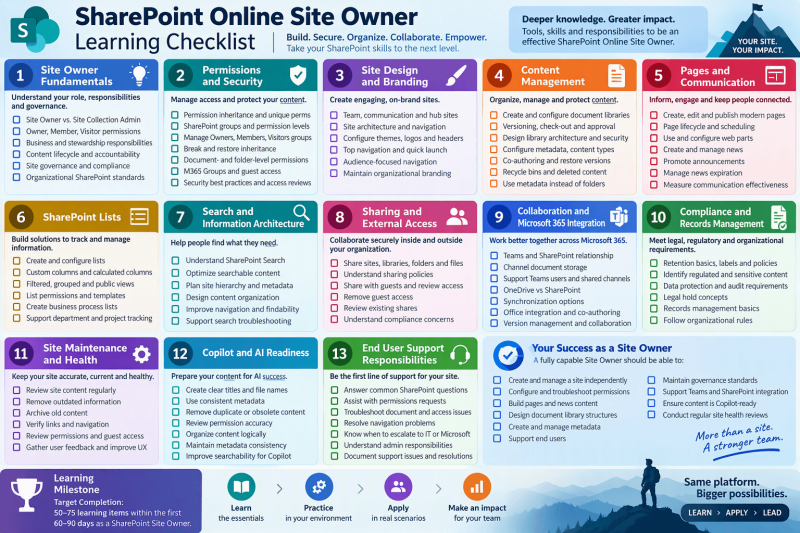
SharePoint Online Site Owner Learning Checklist
This checklist is designed for experienced SharePoint Online users who are transitioning into a Site Owner role. It focuses on the deeper governance, administration, design, security, content management, and support responsibilities that Site Owners are typically expected to understand.
1. SharePoint Site Owner Fundamentals
Understanding the Site Owner Role
- Understand Site Owner vs. Site Collection Administrator responsibilities
- Understand Site Owner vs. Member vs. Visitor permissions
- Understand the business responsibilities of a Site Owner
- Understand information stewardship responsibilities
- Understand content lifecycle responsibilities
- Understand support and user assistance expectations
Site Governance
- Understand site governance policies
- Understand retention and compliance requirements
- Understand content ownership responsibilities
- Understand audit and accountability requirements
- Review organizational SharePoint standards
2. Permissions and Security
SharePoint Permission Basics
- Understand permission inheritance
- Understand unique permissions
- Understand SharePoint groups
- Understand permission levels
- Understand security trimming
SharePoint Groups
- Manage Owners groups
- Manage Members groups
- Manage Visitors groups
- Create custom SharePoint groups
- Understand when to use custom groups
Advanced Permissions
- Break permission inheritance
- Restore inheritance
- Configure folder-level permissions
- Configure document-level permissions
- Troubleshoot permission issues
Microsoft 365 Groups
- Understand M365 Groups vs SharePoint Groups
- Add and remove M365 Group members
- Manage M365 Group owners
- Understand Teams integration
- Understand Outlook integration
Security Best Practices
- Perform regular permission reviews
- Identify orphaned permissions
- Remove unnecessary access
- Understand guest access controls
- Understand external sharing risks
3. Site Design and Branding
Site Structure
- Understand team sites
- Understand communication sites
- Understand hub sites
- Understand site navigation strategies
- Understand site architecture planning
Site Branding
- Configure site themes
- Manage logos and branding
- Update site headers
- Configure footers
- Maintain organization branding standards
Navigation
- Configure top navigation
- Configure quick launch navigation
- Create audience-focused navigation
- Remove obsolete links
- Test navigation usability
4. Content Management
Document Libraries
- Create document libraries
- Configure library settings
- Configure versioning
- Configure required check-out
- Configure content approval
Library Management
- Design library architecture
- Create library-level security
- Configure metadata
- Create custom views
- Optimize user experience
Files and Documents
- Understand co-authoring
- Manage document versions
- Restore previous versions
- Manage deleted content
- Understand recycle bins
Folders vs Metadata
- Understand metadata advantages
- Create site columns
- Create managed metadata
- Use content types
- Design metadata-driven libraries
5. SharePoint Pages and Communication
Modern Pages
- Create pages
- Edit pages
- Publish pages
- Schedule page publication
- Manage page lifecycle
Web Parts
- Text web parts
- Quick Links web parts
- Document Library web parts
- Highlighted Content web parts
- News web parts
- People web parts
- Hero web parts
News Management
- Create news posts
- Promote important announcements
- Manage news expiration
- Organize communication campaigns
- Measure news effectiveness
6. SharePoint Lists
List Fundamentals
- Create lists
- Manage list settings
- Create list templates
- Configure list permissions
- Understand list limitations
Columns and Views
- Create custom columns
- Create calculated columns
- Create filtered views
- Create grouped views
- Create public views
Business Processes
- Create tracking lists
- Manage issue lists
- Create resource lists
- Create project tracking lists
- Support department processes
7. Search and Information Architecture
Search Fundamentals
- Understand SharePoint Search
- Optimize searchable content
- Understand indexing basics
- Identify search issues
- Support search troubleshooting
Information Architecture
- Plan site hierarchy
- Plan library architecture
- Plan metadata structure
- Plan content organization
- Reduce unnecessary folders
Content Findability
- Improve navigation
- Improve metadata quality
- Improve page organization
- Improve search results
- Improve user experience
8. Sharing and External Access
Internal Sharing
- Share sites
- Share libraries
- Share folders
- Share files
- Review existing shares
External Sharing
- Understand sharing policies
- Share with guests
- Review guest access
- Remove guest access
- Understand compliance concerns
9. Collaboration and Microsoft 365 Integration
Microsoft Teams Integration
- Understand Teams and SharePoint relationship
- Understand channel document storage
- Manage files behind Teams
- Support Teams users
- Understand shared channel storage
OneDrive Integration
- Understand OneDrive vs SharePoint
- Move content appropriately
- Share content correctly
- Understand synchronization options
- Support user questions
Office Integration
- Co-authoring best practices
- Office Online editing
- Version management
- SharePoint integration features
- File collaboration workflows
10. Compliance and Records Management
Content Retention
- Understand retention basics
- Understand retention labels
- Understand retention policies
- Identify regulated content
- Follow organizational rules
Compliance Awareness
- Understand sensitive information
- Understand data protection expectations
- Understand audit requirements
- Understand legal hold concepts
- Understand records management basics
11. Site Maintenance and Health
Routine Site Maintenance
- Review site content monthly
- Remove outdated information
- Archive old content
- Verify links
- Verify navigation
Site Health Reviews
- Review permissions
- Review guest access
- Review content quality
- Review unused libraries
- Review orphaned content
User Experience Reviews
- Gather user feedback
- Identify usability issues
- Improve site organization
- Improve navigation
- Improve adoption
12. Copilot and AI Readiness
Content Quality
- Create clear document titles
- Create meaningful file names
- Use consistent metadata
- Remove duplicate content
- Archive obsolete content
Permissions Readiness
- Review permission accuracy
- Eliminate excessive access
- Remove broken inheritance where unnecessary
- Validate sharing settings
- Verify ownership assignments
AI-Friendly Information Architecture
- Organize content logically
- Create dedicated libraries by business function
- Reduce folder complexity
- Maintain metadata consistency
- Improve searchability
13. End User Support Responsibilities
Tier 1 Support Skills
- Answer common SharePoint questions
- Assist with permissions requests
- Support document management issues
- Troubleshoot page access issues
- Resolve navigation problems
Escalation Awareness
- Know when to escalate to IT
- Know when to contact Microsoft Support
- Understand Site Collection Administrator responsibilities
- Understand SharePoint Administrator responsibilities
- Document support issues and resolutions
Recommended Site Owner Certification Milestone
A fully capable Site Owner should be able to:
- Create and manage a site independently
- Configure and troubleshoot permissions
- Build pages and news content
- Design document library structures
- Create and manage metadata
- Support end users
- Maintain governance standards
- Support Teams and SharePoint integration
- Ensure content is Copilot-ready
- Conduct regular site health reviews
Target Completion: 50-75 learning items completed within the first 60-90 days of becoming a SharePoint Online Site Owner. This provides a strong foundation for ownership, governance, support, information architecture, and AI readiness.