


SharePoint Mentor Curated Articles

SHAREPOINT ONLINE VS. ONEDRIVE DOCUMENT LIBRARIES
Features, usage, governance, and when to use each.
-
The simple rule: OneDrive = “my files” • SharePoint = “our files”
-
Use SharePoint when content needs lasting business ownership, structured organization, shared access, and governance.
Executive summary
SharePoint Online and OneDrive both provide cloud file storage and collaboration in Microsoft 365, but they are designed around different ownership models. OneDrive is primarily an individual user’s working area. SharePoint document libraries are shared business-managed repositories associated with a site, team, department, project, or organizational function.
The key business decision is therefore not simply where a file can be stored. It is who should own the information, who must be able to find and manage it, and how long the organization will need it.
At-a-glance comparison

Capabilities users will recognize in both
- Cloud file storage and access from multiple devices
- Secure sharing and collaboration
- Word, Excel, and PowerPoint co-authoring
- Version history
- Search
- Synchronization and offline access through the OneDrive sync application
- Integration with Microsoft 365 applications
Important: The OneDrive sync application can synchronize both OneDrive content and SharePoint libraries to a user’s device. Seeing a SharePoint library in File Explorer or Finder does not change its underlying business ownership.
Where SharePoint provides greater business value
1. Shared organizational ownership
- A SharePoint library belongs to a site rather than being primarily associated with one employee. This makes SharePoint the stronger choice for documents that a department, team, project, or organization must continue to manage and use.
2. Structured document management
- SharePoint libraries can organize documents using columns, metadata, views, filters, folders, and other library features. This becomes valuable when users need to find information by business attributes rather than only by folder location.
3. Consistent access
- Access can be aligned with the site and its membership rather than requiring every important document to be shared separately. This creates a clearer shared workspace for a defined group of users.
4. Business processes
- SharePoint is the better fit when documents participate in repeatable processes such as review, approval, publishing, retention, notifications, or Power Automate workflows.
5. Broader communication and discovery
- Libraries can be presented within SharePoint sites alongside pages, navigation, news, lists, web parts, business resources, and related information. Users therefore receive context around the documents, not simply a collection of files.
Example: a structured Contracts library
- Instead of relying only on folders, a Contracts library could capture business information such as:
- Contract type
- Customer
- Department
- Contract owner
- Effective date
- Expiration date
- Review status
Users could then create views and filter or group documents using those properties, making the library easier to navigate as the volume of content grows.
When OneDrive is the better choice
Use OneDrive when the content is primarily associated with an individual and does not yet require a lasting team or organizational home.
- Personal working notes
- Early document drafts
- Temporary working files
- Personal research
- A document shared with one or two reviewers
- Files that do not yet have an appropriate project or departmental SharePoint site
When SharePoint should be preferred
- The team, instead of one person, owns the document.
- Multiple people need continuing access.
- The file must remain discoverable and manageable when roles or personnel change.
- Access should follow team, site, or library membership.
- The content needs metadata, columns, content types, or custom views.
- The document participates in an approval, review, or publishing process.
- The information represents an official policy, procedure, template, record, or published resource.
- The documents belong with the collaboration taking place in a Teams channel.
- The organization needs consistent governance and lifecycle management.
A practical document lifecycle
A useful governance model is to let a document begin as individual work and transition to shared business ownership when appropriate:
- An employee begins a draft in OneDrive.
- The employee shares it with a small number of colleagues for early feedback.
- When it becomes an official team deliverable, it is moved to the appropriate SharePoint library.
- The team applies the appropriate metadata and access.
- The document proceeds through any required review, approval, or publishing process.
- The final content remains in SharePoint as shared organizational information.
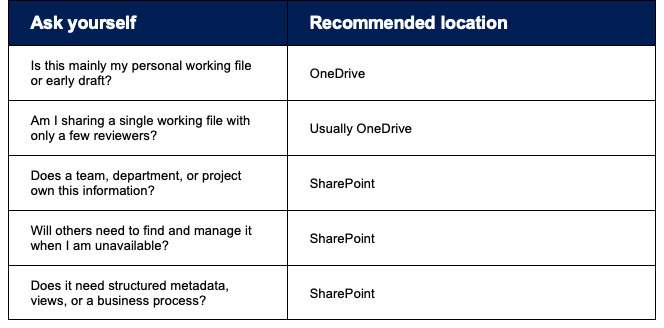
End-user decision guide
Business recommendation
Avoid using an individual employee’s OneDrive as a long-term departmental file repository. Even when a OneDrive folder can be shared broadly, the ownership model still centers the content around that user. For operational content, project documentation, policies, templates, training materials, and organizational knowledge, a SharePoint document library provides a clearer shared business home.