

SharePoint Mentor Curated Articles

MICROSOFT 365 + SHAREPOINT ONLINE GOVERNANCE FRAMEWORK
Establish practical guardrails that keep collaboration simple, permissions understandable, content trustworthy, sites usable, and Microsoft AI experiences grounded in information people are legitimately allowed to access.
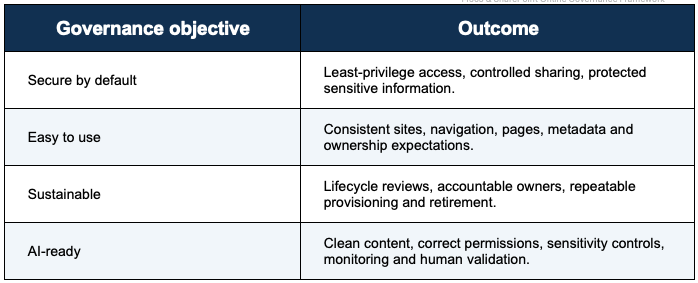
Executive Summary
For a 125-person company, governance should be light enough to follow and strong enough to prevent uncontrolled site growth, confusing permissions, stale content, external-sharing risk, and AI-driven amplification of existing access problems. Microsoft describes governance as the policies, roles, responsibilities, and processes through which business and IT work together to achieve organizational goals. SharePoint governance should also account for connected Microsoft 365 services, not treat SharePoint as an isolated workload.
This framework uses a federated model: a small central governance team establishes tenant guardrails and standards; business site owners operate sites within those guardrails; information owners approve sensitive-data rules; and all users receive concise guidance on sharing, content quality, and responsible AI usage.
Core principle Copilot and SharePoint agents are permission-aware. That makes permissions and content quality foundational AI controls. AI does not repair weak access design or stale information; it can make those weaknesses more visible and consequential.
Recommended governance outcomes
- Every production site has accountable ownership and a stated business purpose.
- Access is assigned primarily through groups, with individual and item-level exceptions minimized.
- External sharing is intentional, reviewable, and limited by data sensitivity and business need.
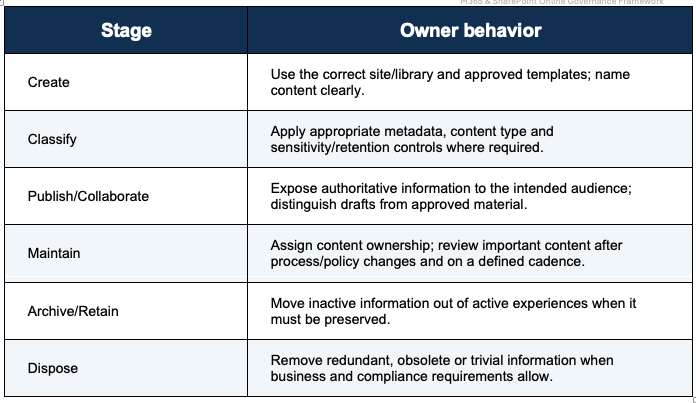
- Content has a lifecycle: create, classify, maintain, review, archive/retain, and dispose when permitted.
- Navigation and page patterns are consistent enough that employees can predict where information belongs.
- AI rollout follows permission cleanup, data classification, risk review, pilot validation, and ongoing monitoring.
1. Governance Operating Model
1.1 Governance principles
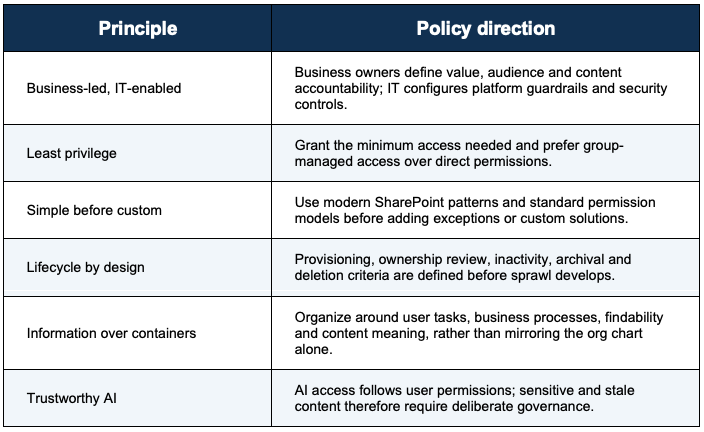
1.2 Roles and decision rights
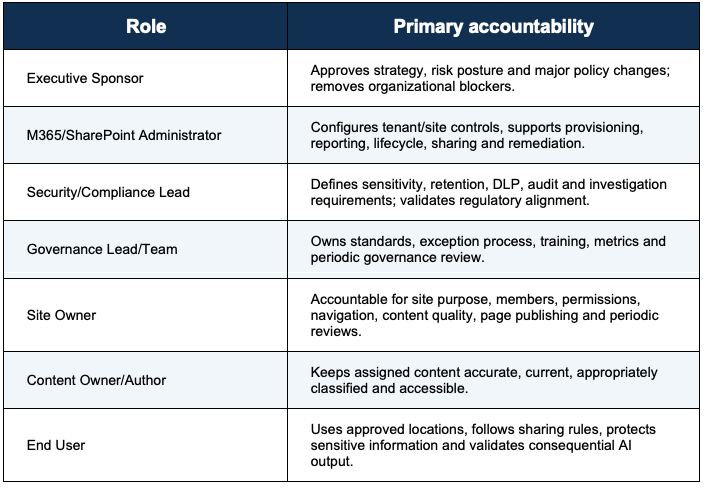
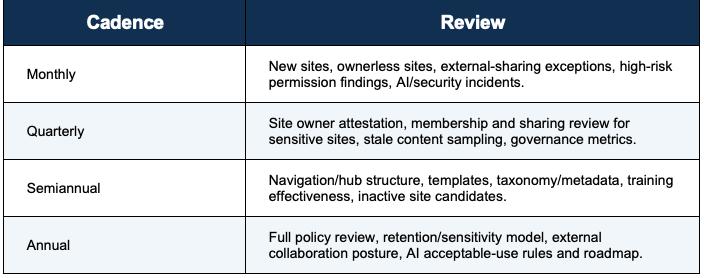
1.3 Suggested cadence for a 125-person company
The following cadence is a recommended operating model, not a Microsoft requirement. Adjust it to business risk and staffing.
2. Site Provisioning and Lifecycle
2.1 Site creation policy
- Require a business purpose, named owner(s), intended audience, data sensitivity, external-sharing requirement, and expected lifecycle before provisioning governed sites.
- Use Team sites for collaboration and Communication sites for broad publishing scenarios. Manage permissions according to the site type and connected Microsoft 365 group model.
- Use a small set of approved templates for department, project, knowledge/publishing and externally collaborative scenarios.
- Apply a consistent naming convention that is meaningful to employees and resilient to organizational change.
- Associate sites with hubs when shared navigation, branding and logical grouping improve the user experience.
2.2 Ownership standard
- Recommended company policy: assign at least two active owners to important business sites for continuity. This is an organizational guardrail rather than a universal Microsoft requirement. Microsoft documents site lifecycle capabilities that can identify and address insufficient ownership, inactive sites and sites requiring periodic attestation.
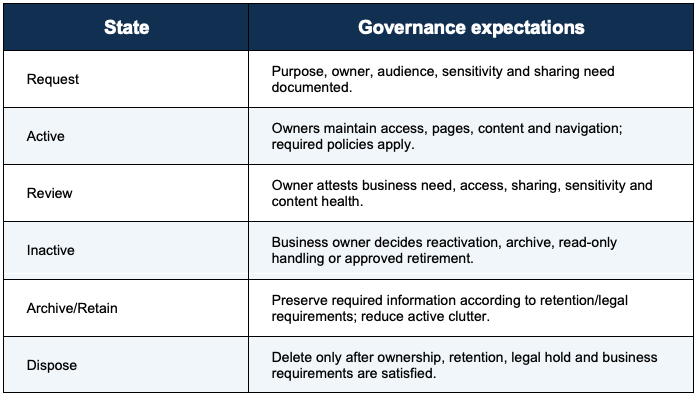
2.3 Lifecycle states
3. Site Owner Responsibilities
Site Owners are the operational heart of this governance model. They are not tenant administrators, but they are accountable for the quality and appropriateness of their site within centrally defined guardrails.
3.1 Required Site Owner duties
- Maintain the site purpose, audience and ownership information.
- Review membership and sharing periodically and after team, project or organizational changes.
- Use the supported group model for access; avoid ad hoc direct grants when a group is appropriate.
- Keep navigation concise, task-oriented and aligned with hub or organizational navigation.
- Ensure home pages explain what the site is for, who it serves, and where key resources are located.
- Review pages, documents and lists for accuracy, duplicates, outdated material and unclear ownership.
- Use metadata/content types where they materially improve filtering, search, consistency, records handling or AI grounding.
- Follow sensitivity, retention, DLP, records and external-sharing requirements defined by the company.
- Escalate requests for unusual permission models, broad external sharing or highly sensitive data.
- Test major changes before broad publication, including permissions and AI experiences tied to site content.
3.2 Site Owner “do not” list
- Do not break inheritance throughout libraries or create many item-level permission exceptions as a routine design pattern.
- Do not use Owners membership as a convenience role for frequent contributors who do not need full control.
- Do not publish sensitive content broadly merely because the site is easier to manage that way.
- Do not create duplicate working copies across multiple sites when one authoritative source can be linked.
- Do not treat the home page as a file dump; it should orient users, prioritize tasks and surface trusted content.
- Do not assume an AI response makes source content correct. Maintain the source and require validation for consequential decisions.
4. Permissions and Sharing Best Practices
4.1 Permission model
- Microsoft recommends managing Team site permissions through the associated Microsoft 365 group or Teams team, while Communication sites commonly use SharePoint Owners, Members and Visitors groups. Built-in groups simplify administration compared with assigning permissions person by person.
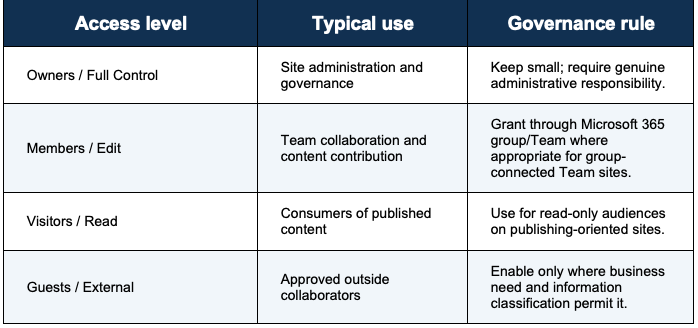
4.2 Permission rules
- Favor group-based access and role alignment over individual grants.
- Preserve inheritance whenever the business requirement allows it.
- Use unique permissions as an exception that must remain understandable and reviewable.
- Avoid broad organization-wide permissions on sensitive sites and content.
- Review anonymous or broadly scoped links and remove stale access.
- Set external sharing at the tenant/site level according to risk; use more restrictive settings for sensitive sites.
- Document elevated-access exceptions, owner approval and review/expiration expectations.
- Use access reviews/owner attestations where available and suitable for the organization.
AI connection Microsoft states that SharePoint agents return information according to each user’s existing access. A permission mistake can therefore become an AI discovery problem as well as a traditional sharing problem.
5. Content Management and Information Architecture
5.1 Content lifecycle
5.2 Library and metadata practices
- Design libraries around meaningful business collections, security boundaries, lifecycle needs and user tasks.
- Use a small, purposeful metadata set. Favor fields users or automation will actually use for filtering, search, compliance, routing or reporting.
- Standardize repeated metadata as site columns/content types when consistency across libraries creates value.
- Use folders deliberately for understandable grouping, not as a substitute for all metadata or as deeply nested navigation.
- Define authoritative locations for policies, procedures, forms and reference material; link to the source instead of proliferating copies.
- Review stale drafts, duplicate files, temporary exports and obsolete versions to reduce ROT content.
- Respect retention and legal hold before deleting or trimming protected content.
5.3 Content quality standard for AI readiness
- Give documents descriptive titles and meaningful file names.
- State owner, status, effective date or revision context for important policies and procedures where appropriate.
- Remove or clearly mark superseded content.
- Avoid contradictory copies of the same policy or procedure.
- Use headings and well-structured pages/documents so people can scan and interpret content.
- Maintain accessible content and descriptive link text.
- Prefer authoritative source content over summary pages that can drift out of date.
6. SharePoint Design Standards
6.1 Navigation and hubs
Microsoft recommends beginning information architecture with user needs, content and scope. Modern SharePoint hubs provide cross-site connection and shared navigation without relying on classic subsite hierarchies. Navigation should reflect vocabulary and tasks that employees recognize.
- Use global/hub navigation for durable organization-wide or cross-site destinations.
- Use local site navigation for resources specific to that site’s purpose.
- Keep labels concise, specific and written in employee language.
- Favor a shallow, understandable navigation model over large nested menus.
- Review navigation as business terminology and content change.
- Use audience targeting only when it improves relevance; do not treat it as a security boundary.
6.2 Page creation and configuration standard
- Start with a defined page purpose and target audience.
- Use approved page templates for recurring patterns such as landing pages, procedures, news and reference pages.
- Lead with clear headings and the most important action or information.
- Use sections and web parts consistently; avoid visual clutter and unnecessary duplication.
- Use Quick Links and curated content intentionally rather than exposing large undifferentiated collections.
- Add meaningful page titles, descriptive text, accessible image alt text and understandable link labels.
- Use news for time-sensitive communication and pages for durable reference content.
- Before publishing, verify links, permissions, mobile/responsive behavior, accessibility and content accuracy.
- Assign an owner to business-critical pages and periodically review their continued relevance.
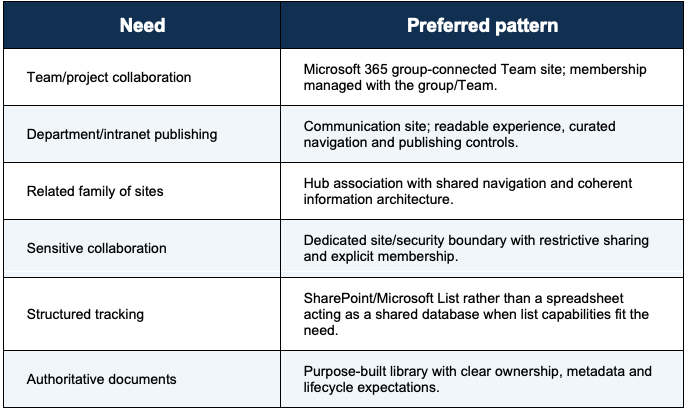
6.3 Design decision matrix
7. Microsoft AI and Copilot Governance
7.1 Security premise
Microsoft’s current guidance emphasizes protecting data and addressing oversharing before and during Copilot adoption. SharePoint sharing controls, Data Access Governance capabilities, Restricted Content Discovery/Restricted Access Control, and Microsoft Purview controls can help reduce exposure or govern sensitive information. Microsoft Purview capabilities can provide information protection, DLP, audit and risk-management controls for Microsoft 365 Copilot interactions, subject to licensing and configuration.
7.2 AI readiness controls
- Inventory high-risk or broadly shared sites before broad AI deployment.
- Remediate permissions and stale sharing links; validate that sensitive information is only available to intended audiences.
- Use sensitivity labels and DLP where appropriate to the organization’s information-protection model.
- Use retention and records controls consistently so AI draws from information that is being governed within its required lifecycle.
- Consider Restricted Content Discovery or Restricted Access Control for appropriate high-risk scenarios while underlying governance is remediated.
- Pilot Copilot with well-owned, well-understood sites and representative business scenarios.
- Tell users that AI-generated output must be checked against authoritative sources for high-impact decisions.
- Monitor AI usage, security signals and governance findings; adapt policies as Microsoft capabilities and organizational risk change.
7.3 Responsible AI user standard
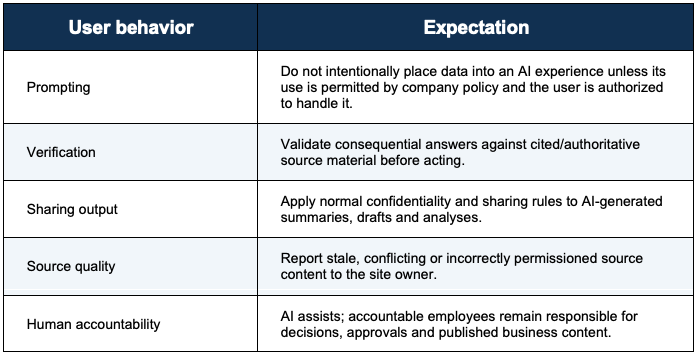
7.4 SharePoint agents
Microsoft documents that SharePoint agents use configured SharePoint knowledge sources but return information based on the user’s access. Governance should therefore cover who can create/use agents, approved knowledge sources, purpose statements, testing, sharing, lifecycle and periodic review. Agent access should never be treated as a substitute for correct SharePoint permissions.
8. Microsoft 365 E5 Governance Beyond SharePoint
Because SharePoint integrates with Microsoft 365 Groups, Teams, OneDrive and Microsoft Purview, this SharePoint framework should sit inside a broader Microsoft 365 governance program. E5 licensing can provide advanced security/compliance capabilities, but exact entitlements and prerequisites should be validated against the organization’s purchased SKUs and current Microsoft documentation before policy implementation.
- Identity: use Microsoft Entra controls appropriate to risk, including strong authentication and privileged-role governance.
- Information protection: define a small, understandable sensitivity-label taxonomy and train users on when labels apply.
- Data Loss Prevention: focus policies first on meaningful sensitive-data scenarios; test and tune before broad enforcement where practical.
- Retention and records: document which business information must be retained, for how long, and who approves disposition.
- Audit and investigations: define who reviews audit/security signals, escalation paths and evidence-handling expectations.
- Teams and Groups: align team creation, ownership, guest access and lifecycle with the associated SharePoint site.
- OneDrive: govern personal work storage, external sharing and employee departure/transfer processes separately from team knowledge repositories.
9. Governance Controls Library
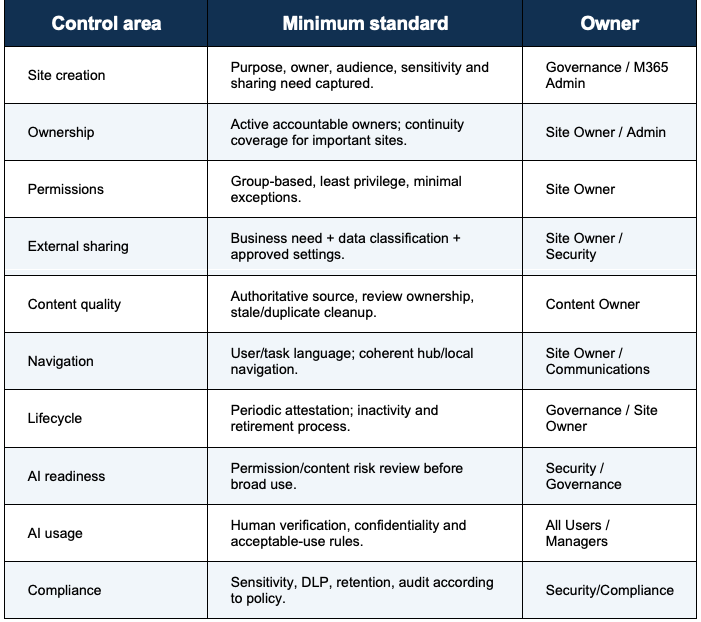
10. Site Owner Quarterly Review Checklist
- Site purpose and audience are still valid.
- At least the required owner coverage is present.
- Owners/Members/Visitors or connected group membership are accurate.
- Guest users and external links remain required.
- No unexpected broad access exists for sensitive content.
- Key navigation links work and still reflect user needs.
- Home page and high-value pages are current.
- Policies/procedures have a clear authoritative source and no known conflicting duplicates.
- Libraries do not contain obvious ROT content that can be safely removed.
- Sensitivity/retention expectations are being followed.
- SharePoint agents/Copilot scenarios, if used, point to appropriate knowledge sources and produce expected access behavior.
- Issues and exceptions have been recorded and escalated.
11. Governance Metrics and Dashboard
Use a compact dashboard rather than dozens of measures. Targets below should be set by the organization after establishing a baseline; Microsoft does not prescribe these company-specific thresholds.
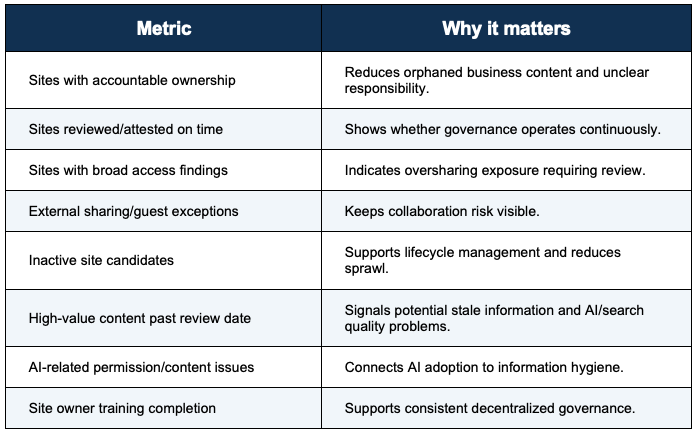
12. Rollout Roadmap for a 125-Person Organization
The phases below are a recommended implementation sequence, not a Microsoft-mandated schedule. Progress can be faster or slower depending on existing content, compliance obligations and team capacity.
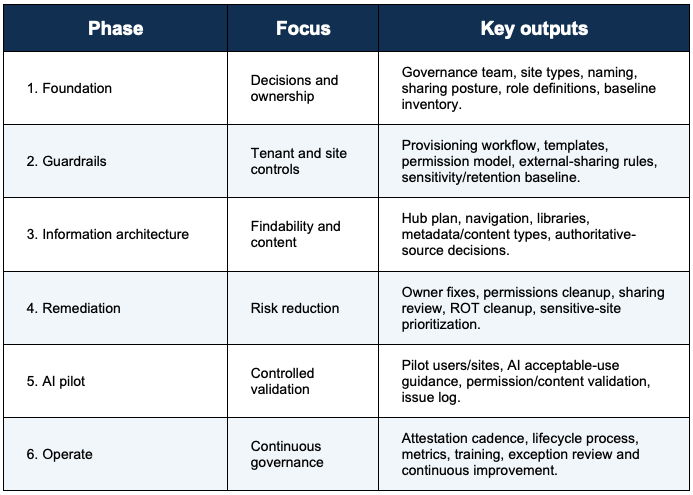
13. Exception and Escalation Process
- Requester documents the business need, data involved, audience, duration and requested exception.
- Site Owner confirms the need and that standard patterns cannot reasonably satisfy it.
- M365/SharePoint administration and Security/Compliance review the technical and information-risk implications.
- Approver records the decision, conditions, owner and review/expiration point.
- Exception is reviewed at expiry or when the business/security context materially changes.
14. Governance Policy Statements
- Every governed SharePoint site must have a documented business purpose and accountable owner.
- Permissions must follow least privilege and use groups wherever practical.
- Sensitive information must not be exposed through broad membership or sharing merely for convenience.
- Site Owners are responsible for ongoing access, content, navigation and page quality within their sites.
- Authoritative business content must have an identifiable owner and maintenance expectation.
- External sharing requires a legitimate business purpose and must comply with the organization’s data-classification rules.
- Site and content lifecycle decisions must respect retention, legal hold and records requirements.
- Microsoft AI experiences must be deployed and used according to approved security, compliance, privacy and acceptable-use rules.
- AI-generated content used for consequential decisions must be validated against authoritative information.
- Governance standards and controls will be reviewed as Microsoft 365 capabilities, business needs and risk evolve.
15. Source Notes and Microsoft Guidance
This guide combines Microsoft guidance with practical recommendations sized for a 125-person organization. Company-specific cadences, owner-count expectations, workflows, templates and approval thresholds are recommendations and should be adjusted to your risk profile and legal/compliance requirements.

Appendix A. 10 Rules for Site Owners
- Know why the site exists and who it serves.
- Keep ownership current.
- Use groups, not piles of one-off permissions.
- Treat external sharing as a deliberate business decision.
- Keep authoritative content current and remove confusing duplicates.
- Design navigation around user tasks and language.
- Use pages to communicate and libraries/lists to manage information.
- Use metadata when it improves findability, consistency or governance.
- Assume AI can surface what a user can already access, so fix access and content at the source.
- Review the site routinely and escalate exceptions early.
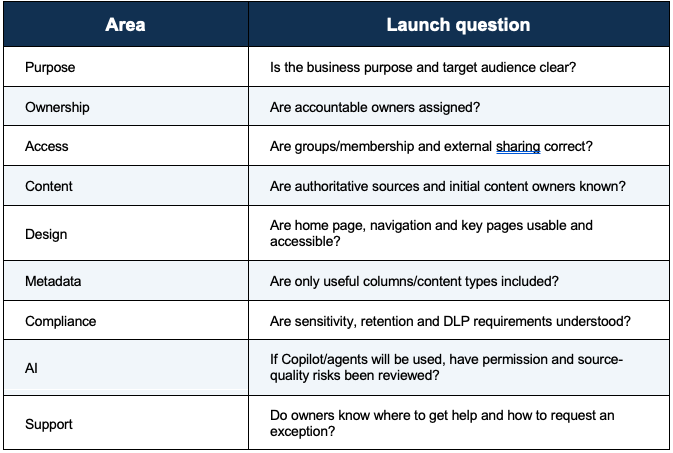
Appendix B. Launch Gate for New Sites
Appendix C. Adoption Message
Governance is an enablement system The goal is not to stop people from collaborating. It is to make the right way the easy way: predictable sites, understandable permissions, useful navigation, trustworthy content and AI experiences that respect the organization’s security and compliance boundaries.
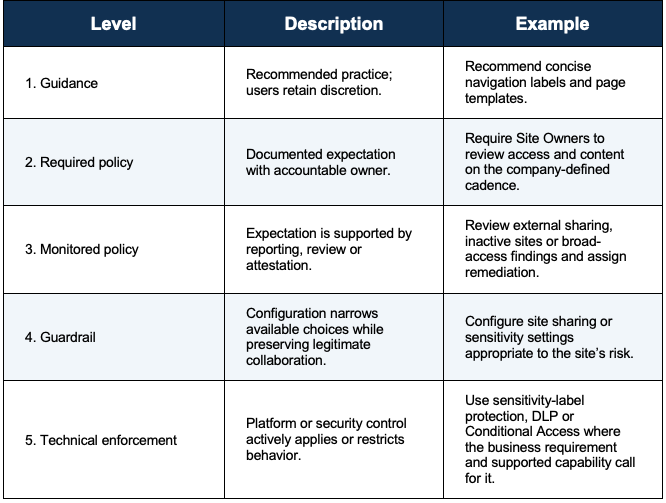
16. Governance Policies vs. Governance Enforcement
A mature Microsoft 365 governance program needs both policy and enforcement. Policy defines the organization’s expectations, decision rights and acceptable behavior. Enforcement turns selected expectations into technical configurations, monitoring, approvals or corrective actions. The two should be intentionally connected, but they are not the same thing.
Key distinction A written rule tells people what should happen. An enforcement control helps prevent, constrain, detect or remediate behavior when the organization decides that relying on guidance alone is not sufficient. Not every governance policy requires hard technical enforcement; the enforcement level should reflect data sensitivity, business impact, usability and risk.
16.1 What is a governance policy?
In this framework, a governance policy is an organization-approved statement of expected behavior, accountability or outcome. Policies answer questions such as who may create sites, who owns content, when guests may be invited, how sensitive information should be handled, how long content should be retained, and how employees should validate AI-generated output.
- Policy is primarily about intent and accountability: what is required, permitted, prohibited or expected.
- Policies should identify scope, responsible roles, exception handling and review expectations.
- Policies should be understandable by the employees and Site Owners expected to follow them.
- Policies can be supported by training, templates, checklists, standards and documented operating procedures even when no technical block is configured.
16.2 What is governance enforcement?
Governance enforcement is the use of platform controls, identity controls, information-protection controls, workflow, monitoring or administrative review to make a policy more consistently observable or actionable. Microsoft technologies can enforce selected governance outcomes. For example, sensitivity labels can apply protection settings to supported content and collaborative workspaces; DLP can evaluate supported Microsoft 365 locations; and Microsoft Entra authentication context can connect Conditional Access requirements to SharePoint sites.
- Preventive controls restrict an action or access condition before the risk occurs.
- Protective controls apply security or information-protection settings to data or a workspace.
- Detective controls provide visibility into conditions that require review or investigation.
- Corrective controls remediate access, sharing, ownership, content or configuration after a finding is identified.
- Administrative enforcement uses approvals, owner attestations, exception tracking and recurring review where a hard technical control is not appropriate.
16.3 Policy-to-enforcement spectrum
16.4 Examples for SharePoint and Microsoft 365

16.5 Choosing what to enforce
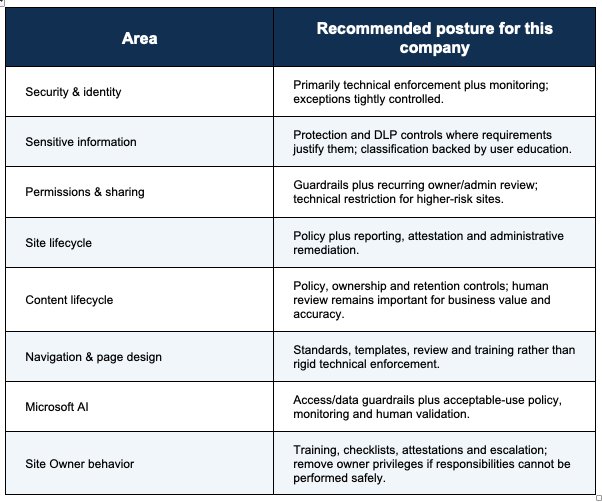
For a 125-person organization, avoid turning every preference into a hard technical control. Reserve stronger enforcement for requirements where inconsistency creates meaningful security, privacy, compliance or business risk. Use lighter governance for experience and content-quality practices that need human judgment.
- Enforce more strongly when the data is sensitive, the audience is broad or external, consequences are material, or a regulatory/security requirement exists.
- Use monitored or administrative enforcement when context and human judgment are important.
- Use guidance and templates for design choices where flexibility improves the user experience and the risk of deviation is low.
- Test controls before broad deployment. Microsoft notes, for example, that authentication contexts have application and scenario limitations, so dependent workloads should be validated before broad use.
- Document exceptions rather than silently weakening a control. Every exception should have a reason, accountable owner and review point.
16.6 Recommended Governance Enforcement Matrix
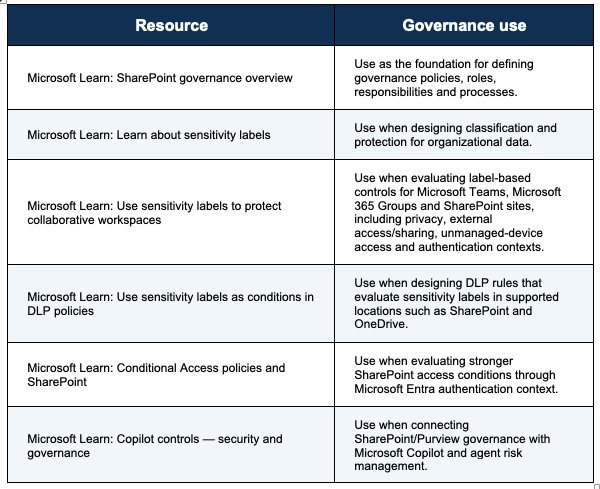
16.7 Resources for Policy and Enforcement Design
Use Microsoft documentation to confirm that each intended enforcement control is supported for the workload, license, content type and scenario before implementation. Key resources include:
16.8 Practical rule for the governance team
For every policy statement, explicitly record one of four enforcement dispositions: Guidance Only, Owner/Admin Review, Configured Guardrail, or Technical Enforcement. This creates a clear bridge between governance documentation and the actual Microsoft 365 configuration, while preventing the organization from assuming that a written policy is automatically being enforced by the platform.