

SharePoint Mentor Curated Articles
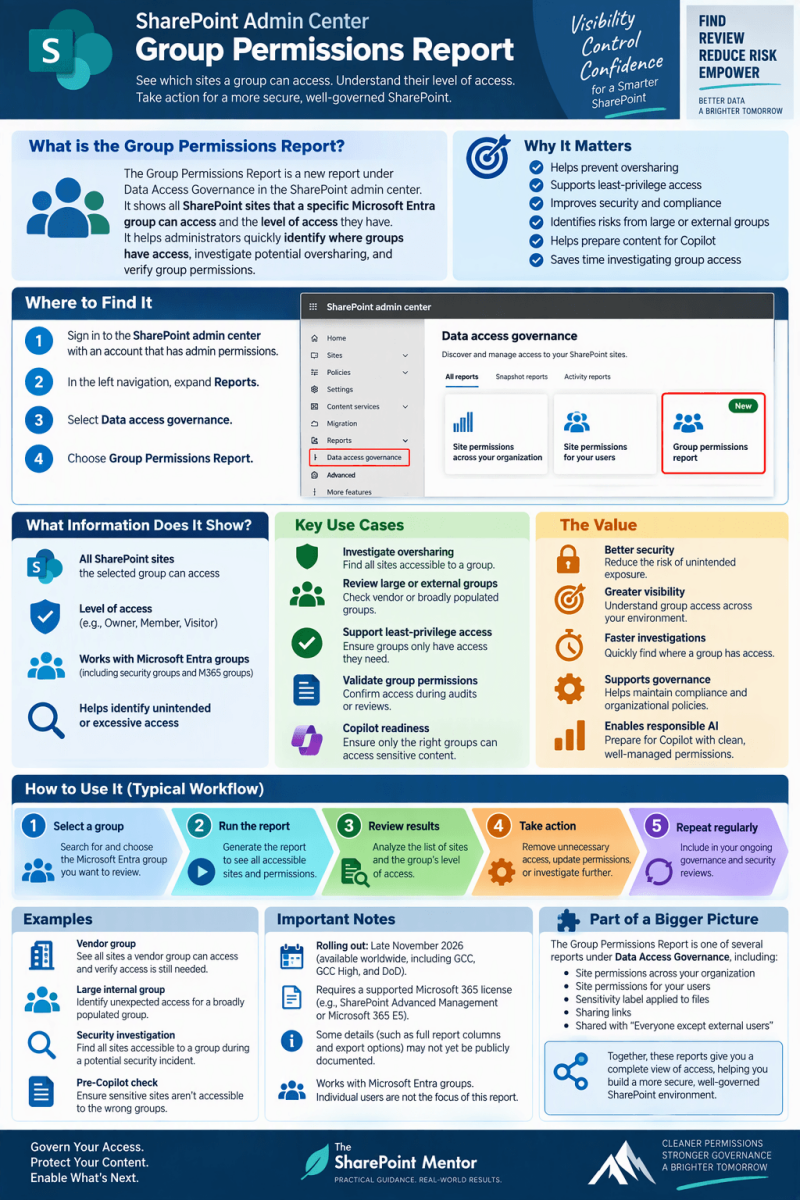
GROUP PERMISSIONS REPORT
A practical guide to the new Data Access Governance reporting capability
Purpose
Help SharePoint administrators understand what the new Group Permissions Report is designed to do, where it fits within Data Access Governance, how administrators will use it, and why group-centric permission visibility matters for oversharing reviews and Copilot readiness.
Executive summary
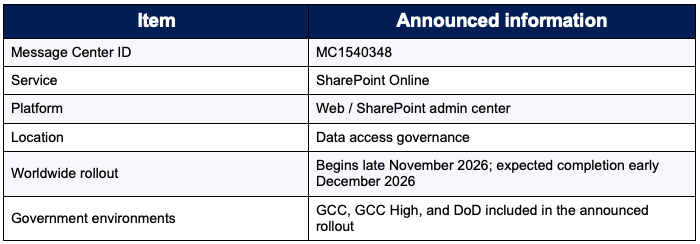
Microsoft has announced a new Data Access Governance report in the SharePoint admin center that is designed to let SharePoint administrators identify all sites accessible to a given group and understand the extent of that group’s access. Microsoft’s Message Center announcement, MC1540348, says the feature will begin worldwide rollout in late November 2026 and is expected to complete by early December 2026, including GCC, GCC High, and DoD environments.
The practical shift is important: instead of starting with a site or an individual user, an administrator can investigate access from the perspective of a group. This is especially useful for groups with broad membership, including groups created for vendors, because overly broad group access can expose content to unintended recipients. Microsoft specifically positions the report as a way to investigate potential exposure, verify group permissions, and review permissions before assigning Copilot licenses.
Key takeaway
Think of the Group Permissions Report as a group-centered access investigation tool: “If this group is the subject of my review, which SharePoint sites can it reach, and what is the extent of that access?”
1. Why this report matters
SharePoint permissions are often granted through groups because group-based access is easier to manage than direct permission assignments to many individual users. Microsoft guidance recommends following least privilege and using standard groups where appropriate. The governance problem is that group membership and site access can evolve independently over time. A group that was appropriate when first created may later acquire broader membership, broader site permissions, or both.
- Group-centric visibility enables an administrator to investigate the access footprint of a specific group across sites rather than checking sites one at a time.
- It can help expose situations where a broadly populated group has access to content that warrants closer review.
- It adds another perspective to Data Access Governance, complementing tenant-wide site permission baselines and user-centric permission reports.
- Microsoft specifically recommends this capability for reviewing group permissions before assigning Copilot licenses.
2. What is Data Access Governance?
Data Access Governance (DAG) is a reporting capability in the SharePoint admin center intended to help organizations govern access to SharePoint data. Microsoft describes DAG reports as a way to discover sites that may contain overshared or sensitive content, assess exposure, and apply appropriate security and compliance policies.
Administrators access the DAG area in the SharePoint admin center by expanding Reports and selecting Data access governance. Microsoft currently documents snapshot reports and activity reports. Snapshot reports capture the organization’s status at the time a report is generated; activity reports focus on potential oversharing activity.

3. What the new Group Permissions Report does
According to Microsoft’s Message Center announcement, the new report allows SharePoint administrators to identify all sites accessible to a given group and the extent of that access. Its purpose is to make it easier to investigate group-based exposure and verify whether a group’s SharePoint permissions remain appropriate.
The administrator’s investigation model
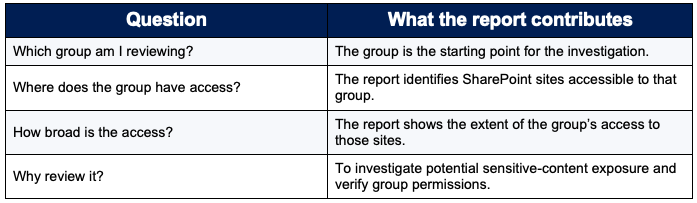
At the time of this guide, Microsoft’s public Data Access Governance Learn overview documents the existing site-, user-, sensitivity-, sharing-link-, and broad-sharing reports, while the new group permissions capability is described in MC1540348. Exact production UI labels, fields, filters, export behavior, and processing details for the new report should be validated in your tenant as rollout reaches your environment.
4. Rollout and availability
MC1540348 was published November 5, 2026. The announcement states that General Availability rollout for Worldwide, GCC, GCC High, and DoD is planned to begin in late November 2026 and complete by early December 2026. Because today is November 10, 2026, the capability may not yet be visible in a tenant.
5. Prerequisites and administrator access
Microsoft’s Data Access Governance documentation directs organizations to the prerequisites for SharePoint Advanced Management. The documented DAG entry point requires SharePoint administrator credentials. Licensing and role requirements can vary by DAG capability, so administrators should validate the current prerequisites for the new group report when it appears in their tenant.
Licensing context
Microsoft documents that Data Access Governance is part of the SharePoint Advanced Management feature set. Microsoft also notes special Data Access Governance reporting access for IT administrators with Microsoft 365 E5, with limitations compared with the full SharePoint Advanced Management experience. Validate the entitlement that applies to your tenant before relying on the new report operationally.
6. How to use the Group Permissions Report
Microsoft has announced the report’s purpose and Data Access Governance location, but the sources available for this guide do not yet document a complete production click-path for the new group-specific experience. The workflow below therefore separates confirmed navigation from the operational review steps an administrator should perform once the report is available.
Confirmed navigation into Data Access Governance
- Sign in Sign in to the SharePoint admin center with appropriate SharePoint administrator credentials.
- Open Reports In the left pane, expand Reports.
- Open Data access governance Select Data access governance. When rollout reaches your tenant, look for the newly available group-permissions reporting option on this page.
Recommended review workflow after the report is available
- Choose the group to investigate Start with a group that warrants review, for example a group with broad membership or one used for vendor access. The exact selection control should be validated in your tenant.
- Generate or open the group-focused report Use the new report to identify the sites accessible to the selected group. Exact generation controls and processing behavior are not yet specified in the sources used for this guide.
- Review the extent of access Examine the access information Microsoft exposes for each returned site and flag access that appears broader than the group’s business purpose.
- Investigate high-risk relationships Prioritize sites containing sensitive, confidential, regulated, or business-critical content, using other DAG reports and your governance context where appropriate.
- Validate business need Confirm with site owners or information owners whether the group still requires the access it holds.
- Remediate through your normal permission-governance process Where access is no longer justified, use established SharePoint permission-management practices and least privilege. The announcement describes the report as an investigation and verification capability; it does not document group-permission remediation controls within the report itself.
- Record the review Capture the group reviewed, sites investigated, findings, owner decisions, and remediation outcome so the report becomes part of a repeatable governance process.
7. The value of the Group Permissions Report
A. It changes the question from “who can access this site?” to “where can this group go?”
- Traditional site-by-site reviews are useful when the site is the known risk. A group-centric report is valuable when the group is the known risk or review target. This makes it easier to understand the footprint of a broadly populated group across SharePoint sites.
B. It supports oversharing investigations
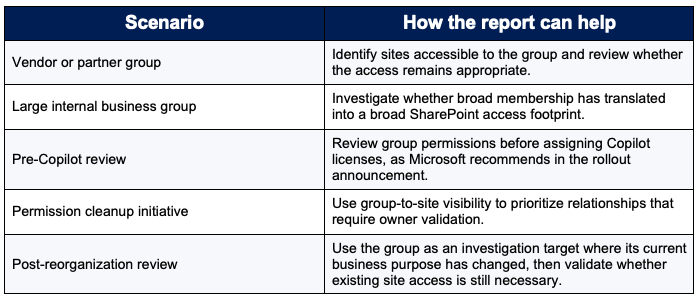
- Microsoft directly links the feature to preventing unintended content exposure. Groups with broad membership, including vendor groups, can create risk when their access extends beyond their intended collaboration boundary.
C. It strengthens least-privilege reviews
- Microsoft SharePoint permission guidance recommends least privilege. A cross-site group view gives administrators a practical evidence set for asking whether a group’s access still matches its current business purpose.
D. It supports Copilot readiness
- Microsoft’s Message Center guidance explicitly says administrators can use the new report to review group permissions before assigning Copilot licenses. This aligns with the broader Data Access Governance strategy of understanding permission exposure before expanding AI use across organizational content.
E. It helps establish repeatable governance
- The report can serve as an evidence source in a recurring access-review process. The report identifies group-to-site access relationships; your governance process supplies the decision criteria, owner validation, documentation, and remediation follow-through.
8. Practical scenarios
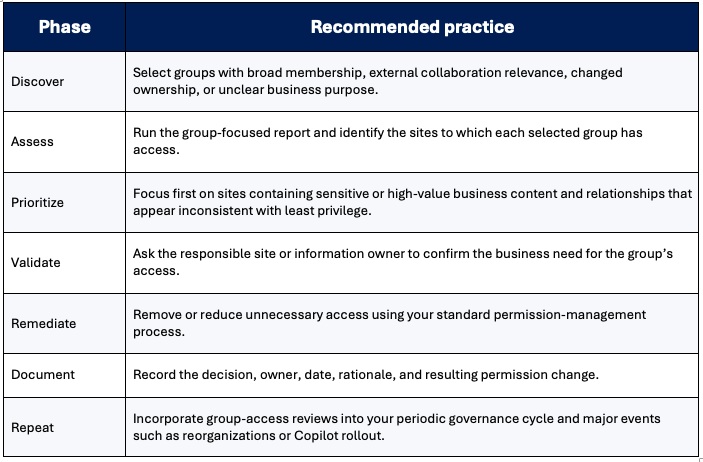
9. Recommended governance operating model
The following is a recommended governance practice, not a Microsoft-documented requirement for the new report.
10. How it complements existing DAG reports
The strongest governance model uses the group report alongside other Data Access Governance perspectives rather than as a replacement for them.

11. Administrator checklist
- Confirm the feature has reached your tenant.
- Confirm applicable SharePoint Advanced Management / Data Access Governance licensing and roles.
- Identify high-priority groups for review.
- Run the group-focused access investigation.
- Review accessible sites and the extent of access shown by the report.
- Cross-check high-risk sites using other DAG signals where useful.
- Validate business need with the responsible owner.
- Apply least-privilege remediation through established permission controls.
- Document decisions and retain evidence according to your governance process.
- Repeat reviews when group purpose, membership, external collaboration, or AI deployment changes.
12. What the available sources do not yet specify
Because this feature was announced only days before this guide was prepared and its rollout has not yet begun, several implementation details are not explicitly documented in the sources reviewed:
- The final production name of every UI control in the new report experience.
- The exact group types supported by the report.
- The detailed output columns and definitions for each access field.
- Report generation duration, refresh cadence, retention, row limits, and export details specific to the new group report.
- Whether the final UI includes built-in filtering, direct remediation, Site Access Review, or AI Insights for this specific report.
- PowerShell syntax specifically for the group-focused report.
Do not assume these details from other DAG reports. Validate them in Microsoft documentation or in the SharePoint admin center once the feature reaches your tenant.
13. Frequently asked questions
What is the Group Permissions Report?
- A newly announced SharePoint Data Access Governance report that lets SharePoint administrators identify all sites accessible to a given group and understand the extent of that group’s access.
Where will I find it?
- Microsoft says the capability is in the SharePoint admin center under Data access governance. The established entry point is Reports > Data access governance.
Who is the primary audience?
- SharePoint administrators responsible for managing and reviewing site permissions.
Why does Microsoft call out vendor groups?
- The announcement notes that groups with broad membership, including vendor groups, can expose sensitive content to unintended recipients.
How does it help with Copilot?
- Microsoft recommends using the report to review group permissions before assigning Copilot licenses.
Is the feature available everywhere today?
- Not necessarily. As of November 10, 2026, the announced rollout has not yet begun. Microsoft plans to begin rollout in late November 2026 and complete it by early December 2026.
Does the report automatically fix permissions?
- The announcement describes the report as a way to investigate potential exposure and verify permissions. The sources reviewed do not document automatic group-permission remediation inside this new report.
Does this replace existing DAG reports?
- No. Its value is a new group-centric investigation perspective that complements existing organization-, site-, user-, sensitivity-, and sharing-focused views.
14. Recommended success measures
These are suggested governance measures, not Microsoft product metrics:
- Percentage of high-priority groups that have a documented access review.
- Number of group-to-site relationships validated as required, reduced, or removed.
- Time from identification of questionable access to owner decision.
- Percentage of Copilot-targeted populations whose relevant broad groups were reviewed before license assignment.
- Recurrence of previously remediated overbroad group access.
15. Sources and reference notes
- Microsoft Learn: Data access governance reports for SharePoint and OneDrive sites
https://learn.microsoft.com/en-us/sharepoint/data-access-governance-reports - Microsoft Learn: Get your organization’s site permissions baseline with the snapshot report
https://learn.microsoft.com/en-us/sharepoint/data-access-governance-site-permissions-report - Microsoft Learn: What is SharePoint Advanced Management?
https://learn.microsoft.com/en-us/sharepoint/advanced-management - Microsoft 365 Message Center item MC1540348 (announcement summarized by public archive)
MC1540348, published November 5, 2026; rollout announced for late November through early December 2026.
This guide distinguishes announced/officially documented product behavior from recommended governance practices. Because the Group Permissions Report is in a pre-rollout state as of November 10, 2026, verify tenant-specific UI and licensing details as Microsoft publishes final documentation and the feature becomes available.