

SharePoint Mentor Curated Articles
Executive Summary
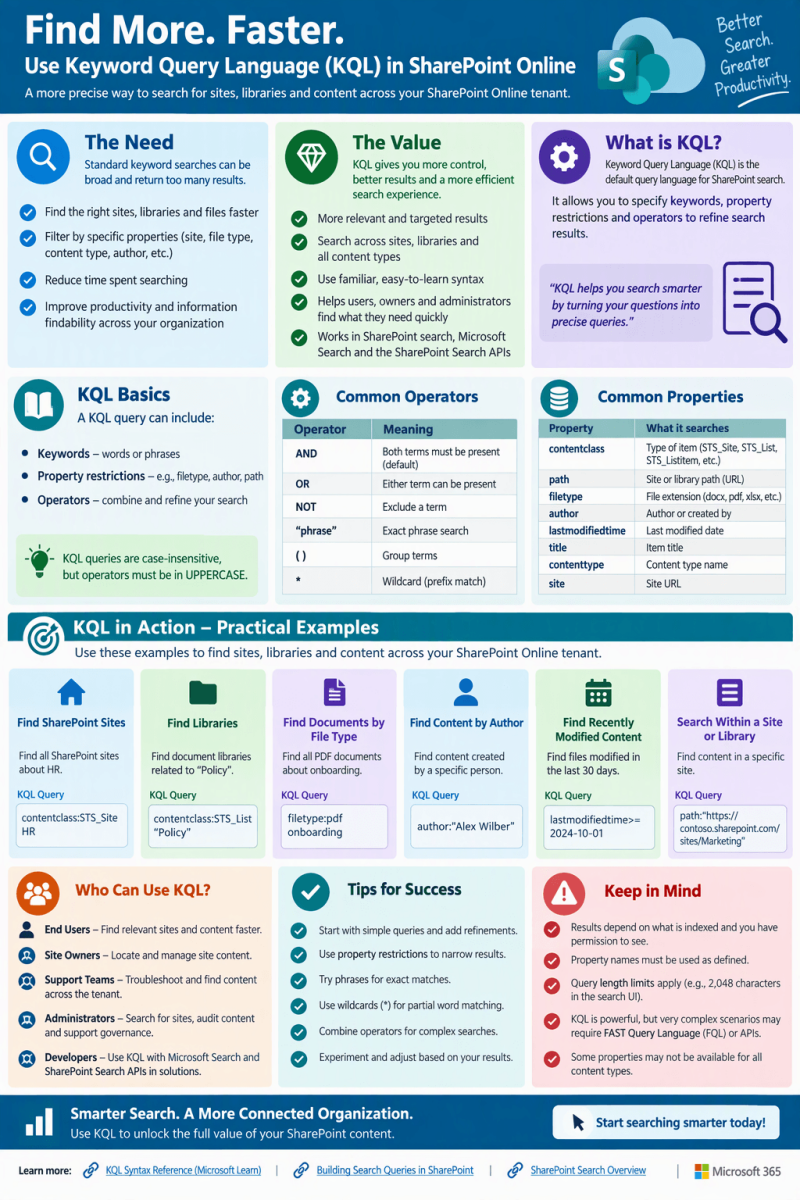
SharePoint Online search is often used as a simple keyword experience, but ordinary keywords can return a broad mix of matches. Keyword Query Language (KQL) provides a more deliberate way to express search criteria. Microsoft documents KQL as the default query language for building SharePoint search queries and identifies free-text terms, property restrictions, and operators as core query elements. KQL can therefore serve as a practical alternative when users, site owners, support staff, or administrators need to narrow results by indexed metadata rather than relying only on a general search phrase.
- NEED: Reduce ambiguity when ordinary keyword searches return too many or mixed results.
- VALUE: Combine words, phrases, managed properties, and logical operators for more targeted retrieval.
- USAGE: Build repeatable search expressions for locating indexed sites, libraries, pages, files, and other content.
1. Why KQL Is Needed
A SharePoint tenant can grow into a large information environment spanning many sites, libraries, pages, documents, and Microsoft 365-connected content. A broad search term may be useful for discovery, but it is not always specific enough for support, governance, content cleanup, migration validation, or targeted research. KQL adds structure to the search request.
- Precision: restrict a query to an indexed property instead of matching the same word everywhere.
- Scope: target a site or path when you know where content should reside.
- Content filtering: combine a topic with file type, author, title, path, or other searchable managed properties.
- Repeatability: preserve a query pattern that support teams or site owners can reuse with different values.
- Troubleshooting: test whether expected content can be found through the SharePoint search index using explicit query criteria.
2. What KQL Is
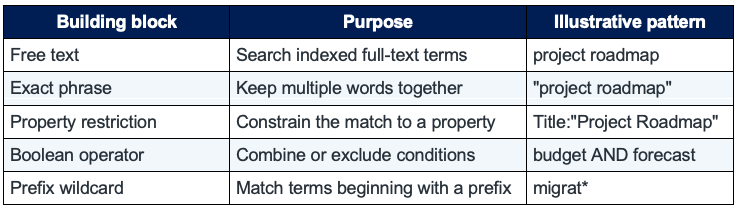
KQL is a language for expressing search criteria to SharePoint search. Microsoft states that KQL is the default query language for building search queries. A KQL query may contain free-text keywords, property restrictions, and operators. Free-text searches are case-insensitive, while KQL operators are case-sensitive and should be uppercase.
3. The Value of KQL in SharePoint Online

4. Core Syntax to Learn
Free-text terms and phrases
- project governance
- "project governance"
- Without an operator between multiple free-text expressions, Microsoft documents the behavior as equivalent to AND. Quotes identify a phrase.
Property restrictions
- Title:"Migration Plan"
- Author:"Alex Wilber"
- FileType:pdf
- Path:"https://contoso.sharepoint.com/sites/Projects"
- These are patterns. The managed property must exist in the search schema and be queryable for a property restriction to work. Property names and values should be adapted to the tenant and the content being searched.
Operators
- budget AND forecast
- policy OR procedure
- migration NOT archive
- Use uppercase operators. Microsoft documents operators including AND, OR, NOT, NEAR, ONEAR, and XRANK, along with property operators such as :, =, <>, >, >=, <, and <=.
5. Practical Query Patterns
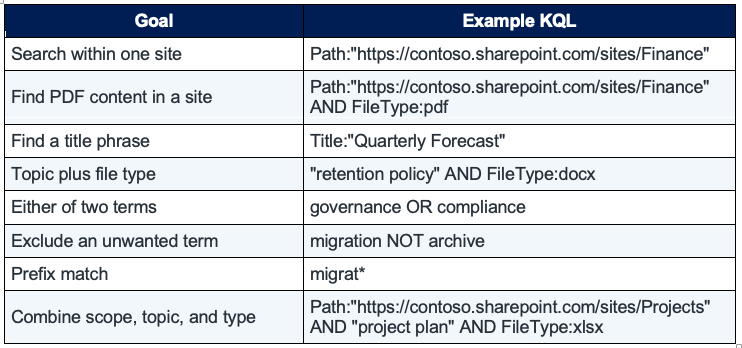
The following examples are reusable starting points. Replace the sample tenant URLs, names, titles, and terms with real values from your environment.
6. Sites, Libraries, and Content: Recommended Approach
Think of a KQL search as progressively narrowing a result set. Start with the information you know, then add constraints only when they improve the result.
- Step 1 — Start with the subject: Use a distinctive word or quoted phrase that describes the content.
- Step 2 — Add location: If you know the site or library location, add a Path restriction.
- Step 3 — Add content characteristics: Add a queryable property such as Title, Author, or FileType when appropriate.
- Step 4 — Combine conditions: Use uppercase AND, OR, or NOT to express the relationship between criteria.
- Step 5 — Validate: Review the returned results and simplify the query if an expected item disappears. The content must be indexed and the properties used in restrictions must be available to search.
7. When KQL Is Most Useful
- A normal keyword search produces a large or noisy result set.
- You know part of the item metadata, such as its title, author, type, or path.
- You need a repeatable search pattern for support or administrative investigation.
- You are validating indexed content after information architecture, migration, or content-management work.
- You are designing a search-driven experience or application that submits queries to SharePoint search.
8. Important Limitations and Guardrails
- KQL searches the SharePoint search index. It does not bypass SharePoint access controls; results in a user context are based on content available to that user.
- A property restriction depends on the search schema. The property must be available to query for the intended restriction.
- Operators are case-sensitive. Use uppercase AND, OR, and NOT.
- Prefix wildcard matching uses an asterisk at the end of the beginning portion of a word. Do not treat the wildcard as a general substitute for understanding the indexed terms.
- The default SharePoint search front end has a documented KQL query length limit of 2,048 characters. Programmatic Query object model queries have different documented limits.
- KQL is powerful, but it should complement good information architecture, metadata, permissions, and content hygiene rather than compensate for weak governance.
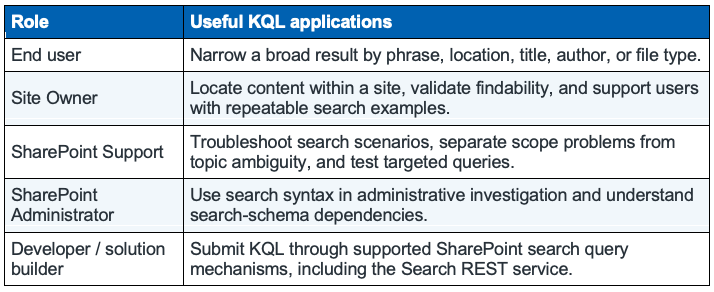
9. Suggested Role-Based Usage
10. Quick Reference
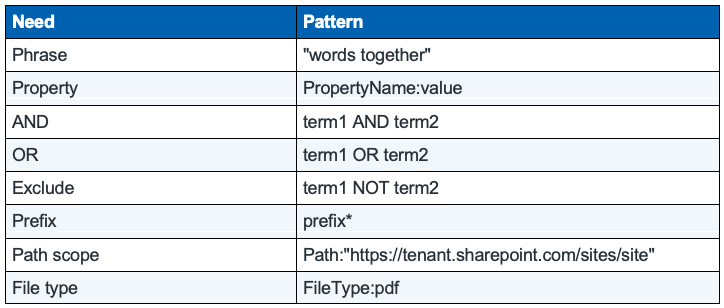
11. Adoption Recommendations
For a SharePoint support or training program, introduce KQL as an advanced search skill rather than as a replacement for every search. Start with a short set of tenant-tested patterns for Path, Title, Author, FileType, phrases, and Boolean operators. Validate the managed properties used in your environment, document successful examples, and incorporate them into support knowledge articles, site-owner training, and migration or governance checklists.
Microsoft References
- Keyword Query Language (KQL) syntax reference: https://learn.microsoft.com/en-us/sharepoint/dev/general-development/keyword-query-language-kql-syntax-reference
- Building search queries in SharePoint: https://learn.microsoft.com/en-us/sharepoint/dev/general-development/building-search-queries-in-sharepoint
- SharePoint Search REST API overview: https://learn.microsoft.com/en-us/sharepoint/dev/general-development/sharepoint-search-rest-api-overview
- [MS-KQL]: Keyword Query Language Structure Protocol: https://learn.microsoft.com/en-us/openspecs/sharepoint_protocols/ms-kql/3bbf06cd-8fc1-4277-bd92-8661ccd3c9b0
Note: Example queries in this guide are illustrative. Test them against the managed properties, URLs, permissions, and indexed content in your own SharePoint Online environment.