

SharePoint Mentor Curated Articles
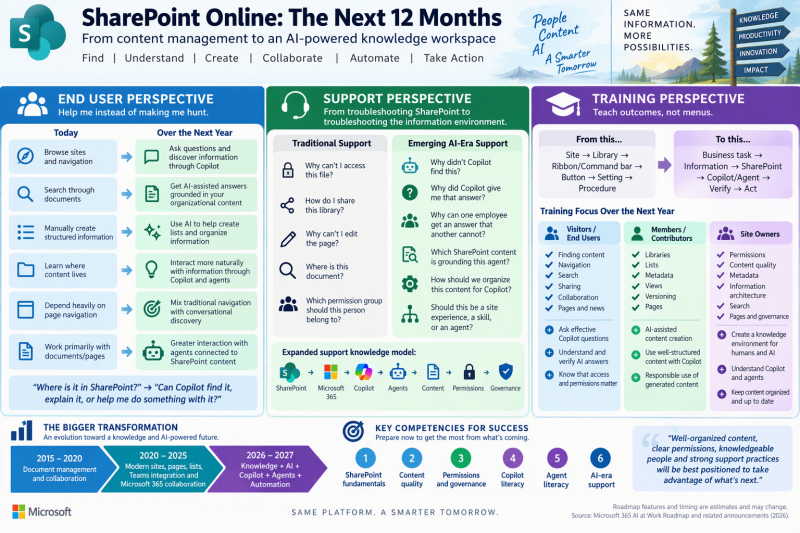
Over the next year, the biggest change in SharePoint Online may be less about a completely redesigned SharePoint and more about SharePoint becoming an increasingly AI-assisted workspace for finding, understanding, creating, and acting on information.
We might frame the coming year like this:
1. End-user perspective: “Help me instead of making me hunt”
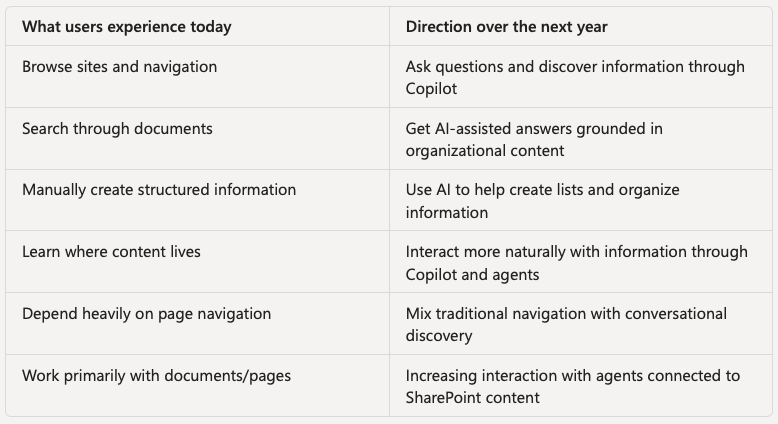
A great example is the SharePoint list agent, which supports creating lists through prompts with schema generation and setup.
- Even more significant is Microsoft's current transition of SharePoint agents toward the broader Copilot extensibility ecosystem. The announced direction includes Copilot in SharePoint for site-level Q&A, skills for focused tasks, agents that can work across Microsoft 365, and an Agent Chat web part intended to surface agents directly on SharePoint sites.
The user expectation therefore changes from:
“Where is it in SharePoint?” → “Can Copilot find it, explain it, or help me do something with it?”
Support perspective: from troubleshooting SharePoint to troubleshooting the information environment
This could be an even bigger shift for the support organization. Traditional SharePoint support will certainly remain important: permissions, sharing, synchronization, pages, libraries, lists, navigation, versioning, and access problems aren't going away.
Support teams should prepare for a new layer of questions:
Traditional support
- “Why can't I access this file?”
- “How do I share this library?”
- “Why can't I edit the page?”
- “Where is this document?”
- “Which permission group should this person belong to?”
Emerging AI-era support
- “Why didn't Copilot find this?”
- “Why did Copilot give me that answer?”
- “Why can one employee get an answer that another employee cannot?”
- “Which SharePoint content is grounding this agent?”
- “How should we organize this content for Copilot?”
- “Should this be a SharePoint site experience, a skill, or an agent?”
This is particularly important because Microsoft is already changing the agent architecture around SharePoint and OneDrive. Microsoft has announced that creation will move toward Microsoft Copilot Agent Builder and that existing .agent files will need to transition as the ecosystem evolves.
Consequently, we should consider expanding a SharePoint support team's knowledge model to:
SharePoint → Microsoft 365 → Copilot → Agents → Content → Permissions → Governance
- That makes your long-standing emphasis on clean SharePoint permissions and governance increasingly valuable.
Training perspective: teach outcomes, not menus
This may be the area where you should make the biggest changes to an existing SharePoint training program.
- Historically we have trained people like this: Site → Library → Ribbon/Command bar → Button → Setting → Procedure
Over the coming year, training should increasingly become:
- Business task → Information → SharePoint → Copilot/Agent → Verify → Act
People still need foundational SharePoint skills, but training should start incorporating AI literacy alongside SharePoint literacy.
Visitors / End users
Continue teaching:
- Finding content
- Navigation
- Search
- Sharing
- Document collaboration
- Pages and news
Add:
- Asking effective Copilot questions
- Finding information conversationally
- Understanding where AI answers come from
- Verifying AI-generated answers
- Understanding that access and permissions still matter
Members / Contributors
Continue teaching:
- Libraries
- Lists
- Metadata
- Views
- Versioning
- Pages
Add:
- AI-assisted content creation
- Using well-structured content with Copilot
- Prompting against organizational information
- Working with AI-supported lists and structured information
- Responsible use of generated content
Site Owners
This is where training needs to evolve substantially. Site Owners should increasingly understand:
- Permissions + Content Quality + Metadata + Information Architecture + Search + Copilot + Agents
Rather than simply teaching someone how to configure a site, we should start teaching them how to create a high-quality knowledge environment that humans and AI can both consume effectively.
The bigger transformation
We can describe the coming transition this way:
- SharePoint 2015–2020 - Document management and collaboration
- SharePoint 2020–2025 - Modern sites, pages, lists, Teams integration and Microsoft 365 collaboration
- SharePoint 2026–2027 - Knowledge + AI + Copilot + Agents + Automation
What this means for a SharePoint support/training organization
Begin preparing now around six competencies:
-
SharePoint fundamentals - Permissions, libraries, lists, pages, sharing and navigation remain the foundation.
-
Content quality - Clean up ROT, obsolete pages, duplicate documents, unclear ownership and poorly organized information.
-
Permissions and governance - Make access intentional and understandable before dramatically expanding AI adoption.
-
Copilot literacy - Teach users how to ask, evaluate, verify and refine AI-assisted answers.
-
Agent literacy - Develop the skills to understand when SharePoint Q&A, a focused skill, or a broader agent is appropriate. Microsoft's announced agent transition makes this an especially important emerging area.
-
AI-era support - Help support personnel diagnose not merely “SharePoint isn't working,” but issues involving content, access, grounding, search, Copilot and agents.
Bottom Line: For support resources, mentoring, training and support focus, we should not abandon traditional SharePoint training. Instead, put another layer on top of it:
- SharePoint skills → Content management → Governance → Permissions → Copilot → Agents
- The organizations that have clean permissions, well-maintained content, knowledgeable Site Owners, strong information architecture, and effective support practices will be much better positioned to take advantage of these emerging AI experiences.