

SharePoint Mentor Curated Articles
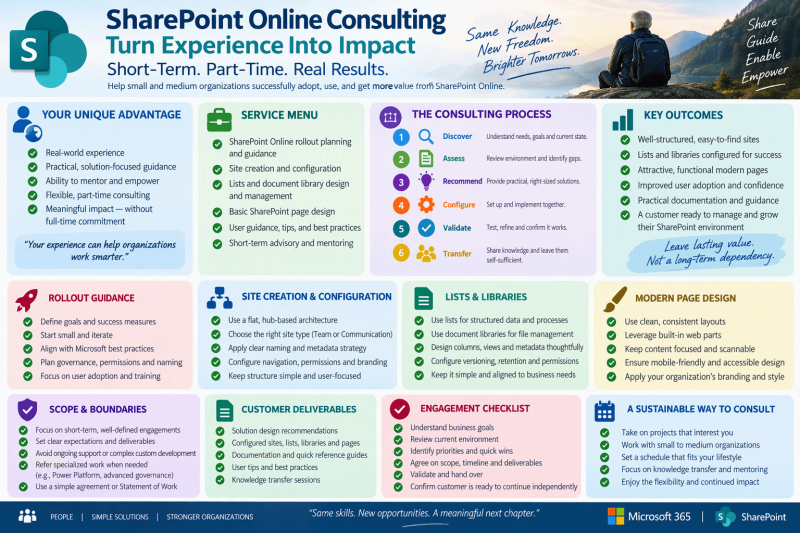
SharePoint Online Short-Term Consulting Guide
Best practices and practical guidance for a recently retired SharePoint Support Professional
Purpose Build a low-risk, part-time consulting practice focused on practical Microsoft 365 and SharePoint Online help for small and medium-sized organizations, while keeping engagements clear, bounded, useful, and easy to hand off.
Focus areas: Rollout guidance • Site creation & configuration • Lists & libraries • Basic page design • Coaching & handoff
1. Position the Practice Around Experience, Simplicity, and Transfer of Knowledge
A retired support professional can be especially valuable to smaller customers that need experienced, calm, hands-on guidance but do not need a large implementation team. The strongest positioning is not “I will redesign everything.” It is “I will help you make sound SharePoint decisions, configure the essentials correctly, teach your people, document what we changed, and leave you able to operate it.”
- Lead with advisory and enablement work: assessment, configuration guidance, troubleshooting, coaching, and practical documentation.
- Favor short engagements with a defined outcome, owner, schedule, and handoff point.
- Keep solutions supportable by the customer after you leave. Prefer standard Microsoft 365 capabilities unless a documented requirement justifies more complexity.
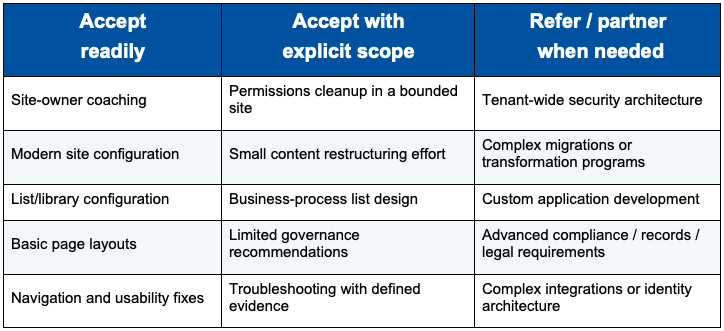
- Be explicit about what you do not cover, such as custom development, complex migrations, advanced compliance architecture, or tenant-wide security engineering unless you are qualified and contracted for that work.
- Protect the flexibility of retirement: define weekly availability, response expectations, travel limits, and maximum engagement length before accepting work.
Consulting principle: Your value is judgment and clarity. Solve the customer’s immediate SharePoint problem without creating a new long-term dependency on you.
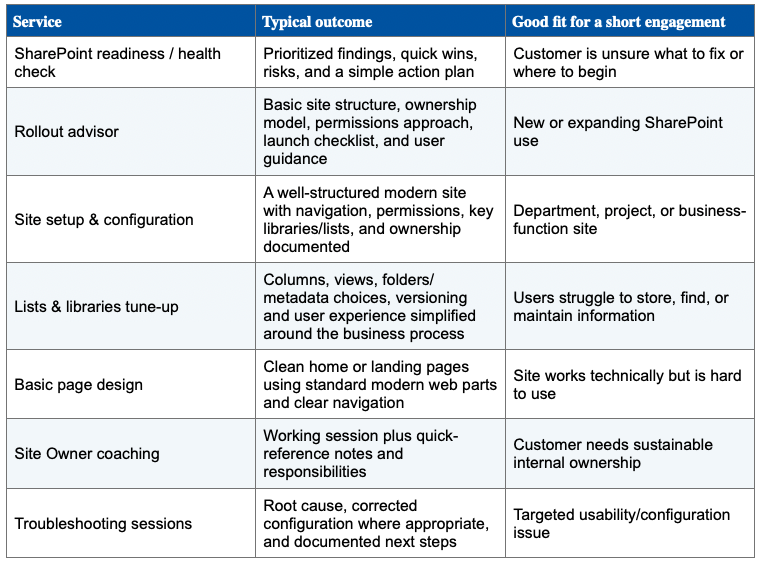
Define a Clear Service Menu
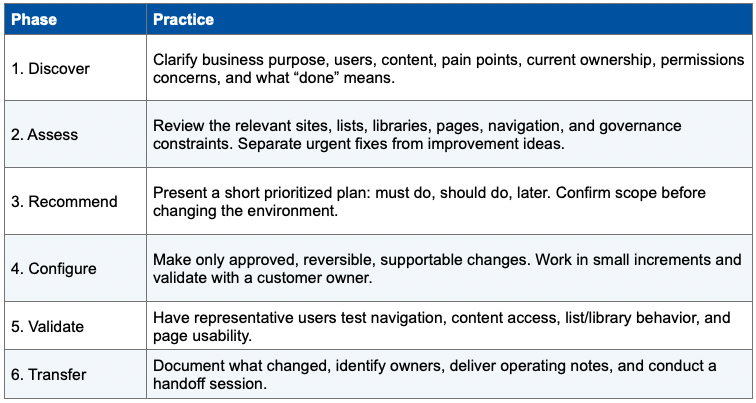
2. Use a Small, Repeatable Engagement Model
3. SharePoint Online Rollout Guidance
Start with users, business tasks, content, and ownership before choosing structure. Microsoft’s current guidance emphasizes planning information architecture around what users need to find and do; modern SharePoint also favors a flatter collection of sites that can be associated with hubs rather than deeply nested site hierarchies.
- Define a small number of business scenarios first: collaboration, departmental information, project work, reference content, or internal communications.
- Identify a business owner and at least one capable Site Owner for each site. Document who approves access and who maintains content.
- Create a simple naming and provisioning convention so new sites are recognizable and consistently owned.
- Plan navigation from the user’s perspective. Use clear labels based on tasks, services, audiences, or familiar business language.
- Pilot with a representative group before broad rollout. Capture friction points, update guidance, then expand.
- Provide basic end-user and Site Owner training at launch, including where content belongs, how sharing works, and who to contact for help.
4. Site Creation and Configuration
- Confirm whether the site is primarily for collaboration or communication before selecting the site experience and layout.
- Keep the initial site lean. Add lists, libraries, pages, and navigation only when they serve a clear business need.
- Use understandable site names, descriptions, navigation labels, and ownership information.
- Avoid unnecessary hierarchy. Microsoft describes modern SharePoint as a flatter architecture and notes that hubs can connect related sites through shared navigation and other elements.
- Review access deliberately: understand who should read, contribute, manage, or own the site. Avoid ad hoc permission exceptions when a simpler group-based model will meet the requirement.
- Before handoff, validate the site as a normal user, not only as an owner or administrator.
Scope guardrail If the engagement encounters advanced identity, retention, records management, sensitivity labeling, eDiscovery, custom SPFx development, or complex tenant architecture, document the issue and recommend the customer involve the appropriate Microsoft 365 specialist.
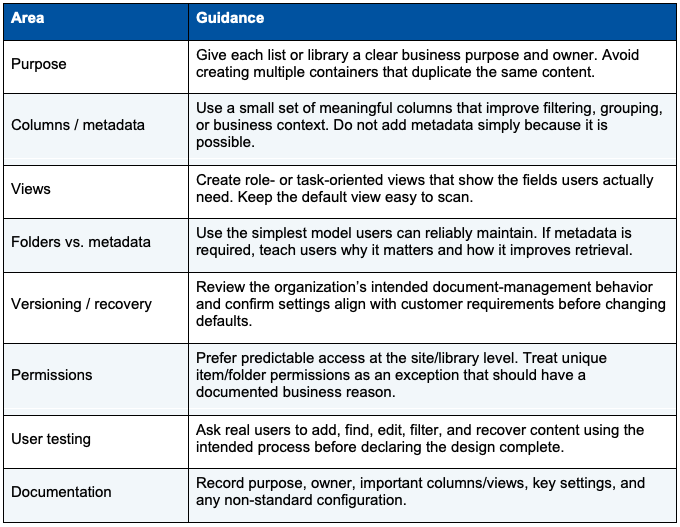
5. Lists and Libraries: Practical Best Practices
6. Basic SharePoint Page Design
Modern SharePoint is designed for responsive sites and pages. Microsoft’s design guidance also emphasizes accessibility and usability. citeturn1search2turn1search5
- Design the page around the top few tasks visitors need to complete, not around everything the site contains.
- Put high-value links, news, documents, or actions near the top. Use headings and sections so the page can be scanned quickly.
- Use standard modern web parts consistently. Avoid excessive decoration, duplicated links, and pages that become long catalogs of content.
- Use plain-language headings and navigation. Label links by destination or action rather than vague phrases.
- Check the experience at different window sizes and consider accessibility when choosing images, headings, link text, and content structure.
- Keep page ownership clear. Outdated pages quickly reduce confidence in the whole site.
7. Protect the Customer and Yourself
- Use a written statement of work for every engagement, even a small one. Define objectives, deliverables, assumptions, exclusions, access required, schedule, fees, expenses, and customer responsibilities.
- Agree on a single customer sponsor who can approve scope and decisions.
- Use the customer’s accounts and approved access methods. Request only the access needed for the agreed work, and have it removed when the engagement ends.
- Do not keep copies of customer data, exports, credentials, screenshots, or configuration information beyond what the agreement requires.
- Keep a simple decision and change log for configuration work. Note the reason, date, affected area, approver, and rollback consideration.
- Use a change-control rule: if a request changes the objective, risk, or estimated effort, pause and agree on the change before proceeding.
- Consider appropriate business structure, insurance, tax, contracting, and confidentiality needs with qualified legal/accounting professionals. This guide is operational guidance, not legal or tax advice.
8. Recommended Engagement Boundaries
9. Deliverables That Make Short Engagements Valuable
- One-page assessment summary with priorities and risks.
- Site configuration record: owners, access model, navigation, lists/libraries, key pages, and notable settings.
- Before/after change log for significant configuration work.
- Site Owner quick-reference guide tailored to what was implemented.
- Open-items list that clearly separates completed work from future recommendations.
- 30- to 60-minute handoff/coaching session with the customer’s designated owner.
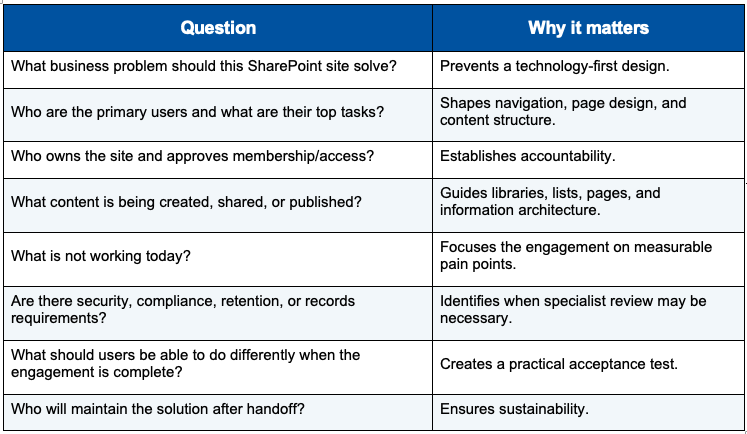
10. Sample Discovery Checklist
11. A Sustainable Part-Time Consulting Rhythm
- Prefer one or two active customers at a time rather than overlapping commitments that recreate a full-time support queue.
- Sell defined blocks of advisory/configuration time or milestone-based mini-engagements rather than undefined “on call” availability.
- Reserve a portion of each engagement for documentation and knowledge transfer. Do not make handoff an unpaid afterthought.
- Build reusable templates for discovery, site review, decision logs, quick-reference guides, and closeout summaries.
- Keep current through official Microsoft documentation and a small lab/demo tenant where appropriate, especially because Microsoft 365 features and interfaces change over time.
12. Closeout Checklist
- Customer confirms agreed deliverables are complete
- Site owners and business owners are identified
- Access and permissions have been reviewed with the customer
- Key configurations and decisions are documented
- Open risks and future recommendations are clearly separated
- Customer has received coaching / handoff
- Consultant access is removed or scheduled for removal
- Customer knows where to obtain ongoing Microsoft 365 support