

SharePoint Mentor Curated Articles
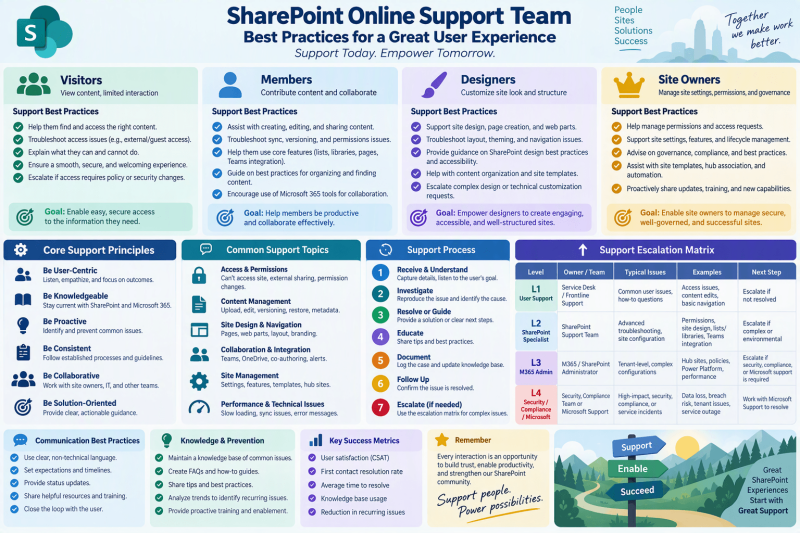
An operating guide for supporting Visitors, Members, Designers, and Site Owners
Purpose: Help support teams resolve issues consistently, protect access and content, reduce repeat incidents, and coach users according to the responsibilities of their role.
- VISITORS - Find, read, navigate
- MEMBERS - Collaborate, create, edit
- DESIGNERS - Build pages and experiences
- SITE OWNERS - Govern access and site health
Core principle: diagnose first, make the smallest safe change, validate as the affected user, document the outcome, and teach the user how to avoid recurrence.
1. Support Operating Model
A strong support practice treats each request as both a technical incident and an adoption opportunity. The objective is not merely to close a ticket, but to restore the user’s ability to work while preserving governance and minimizing unnecessary changes.
- Capture the business outcome before troubleshooting: what was the user trying to read, edit, publish, share, locate, or manage?
- Record the affected site, page, list/library, item or file, user role, error message, browser/device context, and whether the problem affects one user or many.
- Reproduce with the least-privileged appropriate account or through evidence from the affected user. Avoid testing only with administrator access.
- Check scope from broad to narrow: service or tenant behavior, site configuration, library/list settings, item-level behavior, user permissions, then client/browser factors.
- Prefer reversible, least-impact remediation. Avoid broad permission grants, unnecessary inheritance breaks, or structural changes just to make a symptom disappear.
- Validate with the affected role after the change, record what changed, and capture a reusable knowledge article when the issue is likely to recur.
Escalation rule: Escalate when the issue requires tenant-level changes, has broad business impact, involves suspected security or data exposure, cannot be reproduced with available access, or needs a product/service investigation beyond the support team’s authority.
2. Role-Aware Support

3. Troubleshooting Playbook
- Clarify: Restate the expected outcome and exact failure. Identify role, location, scope, urgency, and business impact.
- Classify: Place the issue into access/permissions, content, page/design, list/library, search/navigation, sharing, sync/client, or service/tenant.
- Inspect: Review the site and object settings at the level where the symptom occurs. Compare expected role membership with actual access.
- Isolate: Determine whether the behavior is user-specific, content-specific, site-specific, browser/client-specific, or broader.
- Remediate: Apply the smallest governed change that addresses the root cause. Preserve inheritance and group-based access when practical.
- Validate: Have the affected user or an equivalent role repeat the original task. Confirm both success and that no unintended access was introduced.
- Document: Record cause, fix, validation, owner, and follow-up. Link to a knowledge article or create one when appropriate.
4. Permissions and Access Best Practices
Permissions deserve special care because a quick fix can unintentionally broaden access or create long-term administrative complexity.
- Use the built-in SharePoint groups for communication sites, and for Microsoft 365 group-connected team sites manage Owners and Members through the associated Microsoft 365 group when that matches the site’s design.
- Assign access through groups rather than repeatedly granting individuals direct permissions.
- Keep inheritance intact whenever possible and assign permissions at the highest appropriate level. Use unique permissions only for a clear, documented business requirement.
- When diagnosing an access problem, determine how access was granted, including group membership, direct sharing, or a unique permission scope, before adding new permissions.
- Distinguish “cannot access” from “cannot perform an action.” A user may have site access but lack the permission level or configuration required for a specific operation.
- Review external or guest-sharing issues against organizational sharing policy rather than bypassing controls locally.
Microsoft guidance Microsoft recommends built-in groups for communication sites and the associated Microsoft 365 group for group-connected team sites. Microsoft also recommends minimizing broken inheritance and assigning permissions at the highest appropriate level. See the Sources section.
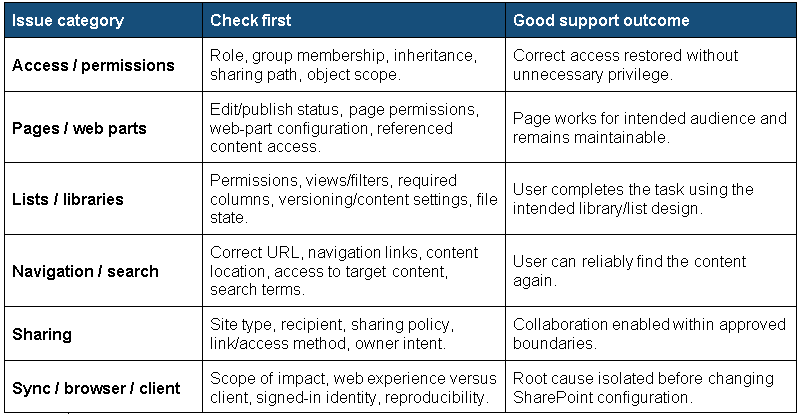
5. Support by Issue Category
6. Communication Practices That Improve Support
- Use role-appropriate language. Tell a Visitor what they can do next; tell a Site Owner what setting or governance choice is involved.
- Explain the cause in plain language before describing the fix. Users learn faster when they understand why the behavior occurred.
- When declining a risky request, provide a supported alternative that still meets the business need.
- For permission changes, state who will gain access, to what scope, and at what level before the change is implemented.
- Close with a short “what changed / what you should do now / what to do if it happens again” summary.
7. Knowledge Management and Prevention
- Maintain short knowledge articles for repeat issues, organized by user role and task rather than by internal technical terminology.
- Capture screenshots only where they add diagnostic or learning value; keep articles focused on decision points, symptoms, and validated resolution paths.
- Review recurring tickets for patterns that indicate training gaps, unclear navigation, poor information architecture, excessive unique permissions, or inconsistent site-owner practices.
- Create quick-reference guidance for Site Owners covering membership, sharing, inheritance, page publishing, lifecycle responsibilities, and escalation paths.
- Feed common support lessons into user training, site-owner onboarding, governance standards, and design templates.
8. Support Team Quality Checklist
Completion criterion
- Business outcome understood
- Affected role confirmed
- Site/content scope recorded
- Impact and urgency assessed
- Permission path checked before access changes
- Root cause isolated
- Smallest safe remediation applied
- Affected role validated the result
- No unintended access introduced
- Resolution documented
- Knowledge article linked/created if repeatable
- Escalation used when authority or evidence was insufficient
9. Recommended Team Metrics
Use metrics to improve the support system, not simply to reward speed. A balanced review can include:
- Repeat-incident rate by issue category.
- First-contact resolution where meaningful.
- Escalations caused by missing access, documentation, or ownership.
- Permission-related incidents and recurring access patterns.
- Knowledge article usage and gaps.
- User validation and reopened-ticket trends.
Success looks like: Users receive the access and capability appropriate to their role, support changes are explainable and governed, recurring issues decrease, and Site Owners become more self-sufficient without bypassing established controls.
10. Support Escalation Matrix
Use the matrix as an operating template and tailor ownership, response targets, and escalation contacts to your organization. Severity should reflect business impact, number of affected users, security or compliance risk, and whether a viable workaround exists.
