

SharePoint Mentor Curated Articles
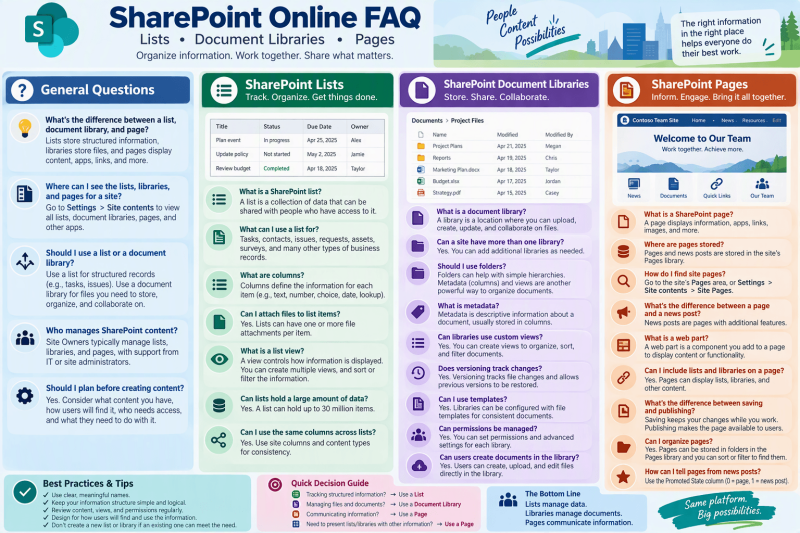
SharePoint Online Frequently Asked Questions
Below is a practical FAQ designed for SharePoint end users, Site Owners, and support documentation. It covers the three core content areas: Lists, Document Libraries, and Modern Pages, with emphasis on everyday creation, use, organization, and management.
Lists, Document Libraries, and Pages
General Questions
1. What is the difference between a SharePoint list, document library, and page?
A list stores structured information such as tasks, contacts, issues, requests, or project records. A document library stores and manages files such as Word documents, Excel workbooks, PDFs, and PowerPoint presentations. A page presents information to users through text, images, links, web parts, lists, libraries, and other content. Microsoft specifically describes libraries as being for documents and other files, lists as useful for tracking information such as tasks or issues, and pages as places to display content, apps, links, and more. [support.mi...rosoft.com]
2. Where can I see the lists, libraries, and pages associated with a SharePoint site?
Site Owners can use Settings > Site contents to view the site's lists, document libraries, pages, and other applications. Site Contents also provides an entry point for creating new lists and libraries. [support.mi...rosoft.com]
3. Should I use a list or a document library?
Use a list when the primary information consists of structured records, such as issues, contacts, requests, assets, or tasks. Use a document library when the primary information consists of files that users need to store, organize, share, update, and collaborate on. [support.mi...rosoft.com], [support.mi...rosoft.com]
SharePoint Lists
4. What is a SharePoint list?
A SharePoint list is a collection of data that can be shared with other people who have access to it. Lists support columns, views, metadata, attachments, and other features for organizing and managing structured information. [support.mi...rosoft.com]
5. What kinds of information can I manage with a list?
Lists are suitable for information such as tasks, contacts, announcements, issues, surveys, and many other types of business records. [support.mi...rosoft.com]
6. What are columns in a SharePoint list?
Columns define the information associated with each list item. SharePoint supports column types including Text, Number, Choice, Currency, Date and Time, Lookup, Yes/No, and Calculated columns. [support.mi...rosoft.com]
7. What is a list item?
A list item is an individual record in a list. For example, in an Issue Tracker, each issue would normally be represented by its own list item.
8. Can I attach a file to a list item?
Yes. SharePoint lists can support one or more file attachments on an item, such as a supporting spreadsheet or background document. [support.mi...rosoft.com]
9. What is a SharePoint list view?
A view controls how information in a list is presented. Views can organize, sort, and filter information so that users can focus on the records relevant to them. [support.mi...rosoft.com]
10. Can I create multiple views of the same list?
Yes. Different views can present the same underlying information in different ways. This eliminates the need to create separate lists just because different audiences need to see the information differently. SharePoint supports creating, changing, and deleting list and library views. [support.mi...rosoft.com], [support.mi...rosoft.com]
11. Can SharePoint lists contain a large amount of information?
Yes. Microsoft states that a SharePoint list or library can hold up to 30 million items. Designing appropriate views, filters, and information structures remains important when working with large collections. [support.mi...rosoft.com]
12. Can I use the same columns and structures consistently across multiple lists?
SharePoint supports features such as content types, site columns, and templates to help organizations use information structures consistently across sites and lists.
SharePoint Document Libraries
13. What is a SharePoint document library?
A document library is a location within a SharePoint site where authorized users can upload, create, update, organize, and collaborate on files. [support.mi...rosoft.com]
14. Can a SharePoint site have more than one document library?
Yes. Sites commonly include a Documents library, and additional libraries can be added when business or information-management requirements call for them. [support.mi...rosoft.com]
15. Should I create folders inside a document library?
Folders are supported and can be useful when users naturally navigate content by a simple hierarchy. However, metadata and views are another powerful way of organizing documents. The appropriate approach depends on how users need to find and manage the information.
16. What is metadata in a document library?
Metadata is descriptive information associated with a document, usually represented through library columns. It can be used to categorize and organize documents and provide additional information about them.
17. Can document libraries use custom views?
Yes. Libraries can be customized with views controlling how documents and information associated with them are displayed. [support.mi...rosoft.com]
18. Does SharePoint support document version history?
Yes. Document libraries support versioning, which can track versions of files and provide a history of how files have changed. [support.mi...rosoft.com]
19. Can a previous version of a document be restored?
Versioning can provide a history of how a file evolves and allow a previous version to be restored when necessary. [support.mi...rosoft.com]
20. Can document libraries use templates?
Yes. SharePoint libraries can be configured with file templates, helping users create consistent documents. [support.mi...rosoft.com]
21. Can users create new documents directly within a library?
Yes. Libraries provide a location where authorized users can create as well as upload and update files. [support.mi...rosoft.com]
22. Are document libraries only for Office documents?
No. Microsoft describes libraries generally as locations for storing documents and other files. [support.mi...rosoft.com]
23. Can permissions be managed for a document library?
Yes. SharePoint includes permissions and advanced settings for libraries. Permission design should generally be planned carefully so that users have appropriate access to the site's content. [support.mi...rosoft.com]
SharePoint Pages
24. What is a SharePoint page?
A SharePoint page is an individual piece of site content that can display information, applications, links, and other content. [support.mi...rosoft.com]
25. Where are SharePoint pages stored?
Pages and news posts that users create, save, or publish are stored in the site's Pages library. [support.mi...rosoft.com]
26. How do I find the pages belonging to a SharePoint site?
Navigate to the site's Pages area. If Pages does not appear in the navigation, Microsoft documents the alternative path of Settings > Site Contents > Site Pages. [support.mi...rosoft.com]
27. What is the difference between a SharePoint page and a news post?
News posts are pages with additional features. Because of that relationship, both pages and news posts are stored in the Pages library. [support.mi...rosoft.com]
28. What is a web part?
A web part is a component placed on a modern SharePoint page to present content or functionality. Web parts allow a page creator to assemble different types of information into a useful page experience.
29. Can lists and libraries be presented on SharePoint pages?
Yes. Pages are designed to display content and apps, making them useful as user-facing destinations that bring important site information together. [support.mi...rosoft.com]
30. What is the difference between saving and publishing a page?
Saving allows a page author to retain page changes while working on the page. Publishing makes the completed page available according to the site's publishing and access configuration.
31. Can I organize pages?
SharePoint pages are stored in the Pages library, and Microsoft notes that the library may contain folders. The Pages library can also be sorted and filtered to help locate pages. [support.mi...rosoft.com]
32. How can I distinguish regular pages from news posts in the Pages library?
Microsoft documents the use of the Promoted State column for distinguishing pages from news posts within the Site Pages library. [support.mi...rosoft.com]
Management and Best Practices
33. Who should manage SharePoint lists, libraries, and pages?
Organizations commonly give designated Site Owners responsibility for configuring and maintaining site content. Microsoft specifically identifies Site Owners and Site Collection Administrators as important participants in planning site content. [support.mi...rosoft.com]
34. Should I plan my information structure before creating lists and libraries?
Yes. Microsoft recommends considering the types of content users will have, how they will find and access that content, and what they need to do with it. Planning helps determine what lists, libraries, pages, and other components should be created. [support.mi...rosoft.com]
35. Should everything be placed in one document library?
Not necessarily. SharePoint allows additional libraries to be created as requirements evolve. The structure should reflect how users need to organize, find, secure, and work with information. [support.mi...rosoft.com]
36. Should I create a separate list for every requirement?
Not automatically. Because a single list can have multiple columns and views, first determine whether an existing list can represent the information appropriately before creating another one. [support.mi...rosoft.com]
37. Why are meaningful names for lists, libraries, columns, and pages important?
Clear naming makes the site easier for users to understand, navigate, search, and maintain. It also reduces ambiguity as the site grows.
38. What should a Site Owner periodically review?
A practical governance review should look at whether lists, libraries, pages, views, metadata, navigation, and permissions still support current business requirements. Microsoft emphasizes logical organization and findability as important elements in making SharePoint content easier to maintain and use productively. [support.mi...rosoft.com]
39. What is a good rule of thumb when deciding what SharePoint component to use?
- Tracking structured information? → Use a List
- Managing files and documents? → Use a Document Library
- Communicating or presenting information? → Use a Page
- Need to present list/library information along with other information? → Use a Page as the presentation layer
This aligns with Microsoft's distinction between libraries for files, lists for tracking structured information, and pages for displaying content, apps, links, and related information. [support.mi...rosoft.com]
SharePoint Mentor takeaway
A simple principle for training users is: Lists manage data, Libraries manage documents, and Pages communicate information. Once users understand those three roles, it becomes much easier to decide where SharePoint content belongs and how it should be managed.