

SharePoint Mentor Curated Articles

In the AI era, SharePoint roles need to move beyond traditional site administration.
The new priority is ensuring that SharePoint content is secure, correctly permissioned, current, well-structured, searchable, and trustworthy enough for Copilot and SharePoint agents to use. Copilot and agents retrieve SharePoint information through Microsoft Graph while respecting existing permissions, sharing settings, and governance policies.
Role-based AI learning roadmap
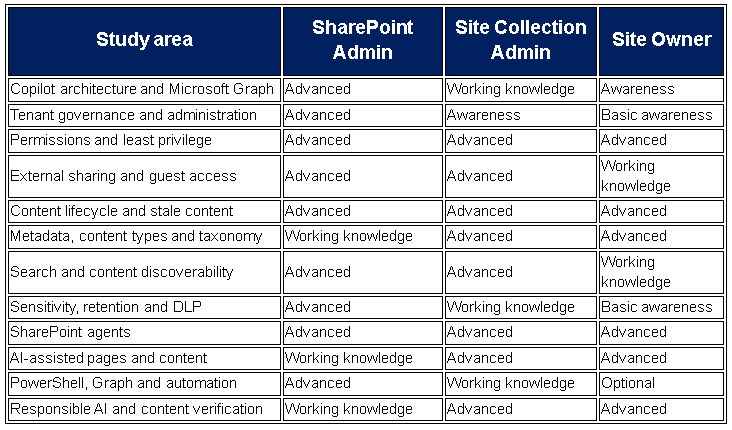
SharePoint Administrator, SP ADMIN
The SharePoint Admin should concentrate on the tenant-wide security, governance, architecture, and operational controls that determine what AI can discover and use.
Highest-priority subjects
1. How Copilot retrieves SharePoint content
Study:
- Microsoft Graph and Microsoft Search
- Semantic indexing and content discovery
- How Copilot inherits the requesting user’s access
- The difference between access, searchability and AI discoverability
- How deleted, stale, duplicated or poorly classified information affects answers
The key concept is that AI does not repair weak permissions. It can make permitted information easier and faster for an authorized user to discover.
2. SharePoint Advanced Management
Become highly proficient with:
- Content Management Assessment
- Data access governance reports
- Site ownership policies
- Inactive-site policies
- Site attestations
- Site access reviews
- Change-history reports
- Catalog management
- Microsoft 365 Archive
- Restricted Access Control
- Restricted Content Discovery
SharePoint Advanced Management is designed to help administrators manage content sprawl, content lifecycles, oversharing, governance risk and audit readiness.
3. Oversharing detection and remediation
Learn to identify:
- “Everyone except external users” exposure
- Organization-wide sharing links
- Anonymous links
- Excessive direct permissions
- High-volume sharing activity
- Sites with no active owner
- Sensitive sites with broad membership
- Files shared outside their intended sites
- Broken inheritance at scale
This is one of the most important AI-readiness responsibilities because Copilot can rapidly surface information that a user technically has permission to access but may not have known existed.
4. AI discovery controls
Study the differences among:
- Restricted Content Discovery
- Restricted Access Control
- Sensitivity labels
- Information barriers
- Conditional Access
- Data loss prevention
- Tenant and site external-sharing controls
Restricted Content Discovery limits content from selected sites in organization-wide search and Copilot responses while permissions are being reviewed, but it does not change the underlying permissions.
Legacy Restricted SharePoint Search should not be treated as the future-state solution. Microsoft states that it is retiring, with new enablement blocked beginning July 31, 2026, and recommends controls such as Restricted Content Discovery, SharePoint Advanced Management and Microsoft Purview.
5. Microsoft Purview
Develop working knowledge of:
- Sensitivity labels
- Retention labels and retention policies
- Data loss prevention
- Records management
- Audit
- eDiscovery
- Insider risk concepts
- AI interaction and activity auditing
The SharePoint Admin may not own every Purview configuration, but must understand how those controls affect SharePoint, Copilot and agents.
6. SharePoint agents
Study:
- How agents ground responses in SharePoint content
- Who can create and use agents
- Agent sharing and access
- Approved source selection
- Billing and licensing models
- Agent lifecycle and ownership
- Testing answers against source content
- Preventing agents from being shared more broadly than intended
SharePoint agents respond using information the requesting user is permitted to access. Administration can control who uses agents, what information is available through them, and where agents are available.
7. Administration automation
Build skills in:
- SharePoint Online Management Shell
- PnP PowerShell
- Microsoft Graph PowerShell
- Microsoft Graph API
- Site inventory reporting
- Permission and sharing-link reporting
- Ownerless-site detection
- Scheduled governance reviews
- Repeatable remediation scripts
8. SharePoint Admin Agent and AI insights
Learn how to use emerging administrative AI capabilities to investigate tenant-level governance conditions through natural-language requests. The SharePoint Admin Agent focuses on content sprawl, content lifecycle, permissions, oversharing, access reviews and Copilot readiness.
SP Admin target outcome
The SP Admin should be able to answer: “Which SharePoint sites and content present the greatest risk or lowest trustworthiness for Copilot, and what tenant-level control should we use to correct that?”
Site Collection Administrator, SC ADMIN
The Site Collection Admin should concentrate on site-level security, information architecture, lifecycle enforcement and AI readiness across the entire site collection.
Highest-priority subjects
1. Permission architecture
Master:
- Site Collection Administrator versus Full Control
- Microsoft 365 group ownership and membership
- SharePoint Owners, Members and Visitors
- Entra security groups
- Direct permissions
- Sharing links
- Permission inheritance
- Unique permissions
- Access requests
- Limited Access
- Guest access
- Periodic access reviews
A Site Collection Administrator has broad administrative access across the site collection, whereas Full Control may apply only to the object where it was granted and may not overcome unique permissions elsewhere.
2. AI-focused permission reviews
Learn to conduct recurring reviews that ask:
- Who can access the site?
- Who can access restricted libraries?
- Are former team members still included?
- Are guests still required?
- Are sensitive files directly shared?
- Are organization-wide links still active?
- Are nested groups hiding excessive access?
- Do business owners understand who can see the content?
The Site Collection Admin should review permissions from an AI discoverability perspective, not only whether users can manually browse into a library.
3. Information architecture for AI
Become proficient in:
- Content types
- Site columns
- Managed metadata
- Consistent document titles
- Business-friendly terminology
- Library architecture
- Document templates
- Versioning
- Required metadata
- Search schema basics
- Pages, lists and document relationships
AI performs better when content has clear context, ownership, descriptive titles and consistent structure.
4. Content lifecycle management
Study how to establish:
- Content owners
- Review dates
- Expiration dates
- Archival rules
- Records requirements
- Authoritative-source indicators
- Draft-versus-published distinctions
- Duplicate-content remediation
- Obsolete-content removal
- Site closure and handoff procedures
The objective is to prevent Copilot from grounding answers in outdated, conflicting or unofficial material.
5. Search and discoverability
Learn:
- Crawled and managed properties
- Search schema concepts
- Search verticals
- Result sources
- Search visibility
- Hub associations
- Navigation versus search
- Restricted Content Discovery
- How metadata improves findability
6. SharePoint agents
Develop practical skills in:
- Selecting approved agent sources
- Scoping agents to specific libraries, folders or sites
- Reviewing agent instructions
- Testing common business questions
- Verifying citations and source quality
- Documenting agent ownership
- Controlling agent sharing
- Retiring agents that are no longer needed
7. Site-level compliance
Understand how to work with organizational specialists on:
- Site sensitivity labels
- Default library sensitivity labels
- Retention policies
- Records declarations
- DLP notifications
- Legal holds
- Information barriers
- External-sharing restrictions
8. AI-assisted site maintenance
Study AI capabilities that can help:
- Identify outdated pages
- Detect broken links
- Find content gaps
- Suggest page improvements
- Organize libraries
- Generate metadata
- Build FAQs
- Improve site structure
Copilot in SharePoint is being positioned for site managers, content managers, creators and consumers, with capabilities for files, libraries, pages and site improvement
SC Admin target outcome
The SC Admin should be able to answer: “Is this entire site collection appropriately secured, organized, maintained and reliable enough to be used as an authoritative AI knowledge source?”
Site Owner, Full Control
The Site Owner should concentrate on business ownership of access, content quality, usability and responsible everyday AI use.
Highest-priority subjects
1. Permissions and sharing
Every Site Owner should know how to:
- Maintain Owners, Members and Visitors
- Prefer managed groups over direct permissions
- Review membership regularly
- Remove users who no longer need access
- Manage guest access
- understand sharing-link types
- Avoid unnecessary organization-wide sharing
- Recognize broken permission inheritance
- Escalate complex permission problems
Granting Full Control should be treated carefully. Site Owners should not create additional Full Control users unless those people genuinely need to administer the site.
2. Content quality for Copilot
Site Owners should learn to recognize:
- Outdated policies
- Conflicting procedures
- Duplicate documents
- Drafts stored with final content
- Poorly named files
- Missing owners
- Missing review dates
- Scanned or inaccessible documents
- Pages containing broken links
- Content copied from another authoritative location
In an AI-enabled site, weak content quality becomes an operational risk because AI may present obsolete material clearly and confidently.
3. Content organization
Develop skills in:
- Libraries versus folders
- Useful metadata
- Content types
- Views
- Filters
- Version history
- Page publishing
- Document approval
- Consistent naming
- Clear navigation
- Accessible content
Microsoft recommends planning what lists, libraries, pages and content types a site requires so information is logically organized and easier to find and maintain.
4. AI-assisted page and content creation
Learn how to use Copilot responsibly for:
- Drafting and rewriting page text
- Creating page sections
- Developing FAQs
- Summarizing documents
- Comparing files
- Suggesting library columns
- Building views
- Improving page design
- Identifying outdated pages and broken links
Human review remains essential. AI-generated material should be checked for accuracy, relevance, confidentiality, tone and accessibility before publication.
5. Prompting skills
Site Owners should learn to write prompts that specify:
- Purpose
- Intended audience
- Approved source
- Desired format
- Required level of detail
- Date or review-period boundaries
- Confidentiality expectations
- Need for citations
- Items the AI should not assume
6. SharePoint agent ownership
Study how to:
- Define a useful business purpose
- Select only trusted sources
- Write clear agent instructions
- Test expected and unexpected questions
- Verify answers against citations
- Assign an accountable owner
- Collect user feedback
- Review sources when business processes change
- Retire obsolete agents
7. Responsible AI
Every Site Owner should understand:
- AI answers can be inaccurate
- A polished answer is not necessarily a correct answer
- Source citations must be checked
- Confidential information should not be placed into prompts without organizational approval
- AI output should not automatically become official policy
- High-impact content requires human approval
- Permissions remain the foundation of content protection
Microsoft’s SharePoint AI guidance emphasizes data privacy, sensitive-information handling, human review of generated content, and validation of AI suggestions before publication.
8. Adoption and education
Site Owners should also be prepared to:
- Explain approved AI uses
- Teach users how to validate answers
- Publish authoritative guidance
- Provide a visible site contact
- Gather feedback
- Report questionable AI results
- Promote approved agents rather than unmanaged alternatives
Microsoft recommends visible site ownership, user feedback, content cleanup and a consistent user experience as part of effective site ownership.
Site Owner target outcome
The Site Owner should be able to answer: “Can employees and AI systems trust the content on my site, and are only the right people able to discover and use it?”
Recommended learning sequence
Phase 1: Foundation for all roles
- Microsoft Graph, Microsoft Search and Copilot grounding
- SharePoint permissions and least privilege
- External sharing and guest access
- Responsible AI and human verification
- Metadata, search and information architecture
Phase 2: Role specialization
- SP Admin: Advanced Management, Purview, tenant controls, reporting and automation.
- SC Admin: Permission reviews, content lifecycle, search schema and agent governance.
- Site Owner: Content quality, membership management, page authoring and source verification.
Phase 3: Practical exercises
Each person should be able to perform an AI-readiness review of a real site:
- Inventory owners, members, visitors and guests.
- Identify broad links and direct sharing.
- Locate stale, duplicate and ownerless content.
- Classify authoritative versus non-authoritative sources.
- Review metadata, page quality and searchability.
- Test representative Copilot or agent questions.
- Validate responses and citations.
- Document remediation actions and accountable owners.
Bottom line
- SP ADMIN: Govern the tenant and control systemic AI risk.
- SC ADMIN: Make each site collection secure, structured and AI-ready.
- SITE OWNER: Keep local permissions appropriate and content accurate, current and trustworthy.
The most important shift is this: SharePoint administration is no longer only about whether someone can open a document. It is also about whether that document should be discoverable, trusted and reused by AI.