

SharePoint Mentor Curated Articles
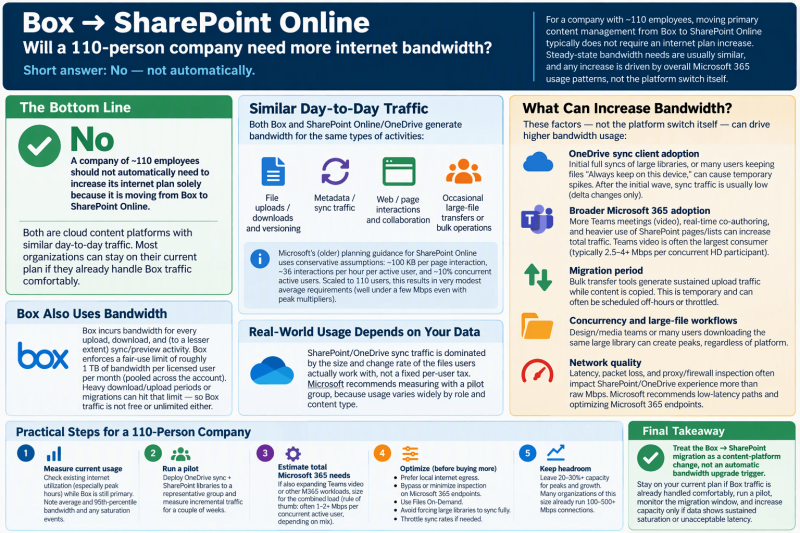
When changing from Box to SharePoint Online should you consider increasing your internet plan?
No, a company should not automatically need to increase its internet plan solely because it is moving primary content management from Box to SharePoint Online. Steady-state bandwidth needs are typically similar, and any increase is driven far more by overall Microsoft 365 usage patterns, OneDrive sync behavior, and concurrent activity than by the platform switch itself.
Why bandwidth needs are usually comparable
Both Box and SharePoint Online/OneDrive are cloud content platforms. Day-to-day traffic consists mainly of:
- File uploads/downloads and versioning
- Metadata/sync traffic
- Web/page interactions and collaboration
- Occasional large-file transfers or bulk operations
- Microsoft’s older planning guidance for SharePoint Online (still commonly referenced) uses conservative assumptions: ~100 KB per page interaction, ~36 interactions per hour per active user, and ~10% concurrent active users. Scaled to 110 users this produces very modest average requirements (well under a few Mbps even with peak multipliers).
- Real-world SharePoint/OneDrive sync traffic is dominated by the size and change rate of the files users actually work with, not a fixed per-user tax. Microsoft recommends measuring with a pilot group rather than relying only on formulas, because usage varies widely by role and content type.
- Box also incurs bandwidth for every upload, download, and (to a lesser extent) sync/preview activity. Box enforces a fair-use limit of roughly 1 TB of bandwidth *per licensed user per month* (pooled across the account). Heavy download/upload periods or migrations can hit that limit, showing that Box traffic is not free or unlimited either.
- In practice, organizations already using Box as their primary content platform already have internet capacity sized for cloud file activity. Replacing that traffic with equivalent SharePoint/OneDrive traffic rarely creates a step-change increase.
Factors that *can* increase bandwidth
- OneDrive sync client adoption and Files On-Demand settings. Initial full syncs of large libraries, or many users keeping large folders “Always keep on this device,” can generate temporary spikes. After the initial wave, delta sync traffic is usually low.
- Broader Microsoft 365 adoption. If the move also accelerates Teams meetings/video, real-time co-authoring in Office apps, or heavier use of SharePoint pages/lists, total Microsoft 365 traffic rises. Teams video is typically the largest consumer (often 2.5–4+ Mbps per concurrent HD participant).
- Migration period itself. Bulk transfer tools generate sustained upload traffic while content is copied. This is temporary and can often be scheduled off-hours or throttled.
- Concurrency and large-file workflows. Design/media teams moving big files, or many people downloading the same large library at once, can create peaks regardless of platform.
- Network quality matters as much as raw speed. Latency, packet loss, and proxy/firewall inspection often hurt SharePoint/OneDrive experience more than absolute Mbps. Microsoft recommends low-latency paths and optimizing the “Optimize” category endpoints (including SharePoint/OneDrive).
Practical recommendation for a 110-person company
- Measure current usage first. Look at existing internet utilization (especially peak hours) while Box is still the primary platform. Note average and 95th-percentile bandwidth, plus any saturation events.
- Run a pilot. Deploy OneDrive sync + SharePoint libraries to a representative group (different roles, mix of light/heavy file users). Measure the incremental traffic for a couple of weeks. Microsoft’s network utilization planning guidance for the OneDrive sync app is designed exactly for this.
- Estimate total Microsoft 365 needs holistically. If the organization is also expanding Teams video or other M365 workloads, size for the combined load (rule-of-thumb guidance for mixed M365 use often starts around 1–2+ Mbps per concurrent active user depending on mix of file work vs. meetings, but real measurement is better).
- Optimize rather than just buy more bandwidth.
- Prefer local internet egress (avoid backhauling everything through a central site).
- Bypass or minimize inspection on Microsoft 365 Optimize endpoints.
- Use OneDrive Files On-Demand and avoid forcing large libraries to sync fully to every device.
- Throttle sync upload/download rates if needed during business hours.
- Headroom. Leave 20–30%+ capacity for peaks and growth. Many organizations of this size already run 100–500+ Mbps connections; the SharePoint migration alone is unlikely to push a healthy circuit into saturation.
Bottom line:
Treat the Box → SharePoint Online migration as a content-platform change, not an automatic bandwidth upgrade trigger. Most companies of this size can stay on their current plan if they already handle Box traffic comfortably and do not simultaneously introduce heavy new Teams video or other bandwidth-heavy workloads. Measure with a pilot and monitor the migration window; increase capacity only if data shows sustained saturation or unacceptable latency.