

SharePoint Mentor Curated Articles
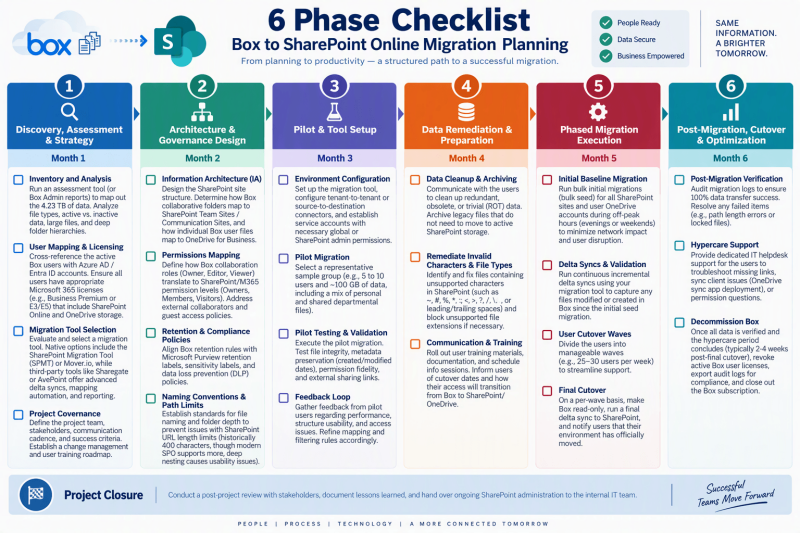
6 Phase Checklist - Box to SharePoint Online Migration Planning
Phase 1: Discovery, Assessment & Strategy (Month 1)
- Inventory and Analysis: Run an assessment tool (or Box Admin reports) to map out the 4.23 TB of data. Analyze file types, active vs. inactive data, large files, and deep folder hierarchies.
- User Mapping & Licensing: Cross-reference the active Box users with Azure AD / Entra ID accounts. Ensure all users have appropriate Microsoft 365 licenses (e.g., Business Premium or E3/E5) that include SharePoint Online and OneDrive storage.
- Migration Tool Selection: Evaluate and select a migration tool. Native options include the SharePoint Migration Tool (SPMT) or Mover.io, while third-party tools like Sharegate or AvePoint offer advanced delta syncs, mapping automation, and reporting.
- Project Governance: Define the project team, stakeholders, communication cadence, and success criteria. Establish a change management and user training roadmap.
Phase 2: Architecture & Governance Design (Month 2)
- Information Architecture (IA): Design the SharePoint site structure. Determine how Box collaborative folders map to SharePoint Team Sites / Communication Sites, and how individual Box user files map to OneDrive for Business.
- Permissions Mapping: Define how Box collaboration roles (Owner, Editor, Viewer) translate to SharePoint/M365 permission levels (Owners, Members, Visitors). Address external collaborators and guest access policies.
- Retention & Compliance Policies: Align Box retention rules with Microsoft Purview retention labels, sensitivity labels, and data loss prevention (DLP) policies.
- Naming Conventions & Path Limits: Establish standards for file naming and folder depth to prevent issues with SharePoint URL length limits (historically 400 characters, though modern SPO supports more, deep nesting causes usability issues).
Phase 3: Pilot & Tool Setup (Month 3)
- Environment Configuration: Set up the migration tool, configure tenant-to-tenant or source-to-destination connectors, and establish service accounts with necessary global or SharePoint admin permissions.
- Pilot Migration: Select a representative sample group (e.g., 5 to 10 users and ~100 GB of data, including a mix of personal and shared departmental files).
- Pilot Testing & Validation: Execute the pilot migration. Test file integrity, metadata preservation (created/modified dates), permission fidelity, and external sharing links.
- Feedback Loop: Gather feedback from pilot users regarding performance, structure usability, and access issues. Refine mapping and filtering rules accordingly.
Phase 4: Data Remediation & Preparation (Month 4)
- Data Cleanup & Archiving: Communicate with the users to clean up redundant, obsolete, or trivial (ROT) data. Archive legacy files that do not need to move to active SharePoint storage.
- Remediate Invalid Characters & File Types: Identify and fix files containing unsupported characters in SharePoint (such as ~, #, %, *, :, <, >, ?, /, \, or leading/trailing spaces) and block unsupported file extensions if necessary.
- Communication & Training: Roll out user training materials, documentation, and schedule info sessions. Inform users of cutover dates and how their access will transition from Box to SharePoint/OneDrive.
Phase 5: Phased Migration Execution (Month 5)
- Initial Baseline Migration: Run bulk initial migrations (bulk seed) for all SharePoint sites and user OneDrive accounts during off-peak hours (evenings or weekends) to minimize network impact and user disruption.
- Delta Syncs & Validation: Run continuous incremental delta syncs using your migration tool to capture any files modified or created in Box since the initial seed migration.
- User Cutover Waves: Divide the users into manageable waves (e.g., 25–30 users per week) to streamline support.
- Final Cutover: On a per-wave basis, make Box read-only, run a final delta sync to SharePoint, and notify users that their environment has officially moved.
Phase 6: Post-Migration, Cutover & Optimization (Month 6)
- Post-Migration Verification: Audit migration logs to ensure 100% data transfer success. Resolve any failed items (e.g., path length errors or locked files).
- Hypercare Support: Provide dedicated IT helpdesk support for the users to troubleshoot missing links, sync client issues (OneDrive sync app deployment), or permission questions.
- Decommission Box: Once all data is verified and the hypercare period concludes (typically 2-4 weeks post-final cutover), revoke active Box user licenses, export audit logs for compliance, and close out the Box subscription.