

SharePoint Mentor Curated Articles
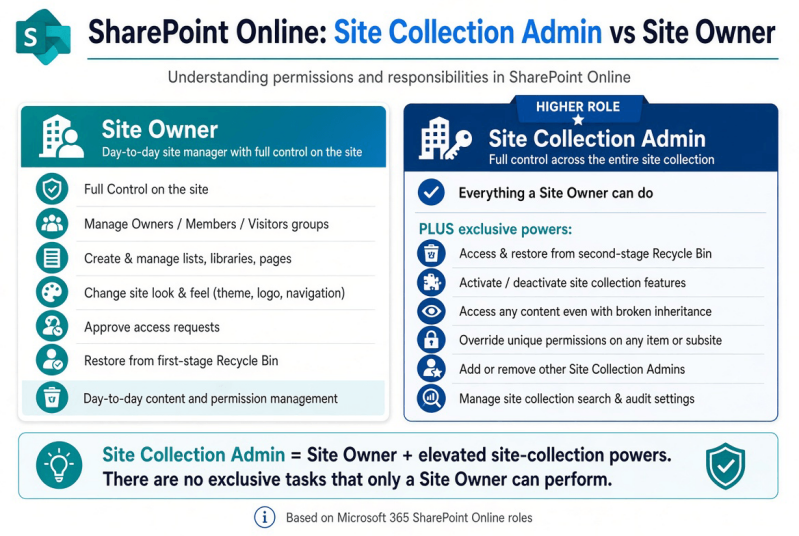
Site Collection Administrators have the same Full Control permissions as Site Owners on a site, plus elevated rights that apply across the entire site collection.
These extra capabilities cannot be granted through the normal Owners group or Full Control permission level alone. Here is a clear list of tasks and support work that a SharePoint Online Site Collection Admin can perform, but a Site Owner cannot.
Recycle Bin & Content Recovery
- Access and manage the **second-stage Recycle Bin** (Site Collection Recycle Bin).
- Restore items that have been deleted from the first-stage Recycle Bin.
- Empty the second stage Recycle Bin.
Site Collection Features & Administration
- Activate or deactivate **site collection features** (Site Settings → Site Collection Administration → Site collection features).
- Examples include Document ID Service, SharePoint Server Publishing Infrastructure, Enterprise features, etc.
- Manage other items that appear only under the **Site Collection Administration** section of Site Settings.
Permissions & Access Override
- Access **any** content, list, library, folder, or item in the site collection — including content in subsites or with unique permissions — even when inheritance is broken.
- Override broken permission inheritance on any subsite or object within the collection.
- Add or remove other Site Collection Administrators.
- A Site Owner cannot remove a Site Collection Admin.
Search & Audit
- Manage certain **search** settings at the site collection level.
- Configure **audit log** settings for the site collection (where available/enabled).
Storage, Metrics & Other Administrative Support
- View and manage site collection storage metrics and related administrative reports that are restricted to Site Collection Admins.
- Perform higher-level support and troubleshooting tasks that require unrestricted access across the entire collection (e.g., recovering content after permission breaks, enabling features needed for specific functionality, or full administrative recovery scenarios).
Key Context
- Both roles have **Full Control**, but the Site Collection Admin role is an **elevated privilege** that sits above the standard permission levels. It is not subject to the normal permission inheritance rules in the same way.
- In modern Microsoft 365 Group-connected team sites, Group Owners are typically mapped as Site Owners (and often as Site Admins as well, depending on how the site was created), but explicitly adding someone only to the Owners group does **not** automatically grant true Site Collection Admin rights.
- Site Collection Admins still do **not** have access to the SharePoint admin center or tenant-wide settings — those require the SharePoint Administrator or Global Administrator roles.
Site admins “have the same Full Control permissions of a site owner, plus they can do more things, such as managing search; the recycle bin; and site collection features. They also have access to any items in the site, including in subsites, even if permissions inheritance has been broken.”
This distinction is important for governance, support escalation, and recovery scenarios.
NOTES:
There are no SharePoint site tasks that only a Site Owner can perform. A Site Collection Admin (Site Admin) has a superset of permissions. They can do everything a Site Owner can do (Full Control on the site), plus additional elevated capabilities.
What Site Owners typically handle (day-to-day)
These are the common tasks associated with the Site Owner role, but a Site Collection Admin can also perform all of them:
- Add/remove people from the Owners, Members, and Visitors groups
- Manage site permissions and sharing settings
- Create, edit, and delete lists, libraries, pages, and content
- Change the site’s look and feel (theme, logo, navigation)
- Approve access requests
- Restore items from the first-stage Recycle Bin
- Create and manage subsites (if allowed by tenant settings)
- Configure site-level features, regional settings, and alerts
The only meaningful practical difference
On Microsoft 365 Group-connected team sites:
- Site Owners who are also Group Owners can manage the Microsoft 365 Group itself (membership, privacy settings, classification) and the associated Teams team.
- A person added only as an additional Site Admin (without being made a Group Owner) does not automatically get those Group/Teams management rights.