

SharePoint Mentor Curated Articles
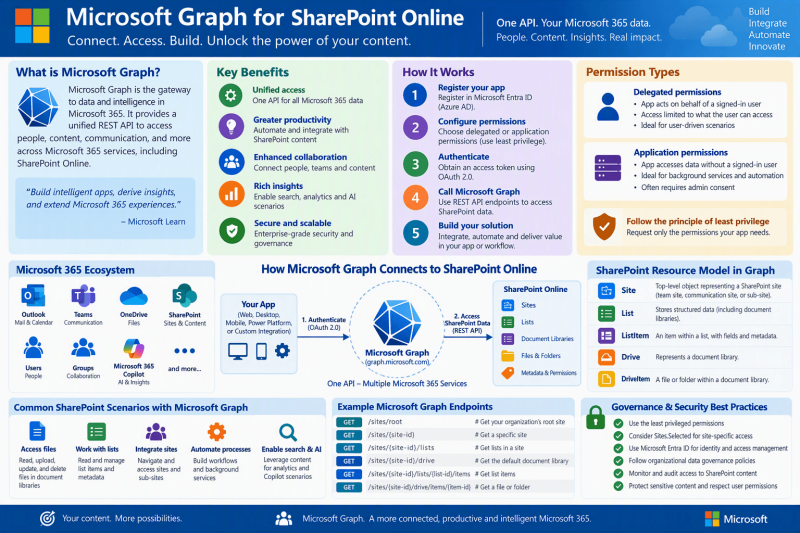
Microsoft Graph is the gateway to data and intelligence in Microsoft 365. For SharePoint Online, it provides a consistent REST API for working with sites, lists, list items, document libraries, files, and selected administrative settings.
The real advantage is not bypassing SharePoint security but integrating with SharePoint through a modern Microsoft 365 API while applying explicit authentication, authorization, and least-privilege permissions.
1. What Microsoft Graph Is
- Microsoft Graph is a RESTful web API and unified programmability model for accessing Microsoft cloud resources. Microsoft describes it as the gateway to data and intelligence in Microsoft 365. Applications authenticate through the Microsoft identity platform, obtain an access token, and then call Microsoft Graph endpoints.
- For SharePoint Online, Graph exposes resources that map to the way SharePoint stores and organizes information: sites, lists, list items, document libraries, files and folders and certain tenant-level SharePoint settings.
Key idea - Think of Microsoft Graph as a controlled API layer into Microsoft 365 services. It does not replace SharePoint permissions. Access depends on the permissions granted to the application and, for delegated access, the permissions of the signed-in user.
2. Why Microsoft Graph Matters for SharePoint Online
- One API model across Microsoft 365: solutions that already use Graph for other services can also integrate SharePoint content through the same Graph endpoint family.
- Direct access to SharePoint content structures: sites, lists, list items, document libraries, files, folders, and metadata are represented as Graph resources.
- Support for read and write scenarios: Microsoft documents read/write support for lists, listItems, and driveItems, while site resources themselves have read-only support for site creation scenarios through this API surface.
- Better control of application access: delegated, application, and Selected permission patterns make it possible to design access around the actual business need rather than automatically granting broad tenant-wide access.
- Natural fit with SharePoint Framework: SPFx solutions can call Microsoft Graph and request the Graph permissions they require.
3. Core Benefits

4. How Microsoft Graph Access Works
- Register or use an application identity in Microsoft Entra ID when building a custom application or automation.
- Choose the access model: delegated access when a signed-in user is acting, or application access when software operates with its own identity and no signed-in user.
- Request only the Microsoft Graph permissions required by the scenario. Some permissions require administrator consent.
- Acquire an OAuth access token for Microsoft Graph.
- Call a Graph endpoint using an HTTP method such as GET, POST, PATCH, or DELETE as supported by that resource.
- Process the response, including paging through @odata.nextLink when a result set is paged.
Governance rule - Use the least privileged permission that supports the requirement. Broad permissions such as tenant-wide read or write should not be the default when a narrower delegated or Selected permission can meet the need.
5. SharePoint Online Resource Model
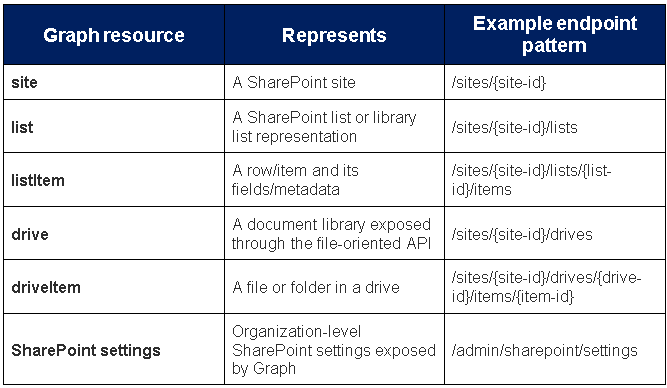
6. Practical SharePoint Online Uses
6.1 Inventory and discovery
- Use Graph to identify a known site, enumerate its lists or document libraries, and inspect the content structures your solution is authorized to access. When working with large responses, design for paging and retrieve only required properties.
6.2 Document libraries and files
- SharePoint document libraries can be treated as drives. This makes Graph useful for file-oriented scenarios such as listing library contents, navigating folders, retrieving file metadata, and reading or writing driveItems when the selected endpoint and granted permissions allow it.
6.3 Lists and business data
- Lists can store structured business data. Through Graph, applications can work with lists, list items, and item fields. This is useful for integrations, line-of-business applications, dashboards, and automated processes that need structured SharePoint data.
6.4 SharePoint Framework solutions
- A SharePoint Framework web part can call Microsoft Graph. The solution declares the Microsoft Graph permissions it needs and those requests are reviewed and approved through the Microsoft 365/SharePoint administration process described by Microsoft for SPFx solutions.
7. Access and Permission Models
Delegated permissions
- The application calls Microsoft Graph on behalf of a signed-in user. The effective access is constrained by both the Graph permissions granted to the app and the user’s own permissions. This model is appropriate when a person is actively using the solution to work with resources they are permitted to access.
Application permissions
- The application calls Graph with its own identity, without a signed-in user. This model is commonly relevant to unattended services and automation. Because application access can be powerful, permission scope should be deliberately minimized.
Selected permissions for SharePoint and OneDrive
Microsoft Graph supports Selected scopes that can restrict access to explicitly assigned resources. Microsoft documents Sites.Selected for site-collection-level application access, plus newer SelectedOperations.Selected scopes for lists, list items, files, and folders. Consent to a Selected scope alone does not automatically grant access to the target resource; the resource assignment must also be made.
- Selected: target a specific site collection.
- SelectedOperations.Selected: target a specific list.
- SelectedOperations.Selected: target one or more list items, including supported file/folder scenarios.
- SelectedOperations.Selected: target one or more files or library folders.
Important distinction
Graph controls what the application is authorized to call. SharePoint continues to enforce its content and permission model. In delegated scenarios, Graph does not elevate a user above the SharePoint access that user already has.
8. A Responsible Implementation Pattern
- Start with the business use case and identify exactly which SharePoint sites, libraries, lists, files, and operations are required.
- Choose delegated access for interactive user actions, or application access for unattended processing when appropriate.
- Select the least privileged Microsoft Graph permissions. Evaluate Selected scopes when the application should be restricted to specific SharePoint resources.
- Prototype calls in a controlled development tenant or tool such as Graph Explorer where appropriate, then move the tested request pattern into the application.
- Use v1.0 endpoints for production functionality when the required API is available there. Treat beta APIs as changeable and evaluate them carefully before relying on them.
- Implement operational controls such as secure credential handling, error handling, paging, logging, retry behavior, and lifecycle review of app permissions.
- Periodically review whether permissions are still required and remove access that is no longer necessary.
9. Example Request Patterns
The following patterns illustrate how SharePoint resources are addressed. Replace placeholders with identifiers from your tenant and use only permissions appropriate for the operation.
Get a specific site
- GET https://graph.microsoft.com/v1.0/sites/{site-id}
List document libraries
- GET https://graph.microsoft.com/v1.0/sites/{site-id}/drives
List SharePoint lists
- GET https://graph.microsoft.com/v1.0/sites/{site-id}/lists
List items in a list
- GET https://graph.microsoft.com/v1.0/sites/{site-id}/lists/{list-id}/items?expand=fields
Address a group team site
- GET https://graph.microsoft.com/v1.0/groups/{group-id}/sites/root
10. Governance and Security Recommendations
- Document every application that can access SharePoint through Microsoft Graph, including owner, purpose, permissions, authentication method, and approved resources.
- Prefer the smallest workable scope. Do not request write access when read access is sufficient.
- For unattended applications, assess whether a Selected permission can replace an organization-wide SharePoint permission.
- Separate development/test identities and permissions from production identities and permissions.
- Treat application credentials and certificates as privileged secrets and manage them through an approved secure process.
- Review application access when the business owner, solution purpose, or SharePoint information architecture changes.
11. Microsoft Graph, SharePoint Search, and Copilot: A Clarification
- Microsoft Graph is an API surface through which authorized applications can access supported Microsoft 365 resources, including SharePoint content. It should not be described as a separate permissions bypass or as a replacement for SharePoint security. When designing any AI, search, integration, or automation scenario, the key architectural question is which service is retrieving the content and under which identity and permissions. Graph-based solutions must still be designed around authentication, authorization, and least privilege.
12. Summary
- Microsoft Graph gives developers and solution owners a modern, consistent way to integrate with SharePoint Online and the broader Microsoft 365 ecosystem. For SharePoint specifically, its value is strongest when working with sites, lists, list items, document libraries, files, folders, and controlled application access. The safest implementation pattern is straightforward: understand the use case, choose the correct identity model, request the least privilege required, scope access wherever possible, and continuously govern the application just as carefully as the SharePoint content it can reach.
13. References
- Microsoft Graph documentation: https://learn.microsoft.com/graph/
- Use the Microsoft Graph API: https://learn.microsoft.com/graph/use-the-api
- SharePoint sites and content API overview: https://learn.microsoft.com/graph/sharepoint-concept-overview
- Working with SharePoint sites in Microsoft Graph: https://learn.microsoft.com/graph/api/resources/sharepoint?view=graph-rest-1.0
- Overview of Microsoft Graph permissions: https://learn.microsoft.com/graph/permissions-overview
- Overview of Selected Permissions in OneDrive and SharePoint: https://learn.microsoft.com/graph/permissions-selected-overview
- Use Microsoft Graph in a SharePoint Framework solution: https://learn.microsoft.com/sharepoint/dev/spfx/web-parts/get-started/using-microsoft-graph-apis