

SharePoint Mentor Curated Articles
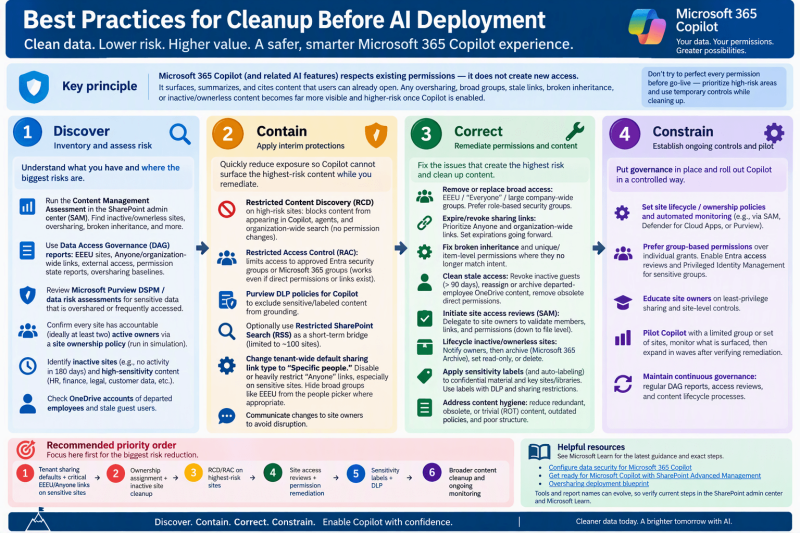
BEST PRACTICES FOR CLEANUP BEFORE AI DEPLOYMENT
Key principle: Microsoft 365 Copilot (and related AI features) respects existing permissions—it does not create new access. It surfaces, summarizes, and cites content that users can already open. Any oversharing, broad groups, stale links, broken inheritance, or inactive/ownerless content becomes far more visible and higher-risk once Copilot is enabled.
The most effective approach follows Microsoft’s recommended sequence (supported by SharePoint Advanced Management / SAM, which is included with Copilot licenses, plus Purview tools): discover → contain (interim protections) → correct (remediate) → constrain (ongoing governance). Do not try to perfect every permission before go-live; prioritize high-risk areas and use temporary controls while cleaning up.
1. Inventory and assess risk (discover)
- Run the Content Management Assessment in the SharePoint admin center (SAM). It surfaces inactive/ownerless sites, oversharing, broken inheritance, and other readiness signals in one place.
- Use Data Access Governance (DAG) reports: sites with “Everyone except external users” (EEEU), Anyone/organization-wide sharing links, external/guest access, permission state reports, and oversharing baselines.
- Review Microsoft Purview Data Security Posture Management (DSPM) / data risk assessments for sensitive data that is overshared or frequently accessed.
- Confirm every site has accountable (preferably at least two) active owners via a site ownership policy (run in simulation first).
- Identify inactive sites (e.g., no activity in 180 days) and high-sensitivity content (HR, finance, legal, customer data, regulated material).
- Check OneDrive accounts of departed employees and stale guest users.
2. Contain high-risk exposure immediately
Apply temporary protections so Copilot cannot surface the worst content while you remediate:
- Restricted Content Discovery (RCD) on high-risk sites: blocks content from appearing in Copilot, agents, and organization-wide search without changing underlying permissions.
- Restricted Access Control (RAC): limits access to approved Microsoft Entra security groups or Microsoft 365 groups (works even if direct permissions or links exist).
- Purview DLP policies for Copilot to exclude sensitive/labeled content from grounding.
- Optionally use Restricted SharePoint Search (RSS) as a short-term bridge (limited to ~100 sites).
- Change tenant-wide default sharing link type to “Specific people” (existing broad links remain until cleaned). Disable or heavily restrict “Anyone” links, especially on sensitive sites. Hide broad groups like EEEU from the people picker where appropriate.
Communicate changes to site owners to avoid disruption.
3. Remediate permissions and content (correct)
Focus on highest-blast-radius items first (sensitive + broadly shared sites):
- Remove or replace broad access: EEEU / “Everyone” / large company-wide groups on sensitive sites, libraries, folders, or files. Prefer role-based security groups.
- Expire/revoke sharing links: Prioritize Anyone and organization-wide links using sharing activity reports. Set expirations going forward.
- Fix broken inheritance and unique/item-level permissions where they no longer match intent.
- Clean stale access: Revoke inactive guests (e.g., >90 days), reassign or archive departed-employee OneDrive content, remove obsolete direct permissions.
- Initiate site access reviews (SAM): Delegate to site owners so they validate members, links, and permissions (down to file level).
- Lifecycle inactive/ownerless sites: Notify owners, then archive (Microsoft 365 Archive), set read-only, or delete. This reduces noise for Copilot and storage costs.
- Apply sensitivity labels (and auto-labeling where possible) to confidential material and key sites/libraries. Use labels with DLP and sharing restrictions. You do not need to label everything first—start with the highest-value/sensitive content.
- Address content hygiene: reduce redundant, obsolete, or trivial (ROT) content, outdated policies, and poor structure so Copilot answers are more accurate and relevant.
4. Establish ongoing controls and pilot
- Set site lifecycle / ownership policies and automated monitoring (e.g., via SAM, Defender for Cloud Apps, or Purview).
- Prefer group-based permissions over individual grants; enable Entra access reviews and Privileged Identity Management for sensitive groups.
- Educate site owners on least-privilege sharing and site-level controls.
- Pilot Copilot with a limited group or set of sites, monitor what is surfaced, then expand in waves after verifying remediation.
- Maintain continuous governance: regular DAG reports, access reviews, and content lifecycle processes.
Recommended priority order
- Tenant sharing defaults + critical EEEU/Anyone links on sensitive sites.
- Ownership assignment + inactive site cleanup.
- RCD/RAC on highest-risk sites.
- Site access reviews + permission remediation.
- Sensitivity labels + DLP.
- Broader content cleanup and ongoing monitoring.