

SharePoint Mentor Curated Articles
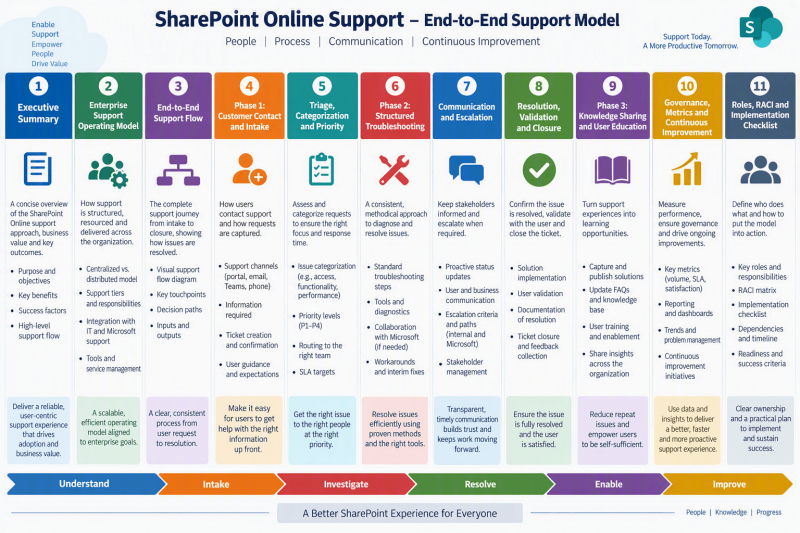
SharePoint Online Support Flow
Purpose - Establish a consistent, user-focused process for receiving, diagnosing, resolving, escalating, documenting, and learning from SharePoint Online support requests.
1. Executive Summary
This enterprise edition expands the three-phase model presented by SharePoint Mentor: Customer Contact, Support Troubleshooting Activities, and Post-Support Knowledge Sharing. It converts that model into an operational playbook with ownership, control points, escalation paths, service measures, and reusable templates.
Business outcomes
- Faster, more consistent intake and prioritization.
- Clear accountability across service desk, platform support, administrators, site owners, security, and Microsoft support.
- Repeatable troubleshooting by issue category.
- Transparent communication throughout the ticket lifecycle.
- Stronger knowledge reuse and fewer recurring incidents.
- Evidence-based service improvement using ticket and trend data.
Core principles

2. Enterprise Support Operating Model
Three-phase lifecycle
- Customer Contact: receive, acknowledge, capture facts, assess impact, create the ticket, assign ownership, and set expectations.
- Support Troubleshooting Activities: assess, reproduce, categorize, diagnose, communicate, remediate, test, and obtain user confirmation.
- Post-Support Knowledge Sharing: record root cause and outcome, update knowledge, share lessons, educate users, and analyze trends.
Support tiers
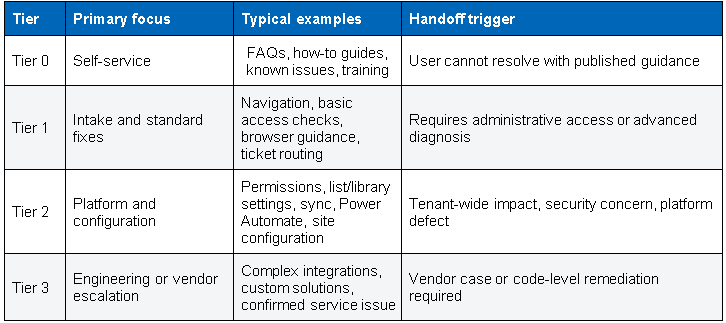
Required control points
- Priority confirmed after initial evidence review.
- Production changes recorded in the ticket.
- Security and compliance concerns routed immediately to the appropriate function.
- Resolution tested and confirmed before closure.
- Reusable knowledge captured when the resolution has future value.
3. End-to-End Support Flow
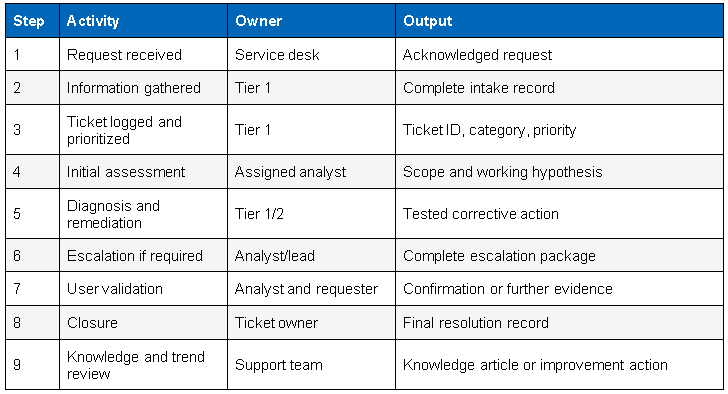
Decision logic
- Is the request a how-to question, service request, incident, security event, or enhancement?
- Is the impact limited to one user, one site, multiple sites, or the tenant?
- Can the issue be reproduced?
- Does the assigned tier have the required permissions and expertise?
- Is there a safe workaround?
- Does the resolution require change approval, vendor support, or user training?
Workflow rule
Do not close a ticket solely because a change was implemented. Confirm that the expected user outcome has been restored or clearly document why validation is pending.
4. Phase 1: Customer Contact and Intake
Intake channels
Requests may arrive by email, phone, a ticketing platform, or Microsoft Teams. The enterprise process should funnel each request into the official system of record so ownership, communications, and service performance can be tracked.
Minimum information set
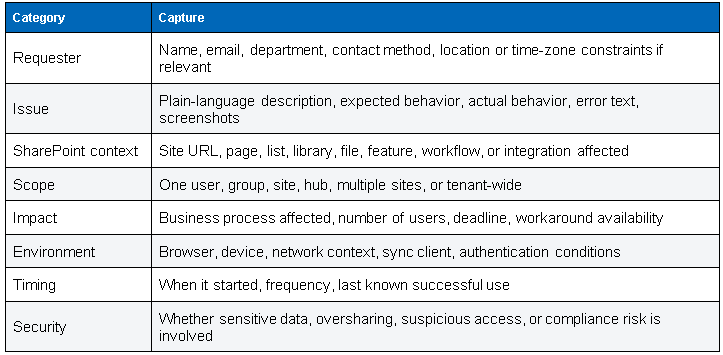
Acknowledgment template
Suggested message
Your request has been logged as [Ticket ID]. We are reviewing the impact and details now. The assigned support owner is [Name/Queue]. We will provide the next update by [Time/Date]. Please reply with any screenshots, exact error text, affected site URL, and steps that reproduce the issue.
5. Triage, Categorization and Priority
Suggested issue categories
- Access and permissions
- Lists, libraries and metadata
- Pages, web parts and navigation
- OneDrive sync and file access
- Power Automate and workflow
- Search and content discovery
- Performance and availability
- Sharing, external access and governance
- Custom solutions and integrations
- User guidance, training and adoption
Enterprise priority matrix
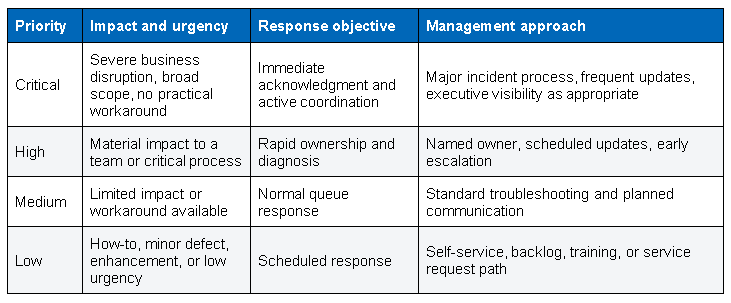
Note: The source workflow provides example targets. Each enterprise should replace examples with approved contractual SLAs and operational-level agreements.
Triage quality checklist
- Priority reflects both impact and urgency.
- Category supports routing and trend analysis.
- Duplicate or related incidents are linked.
- Known issue and knowledge base searches are recorded.
- Sensitive information is handled according to policy.
6. Phase 2: Structured Troubleshooting
Standard diagnostic sequence
- Review ticket evidence and confirm the user outcome that should be restored.
- Reproduce the issue when safe and possible.
- Determine scope by comparing affected and unaffected users, sites, devices, or content.
- Check service health, recent changes, permissions, configuration, dependencies, and known issues.
- Form a working hypothesis and choose the lowest-risk test.
- Apply the correction or workaround under change controls.
- Retest technically and ask the user to validate the business outcome.
- Record findings, actions, evidence, and remaining risk.
Troubleshooting by category
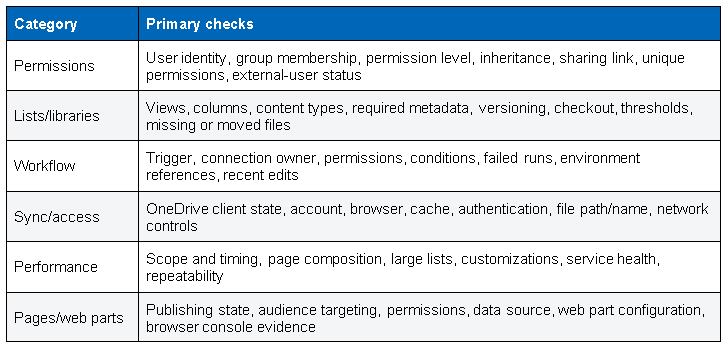
7. Communication and Escalation
Communication cadence
- Confirm ownership and the next update time.
- Explain progress in user language, not diagnostic shorthand.
- Separate confirmed facts from working hypotheses.
- Provide safe, numbered instructions when user action is required.
- State business impact, workaround, risk, and next decision when escalating.
Escalation package
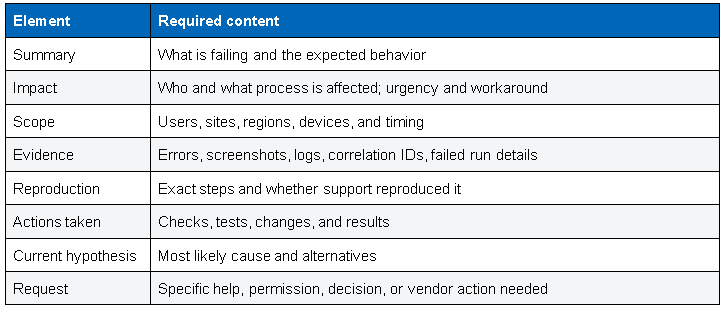
Escalation routes
- SharePoint administrator for advanced configuration or tenant settings.
- Security or compliance team for suspicious access, data exposure, retention, or policy concerns.
- Network or identity teams when authentication, Conditional Access, or connectivity dependencies are implicated.
- Solution owner or developer for custom code and integrations.
- Microsoft Support when evidence indicates a service defect or higher-level platform investigation is required.
8. Resolution, Validation and Closure
Definition of resolved
- The reported behavior is corrected or an approved workaround restores the business process.
- The correction has been tested.
- The requester, affected business owner, or defined monitoring evidence confirms recovery.
- Any residual risk, temporary workaround, follow-up change, or problem record is documented.
- The ticket contains enough information for audit, handoff, and future reuse.
Closure record
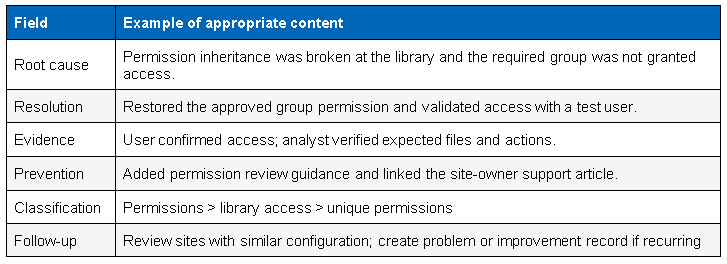
Closure checklist
- User confirmation obtained or validation method documented.
- Temporary access, test artifacts, and elevated permissions removed.
- Final communication sent.
- Related incidents and changes linked.
- Knowledge candidate decision recorded.
9. Phase 3: Knowledge Sharing and User Education
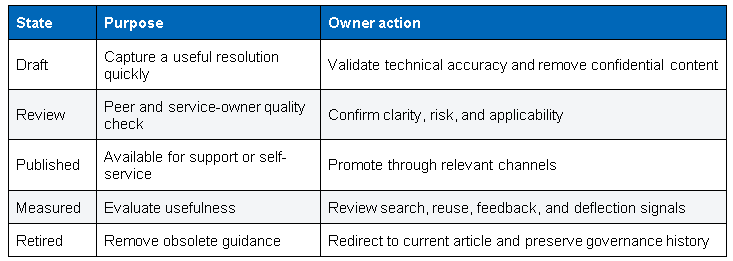
Knowledge article structure
- Title using the language a user or analyst is likely to search.
- Symptoms and business impact.
- Environment and prerequisites.
- Cause, when confirmed.
- Step-by-step resolution or workaround.
- Validation steps and expected result.
- Risks, permissions, rollback, and escalation conditions.
- Keywords, category, owner, review date, and related resources.
Knowledge lifecycle
User education
- Provide a quick guide when the issue arose from a knowledge gap.
- Link to relevant Microsoft learning or internal training.
- Create an FAQ for common issues.
- Use recurring themes to improve site-owner and end-user enablement.
10. Governance, Metrics and Continuous Improvement
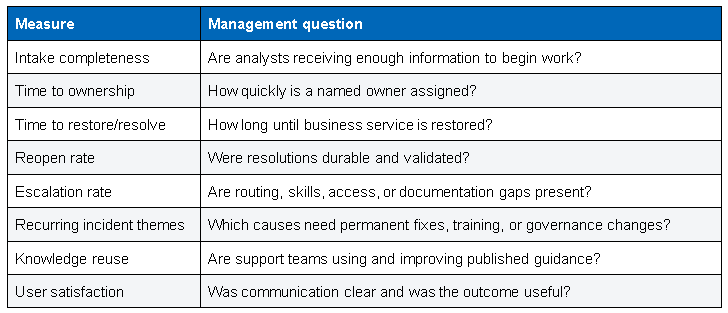
Recommended measures
Monthly service review agenda
- Review service performance and major incidents.
- Analyze top categories, recurring causes, and high-impact sites or processes.
- Review escalations, breached objectives, and aging tickets.
- Approve knowledge, training, automation, and platform improvement actions.
- Assign owners and due dates; track actions to closure.
Continuous improvement rule
Ticket trends should lead to specific actions such as configuration correction, automation, training, knowledge updates, governance changes, or problem management. Reporting alone is not improvement.
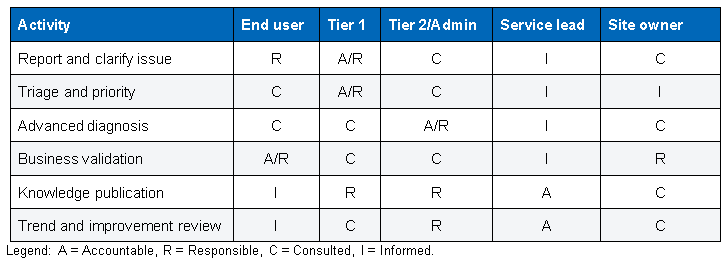
11. Roles, RACI and Implementation Checklist
Implementation checklist
- Approve categories, priorities, and escalation routes.
- Configure required ticket fields and templates.
- Define production change and security handoff rules.
- Publish role descriptions and on-call contacts.
- Create starter knowledge articles for common issues.
- Train analysts on the diagnostic sequence and communication standards.
- Pilot with selected sites, review feedback, and refine.
- Establish monthly service reviews and action tracking.