

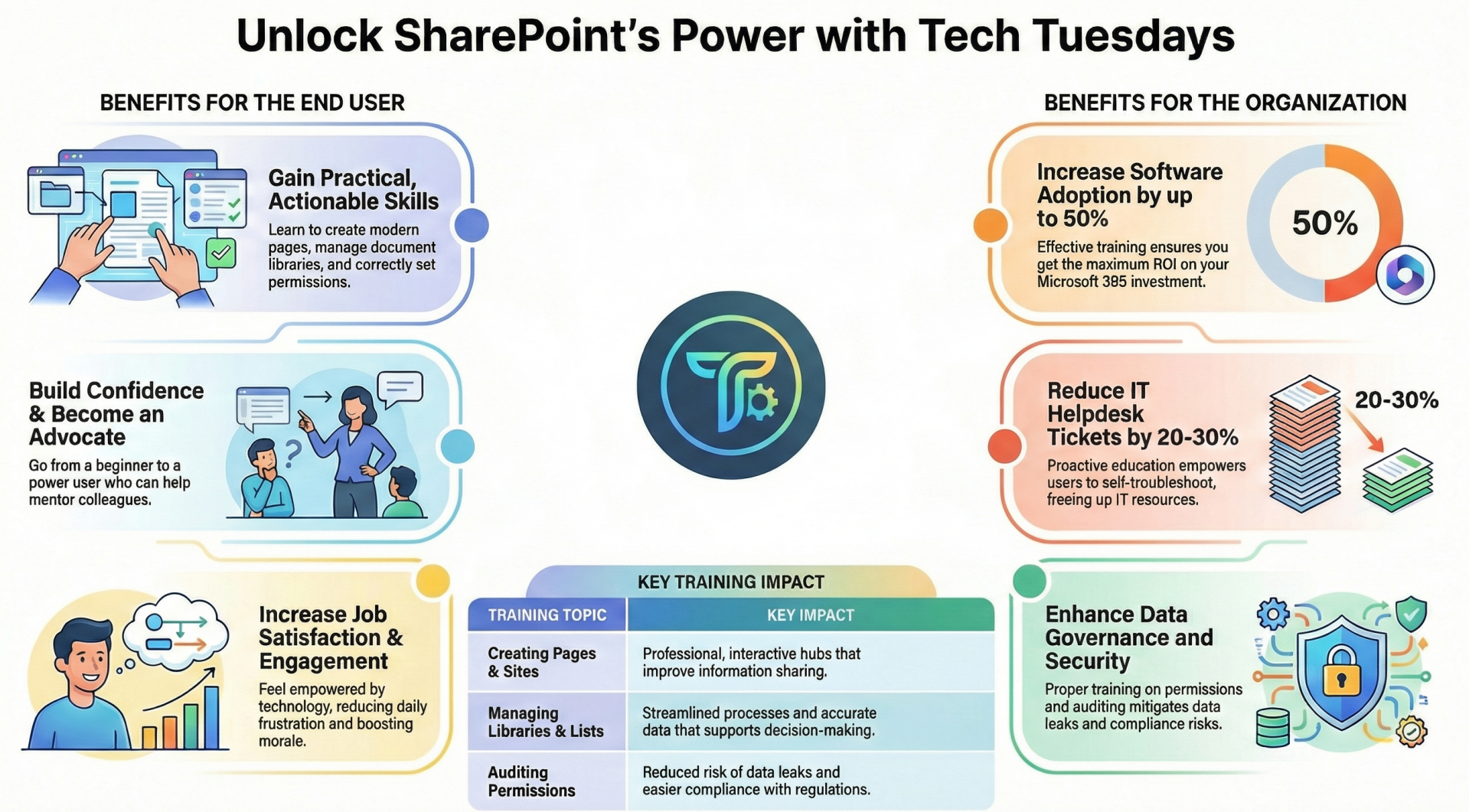
SharePoint Online serves as a cornerstone for collaboration, document management, and information sharing within organizations. Implementing weekly "Tech Tuesday" learning sessions can bridge this gap.
- These learning sessions target key areas such as creating and updating pages, working with libraries and lists, and auditing and managing permissions. By fostering a culture of continuous learning, Tech Tuesday sessions empower end users to leverage SharePoint Online more effectively, ultimately driving better business outcomes.
Introduction to Tech Tuesday Sessions
- Tech Tuesday sessions are designed as bite-sized, interactive learning opportunities tailored for SharePoint Online end users. Each session lasts 30-60 minutes and focuses on practical, actionable topics.
- The format can include live demonstrations, Q&A segments, hands-on exercises, and recorded replays for on-demand access.
- Topics rotate weekly to cover a broad spectrum of SharePoint features, ensuring progressive skill-building without overwhelming participants.
- The core value proposition lies in addressing common pain points: users often struggle with inefficient workflows, permission mishaps, or underused tools, leading to frustration and suboptimal results.
- By scheduling these sessions weekly, organizations create a consistent rhythm of education that reinforces knowledge retention and encourages immediate application. This approach contrasts with traditional one-off training, which can fade quickly without reinforcement.
Benefits to End Users
- End users—ranging from administrative staff to department heads—stand to gain significantly from regular Tech Tuesday sessions. These benefits manifest in personal productivity, skill development, and job satisfaction.
- Sessions on creating and updating pages teach users how to use modern page layouts, web parts and version history for seamless edits. For instance, learning to integrate Microsoft Forms or Power BI embeds can streamline data visualization on pages.
- Training on libraries and lists covers configuration options like metadata columns, views, and workflows. Users learn to set up document libraries with content types for automated categorization or create custom lists for tracking tasks.
- Permission management sessions emphasize auditing tools like the Site Permissions page and activity logs, teaching users to review access rights and avoid over-sharing. By understanding inheritance breaks and group-based permissions, users can prevent unauthorized access, reducing errors that lead to rework.
- These sessions equip users with skills that translate to faster task completion and greater autonomy, leading to a more productive workday.
Skill Development and Confidence Building
- Weekly exposure to SharePoint topics builds cumulative expertise. Beginners start with basics like page creation, while advanced users delve into integrations with Microsoft Teams or Power Automate.
- This scaffolded learning fosters confidence, encouraging users to experiment and innovate rather than avoiding features out of fear.
- Interactive elements, such as polls or breakout rooms, allow users to share experiences, creating a peer-learning environment.
- Over time, participants become internal advocates, mentoring colleagues and reducing dependency on IT support.
Improved Job Satisfaction and Engagement
- Feeling empowered with technology reduces frustration and enhances job fulfillment. Surveys from organizations like Microsoft indicate that employees who receive regular training report higher engagement levels.
- Tech Tuesday sessions signal that the organization values employee growth, boosting morale and retention.
Benefits to the Organization
-
-
- Beyond individual gains, Tech Tuesday sessions deliver substantial organizational value, from operational improvements to risk mitigation.
-
Increased Adoption and ROI on SharePoint Online
- SharePoint Online is a subscription-based service, and low utilization wastes investment. Sessions drive adoption by demystifying features, leading to higher engagement metrics like active sites and document interactions.
- For example, teaching best practices for libraries (e.g., enabling check-in/check-out) ensures consistent data organization, maximizing the platform's collaborative potential.
- Organizations can track ROI through metrics such as reduced support tickets or increased usage of advanced features. A Gartner study highlights that effective training can increase software adoption by up to 50%, directly correlating to better returns on Microsoft 365 investments.
Enhanced Data Governance and Security
- Permissions auditing and management are critical in an era of rising cyber threats. Sessions teach users to use tools like the SharePoint Admin Center for permission reports and sensitivity labels for data classification. Best practices include regular audits to identify orphaned permissions or over-privileged users, preventing data breaches.
- By embedding these habits, organizations reduce compliance risks under regulations like GDPR or HIPAA. Proper library and list configurations, such as enabling Information Rights Management (IRM), add layers of protection, ensuring sensitive documents remain secure.
Streamlined Collaboration and Knowledge Sharing
- Well-trained users create more effective SharePoint sites.
- Page creation sessions cover responsive design and accessibility best practices, making content inclusive and user-friendly.
- Libraries configured with custom views facilitate quick data retrieval, while lists integrated with Microsoft Planner enhance project tracking.
- This leads to better cross-departmental collaboration, as teams share standardized best practices. For instance, a marketing team can use updated pages for campaign hubs, while HR leverages lists for employee onboarding, fostering a unified digital workspace.
Cost Savings and Reduced IT Burden
- Frequent user errors strain IT resources. Tech Tuesday reduces this by proactive education: users learn to self-troubleshoot issues like page publishing errors or list synchronization problems. This decreases helpdesk tickets by 20-30%, per industry benchmarks, allowing IT to focus on strategic initiatives.
- Long-term, organizations save on external consultants or advanced training programs, as internal sessions are cost-effective and scalable.
Detailed Value by Topic Area
- To illustrate, let's break down the value for each key topic.
- Creating and Updating Pages
- Value: Pages are the front door to SharePoint sites. Sessions teach modern vs. classic pages, web part customization, and SEO-friendly titles/descriptions. Best practices include using sections for layout control and analytics for engagement tracking.
- Impact: Users create professional, interactive hubs faster, improving information dissemination and reducing reliance on static documents. This enhances user experience and site navigation, leading to higher intranet adoption.
- Working with and Configuring Libraries and Lists
- Value: Libraries handle documents, while lists manage structured data. Training covers column types (e.g., choice, lookup), validation formulas, and integrations like OneDrive sync. Best practices emphasize versioning, alerts, and metadata for searchability.
- Impact: Efficient configurations prevent data silos and duplication. Users can automate approvals via Power Automate triggers on lists, streamlining processes like expense reporting. This results in accurate, accessible data, supporting better decision-making.
Auditing and Managing Permissions
- Value: Sessions explore permission levels (e.g., Edit vs. Contribute), sharing links with expiration, and audit logs via Microsoft Purview. Best practices include least-privilege principles and regular reviews to revoke access for departed employees.
- Impact: Proactive management mitigates risks like data leaks or insider threats. Organizations achieve compliance more easily, with audit trails providing evidence for regulatory audits. This builds trust in the platform, encouraging wider use.
Implementation Best Practices for Tech Tuesday Sessions - To maximize value, consider these strategies:
- Content Planning: Rotate topics based on user feedback via surveys. Start with fundamentals and progress to advanced scenarios.
- Delivery Format: Use Microsoft Teams for live sessions with screen sharing. Record and store in a dedicated SharePoint library for accessibility.
- Engagement Tactics: Incorporate quizzes, badges, or challenges to gamify learning. Invite guest speakers from IT or power users.
- Measurement: Track attendance, post-session surveys, and usage analytics (e.g., via SharePoint Insights) to refine the program.
- Inclusivity: Offer sessions at varying times for global teams and provide captions/transcripts for accessibility.
Conclusion
- Weekly Tech Tuesday learning sessions represent a strategic investment in human capital and technology utilization.
- By focusing on SharePoint Online's core features—page creation/updating, library/list management, and permission auditing—these sessions deliver tangible value: empowered users, secure data, efficient operations, and maximized ROI.
- In a competitive landscape where digital agility is key, organizations that prioritize such continuous education will thrive. Implementing Tech Tuesday not only addresses immediate skill gaps but cultivates a learning culture that adapts to evolving tools like AI integrations in SharePoint.
- Start small, iterate based on feedback, and watch your organization's collaboration ecosystem flourish.