

SharePoint Mentor Curated Articles
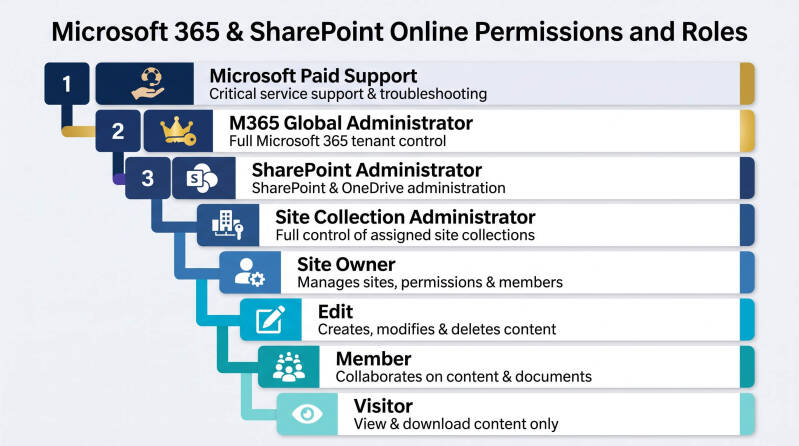
Microsoft 365 & SharePoint Online Permissions Hierarchy
Understanding Administrative Authority and Access Levels from Microsoft Support to Site Visitors
In a Microsoft 365 environment, permissions are layered to provide appropriate levels of administrative control, governance, and content access. The hierarchy begins with Microsoft support personnel who can assist with the service itself and extends down to end users who only consume information. Understanding each role helps organizations maintain security, accountability, and effective governance.
1. Microsoft Paid Support
Service Provider Support Authority
Microsoft Paid Support sits outside your organization but has the highest potential level of access when engaged through authorized support processes.
Although Microsoft support engineers do not maintain permanent access to customer environments, they can receive temporary delegated access to investigate critical issues through Microsoft's support and security processes.
Primary Responsibilities
- Resolve service outages
- Troubleshoot tenant-wide issues
- Investigate SharePoint Online platform problems
- Assist with security and compliance incidents
- Diagnose backend platform issues
- Escalate product defects to engineering teams
What They Can Potentially Do
✅ Access tenant information when properly authorized
✅ Review backend system logs
✅ Assist with platform-level issues
✅ Diagnose service health incidents
✅ Recover from severe platform-related problems
What They Cannot Do
❌ Permanently manage customer environments
❌ Override customer approval processes
❌ Manage day-to-day business operations
❌ Act as business site owners
Typical Usage Scenarios
- Major SharePoint outage
- OneDrive synchronization failures
- Tenant provisioning problems
- Microsoft service incidents
- Data recovery requests
Governance Considerations
Access should be granted only when necessary and monitored through established Microsoft support engagement processes.
2. Microsoft 365 Global Administrator
Complete Tenant Administrative Authority
The Global Administrator role is the highest internal administrative role within a Microsoft 365 tenant.
Global Administrators can manage all Microsoft 365 workloads including:
- SharePoint Online
- Teams
- Exchange Online
- OneDrive
- Microsoft Entra ID
- Intune
- Purview
- Power Platform
Primary Responsibilities
- Tenant administration
- Identity management
- Security administration
- Licensing
- Compliance management
- Administrative role assignments
What They Can Do
✅ Perform any administrative task
✅ Create and remove administrators
✅ Assign licenses
✅ Configure security settings
✅ Manage all Microsoft services
✅ Access SharePoint administration
What They Cannot Do
❌ They are essentially unrestricted within the tenant
Typical Audience
- CIO
- IT Director
- Senior Infrastructure Administrators
- Microsoft 365 Platform Owners
Governance Considerations
Organizations should maintain a minimal number of Global Administrators.
Recommended: 2-4 Global Administrators maximum.
3. SharePoint Administrator (SharePoint Global Admin)
SharePoint Service Administrator
The SharePoint Administrator role oversees the entire SharePoint Online environment without possessing full control over all Microsoft 365 services.
Primary Responsibilities
- SharePoint Online administration
- OneDrive administration
- Site lifecycle management
- Storage management
- Sharing configuration
- Governance implementation
What They Can Do
✅ Create and delete SharePoint sites
✅ Restore deleted sites
✅ Manage SharePoint tenant settings
✅ Configure external sharing
✅ Manage OneDrive settings
✅ Assign Site Collection Administrators
✅ Access sites when required
What They Cannot Do
❌ Manage Exchange Online
❌ Modify M365 licensing
❌ Create Global Administrators
❌ Manage non-SharePoint services
Typical Audience
- SharePoint Administrators
- Collaboration Platform Teams
- Microsoft 365 Specialists
Governance Considerations
SharePoint Administrators should focus on platform governance and service management rather than business content ownership.
4. SharePoint Site Collection Administrator
Administrative Authority Over a Single Site Collection
The Site Collection Administrator has unrestricted access to a specific SharePoint site collection.
This role exists above Site Owners because Site Collection Administrators cannot be removed by site-level permissions and always retain administrative access.
Primary Responsibilities
- Site administration
- Permissions troubleshooting
- Governance enforcement
- Content recovery
- Site maintenance
What They Can Do
✅ Access all content in the site collection
✅ View all libraries and lists
✅ Manage permissions
✅ Restore deleted content
✅ Configure site settings
✅ Manage SharePoint Groups
What They Cannot Do
❌ Manage other site collections without assignment
❌ Modify tenant-wide SharePoint settings
Typical Audience
- SharePoint Support Teams
- SharePoint Administrators
- Platform Governance Teams
Governance Considerations
This role should be assigned sparingly and primarily to support personnel.
5. Site Owner
Business Owner of a SharePoint Site
Site Owners are responsible for the operation, content, and governance of a specific SharePoint site from a business perspective.
In modern SharePoint Online environments, Site Owners are often linked to Microsoft 365 Group Owners.
Primary Responsibilities
- Membership management
- Site organization
- Content lifecycle management
- Site governance
- User experience management
What They Can Do
✅ Add and remove users
✅ Create libraries
✅ Create lists
✅ Configure navigation
✅ Create pages
✅ Add web parts
✅ Manage site permissions
✅ Manage site content
What They Cannot Do
❌ Manage tenant settings
❌ Manage other sites
❌ Override Site Collection Administrators
Typical Audience
- Department Managers
- Team Leaders
- Project Managers
- Business Unit Administrators
Governance Considerations
Every site should have at least two managed Site Owners.
6. Edit
Advanced Content Contributor
Users with Edit permissions have broad content management capabilities but lack administrative control.
Primary Responsibilities
- Content maintenance
- Document management
- Library administration
What They Can Do
✅ Create files
✅ Edit files
✅ Delete files
✅ Create folders
✅ Manage lists
✅ Create libraries
✅ Modify list structures
✅ Configure many content settings
What They Cannot Do
❌ Manage site permissions
❌ Manage site security
❌ Add or remove Site Owners
Typical Audience
- Power Users
- Department Coordinators
- Content Managers
Governance Considerations
Assign only when users require elevated content management capabilities.
7. Member
Standard Collaborative User
Members are the primary contributors to a SharePoint site.
Most employees operate at this level.
Primary Responsibilities
- Document collaboration
- Information sharing
- Team participation
What They Can Do
✅ Upload documents
✅ Edit documents
✅ Create content
✅ Collaborate with colleagues
✅ Participate in team workflows
✅ Access approved business information
What They Cannot Do
❌ Manage permissions
❌ Configure site settings
❌ Administer libraries
❌ Change governance settings
Typical Audience
- Employees
- Project Team Members
- Department Staff
Governance Considerations
The majority of users should reside within the Member role.
8. Visitor
Read-Only User
Visitors represent the lowest standard permission level within SharePoint Online.
Their role is to consume information without modifying it.
Primary Responsibilities
- Read information
- Review content
- Access published materials
What They Can Do
✅ View pages
✅ View documents
✅ Search site content
✅ Open lists
✅ Download permitted files
What They Cannot Do
❌ Edit content
❌ Upload files
❌ Delete information
❌ Manage permissions
❌ Modify site settings
Typical Audience
- Executives
- Auditors
- External Reviewers
- Business Stakeholders
Governance Considerations
Ideal for communication sites, knowledge bases, and executive portals.
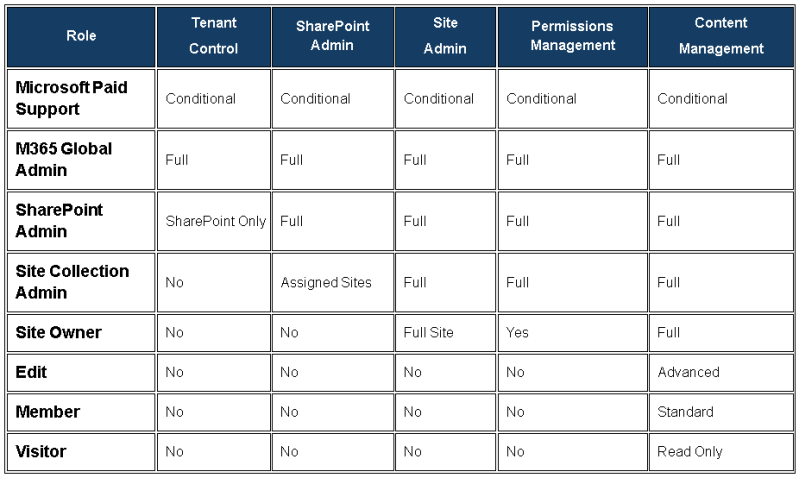
Authority Comparison Matrix
Governance Principle
A successful SharePoint Online environment separates platform administration from business ownership:
- Microsoft Paid Support maintains and troubleshoots the Microsoft service.
- Global Administrators govern the Microsoft 365 tenant.
- SharePoint Administrators govern the SharePoint platform.
- Site Collection Administrators support and secure individual site collections.
- Site Owners manage business sites.
- Editors and Members create and maintain content.
- Visitors consume information.