SharePoint Mentor Curated Articles
SharePoint Online Governance: Guard Rails vs. Roadblocks
Scenarios, Practical Examples, and Implementation Guide
1. Executive Summary: Guide the Journey, Don't Bring It to a Halt
Modern governance in SharePoint Online requires a fundamental shift in perspective. Historically, IT organizations approached governance through restriction, treating control as a binary state: either systems are completely open, or they are locked down to prevent risk. In the modern cloud ecosystem, this legacy mindset creates severe operational friction and ultimately increases risk.
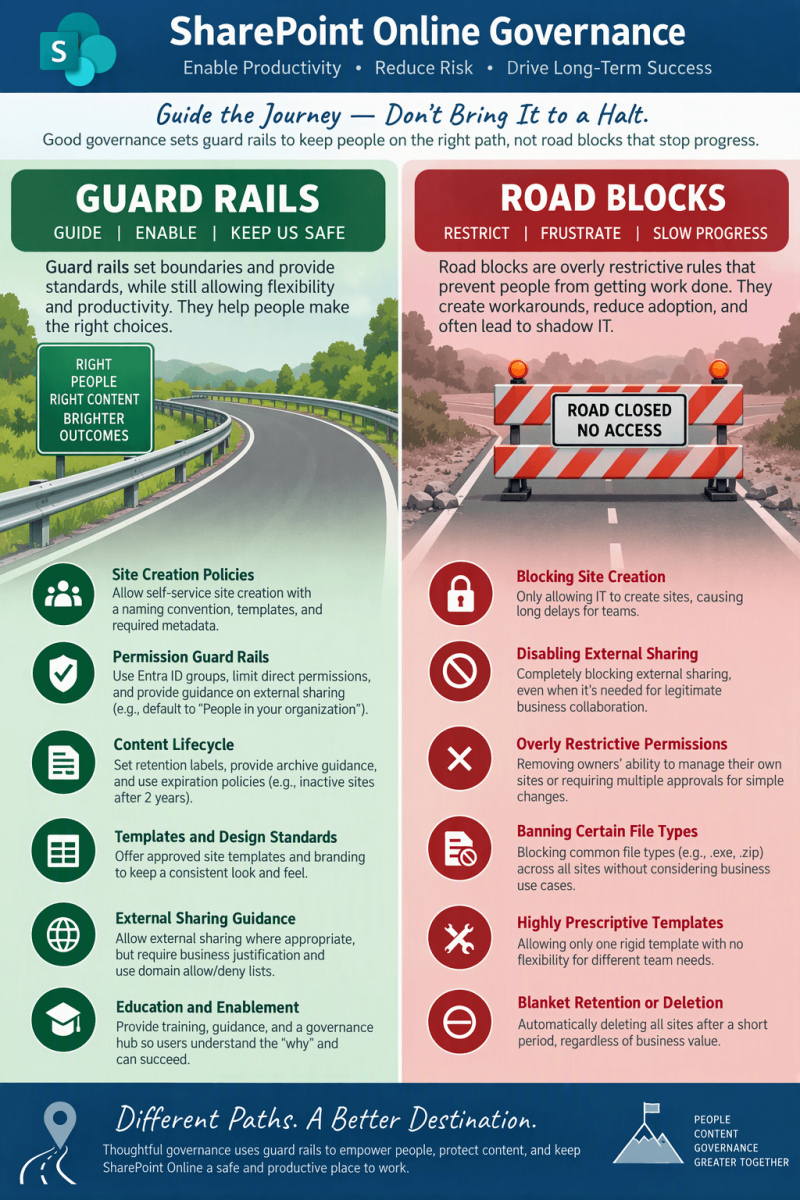
Core Philosophy: "Good governance sets guard rails to keep people on the right path, not roadblocks that stop progress."
The Equation: People + Content + Governance = Greater Together.
The Fundamental Contrast:
- Guard Rails (Guide | Enable | Keep Us Safe): Set boundaries and standards while allowing flexibility and productivity. Help users make the right choices.
- Roadblocks (Restrict | Frustrate | Slow Progress): Overly restrictive rules that stop work, breed Shadow IT (unsanctioned cloud drives, unmanaged messaging apps), reduce adoption, and damage trust.
2. In-Depth Analysis: The Six Governance Pillars
Area 1: Site Creation Policies
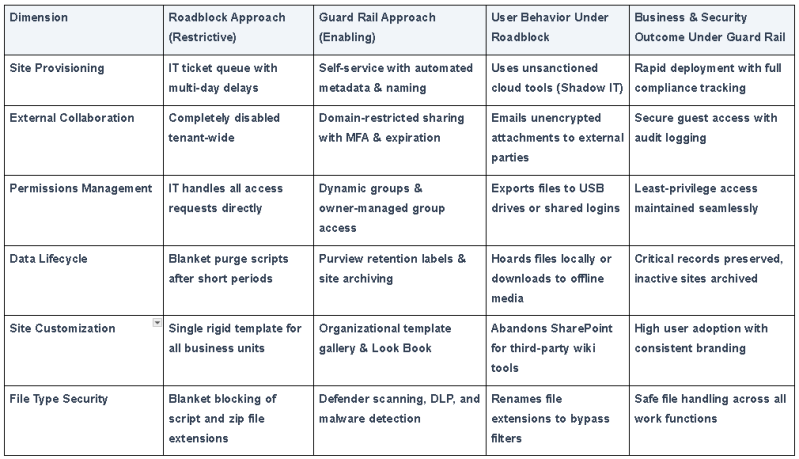
- Architectural Comparison: Self-service site provisioning with automated naming conventions, templates, and required metadata vs. IT-only site creation queue causing multi-day delays.
- Scenario - The Roadblock: A rapid product launch team submits an IT ticket for a project site. The 7-day backlog forces them to set up an unmonitored external Dropbox, leaking proprietary IP.
- Scenario - The Guard Rail: A self-service portal dynamically prepends PRJ-[Dept]-, prompts for confidentiality classification, provisions the site in minutes, and notifies governance admins.
- Technical Implementation: Entra ID group creation policies, PnP provisioning/Power Automate approval flows, and Microsoft 365 sensitivity labels.
Area 2: External Sharing and Collaboration
- Architectural Comparison: Allowing external sharing with business justification, domain allow/deny lists, and Entra B2B vs. Completely disabling external sharing tenant-wide.
- Scenario - The Roadblock: Legal and Procurement collaborating with outside counsel cannot share links. They resort to emailing sensitive contract drafts as unencrypted attachments, resulting in version collision and leakage across personal mailboxes.
- Scenario - The Guard Rail: A dedicated partner collaboration site permits external guest sharing restricted to outside counsel's domain, requiring MFA and expiring guest access after 90 days. Default internal sharing links remain "People in your organization".
- Technical Implementation: SharePoint Admin Center tenant vs. site-level sharing settings, Azure B2B guest lifecycle, Entra ID Conditional Access, and Purview sensitivity labels.
Area 3: Permissions Management and Ownership
- Architectural Comparison: Role-based access via Entra ID groups, limiting broken permission inheritance, and educating site owners vs. Removing owner permissions and routing every access grant through IT.
- Scenario - The Roadblock: A marketing department brings on temporary contractors. Because managers cannot manage site membership, tickets take days to fulfill. Frustrated employees export files to unmanaged USB drives or email attachments.
- Scenario - The Guard Rail: Entra ID dynamic security groups automatically assign membership based on department and role attributes. Site owners manage site visitor/member groups directly without breaking item-level inheritance.
- Technical Implementation: M365 Groups, Entra ID dynamic user groups, permission inheritance preservation, and periodic Access Reviews.
Area 4: Content Lifecycle & Retention
- Architectural Comparison: Retention labels, archive guidance, and activity-based expiration policies (e.g., review after 2 years of inactivity) vs. Blanket automated deletion after short arbitrary timeframes.
- Scenario - The Roadblock: A company implements an automated script that permanently purges any site inactive for 180 days. A dormant site containing critical audit logs and patent disclosures is wiped out right before a federal regulatory inspection.
- Scenario - The Guard Rail: Microsoft Purview retention policies preserve business-critical records for mandatory retention windows. Sites reaching 18 months of inactivity trigger renewal notifications to owners; if abandoned, they are archived to read-only cold storage rather than deleted.
- Technical Implementation: Microsoft Purview Data Lifecycle Management, M365 Group Expiration Policies, and SharePoint Site Archiving.
Area 5: Templates and Design Standards
- Architectural Comparison: Offering approved site templates, corporate themes, and reusable web parts vs. Enforcing a single rigid, non-customizable template across all business units.
- Scenario - The Roadblock: Both an executive communication portal and an engineering software sprint tracker are forced into the same rigid list template. Usability plummets, and teams abandon SharePoint for Confluence and Notion.
- Scenario - The Guard Rail: An organizational template gallery provides purpose-built templates (e.g., Department Hub, Event Showcase, Project Tracker). Each template adheres to corporate branding and header navigation while allowing tailored web part layouts.
- Technical Implementation: SharePoint Look Book, Organizational Site Templates via PowerShell (Add-SPOSiteDesign), and Brand Center assets.
Area 6: File Type Handling and Security
- Architectural Comparison: Microsoft Defender for Office 365, safe attachments scanning, and Data Loss Prevention (DLP) vs. Blanket blocking of common enterprise file extensions (.zip, .exe, .ps1, .cad).
- Scenario - The Roadblock: An IT DevOps team cannot upload .ps1 automation scripts and .zip deployment packages. Engineers rename extensions to .txt to circumvent the block, introducing unvetted bypasses.
- Scenario - The Guard Rail: Files of all business-relevant types are permitted, but scrutinized with automated anti-malware, DLP inspection for secrets/credentials, and safe links verification.
- Technical Implementation: Microsoft Defender for Office 365, Purview DLP rules, and Antivirus integration.
3. Education and Enablement: The Human Element
Policy without education inevitably leads to failure. Technical governance controls are only half of the equation; organizations must invest equally in user enablement and clear guidance.
- SharePoint Governance Hub: Create a centralized site offering self-service guidelines, automated request workflows, clear FAQs, and "Why This Matters" explainers that clarify security rationale.
- Champions Network: Establish and train peer champions across departments to model best practices, assist colleagues, and provide real-time feedback to governance managers.
- Contextual Tooltips & In-line Guidance: Embed descriptive tooltips directly within site forms and sharing dialogs to steer users toward compliance naturally at the moment of decision.
4. Comparative Governance Matrix