

SharePoint Mentor Curated Articles
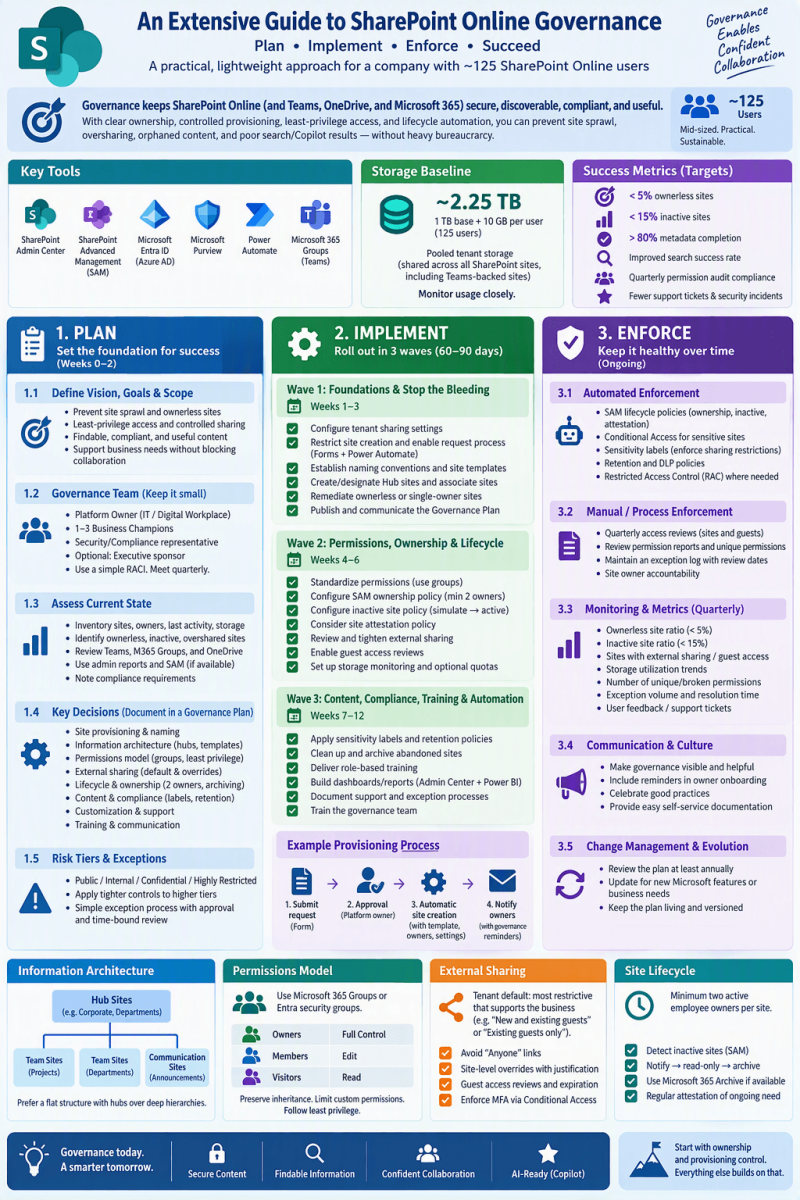
Extensive Guide to Planning, Implementing, and Enforcing SharePoint Online Governance
This guide is tailored for a mid-sized organization of approximately 125 users. At this scale, governance must be practical, lightweight, and sustainable—avoiding heavy bureaucracy while preventing site sprawl, oversharing, orphaned content, security gaps, and poor search/Copilot results. Focus on clear ownership, controlled provisioning, least-privilege permissions, lifecycle automation, and ongoing measurement.
Governance is the set of policies, roles, processes, standards, and controls that keep SharePoint Online (and connected Microsoft 365 workloads such as Teams and OneDrive) secure, discoverable, compliant, and useful. Without it, environments quickly accumulate inactive sites, broken permission inheritance, uncontrolled external sharing, and content that is hard to find or protect.
Key modern tools referenced:
- SharePoint Admin Center
- SharePoint Advanced Management (SAM) — site ownership, inactive site, and attestation policies (available via Microsoft 365 Copilot licensing for at least one user, the standalone SAM Plan 1 add-on, or certain higher suites)
- Microsoft Entra ID (Azure AD) groups and Conditional Access
- Microsoft Purview (sensitivity labels, retention, DLP—availability depends on licensing)
- Power Automate for request/approval workflows
- Microsoft 365 Groups for team sites
Storage baseline for ~125 users: typically 1 TB base + 10 GB per licensed user ≈ 2.25 TB pooled tenant storage (shared across all SharePoint sites, including Teams-backed sites). Monitor usage closely.
1. Planning Phase
1.1 Define Vision, Goals, and Scope
Start with clear, measurable objectives aligned to business needs:
- Prevent uncontrolled site sprawl and ownerless sites.
- Enforce least-privilege access and controlled external sharing.
- Ensure content is findable (good search and future Copilot relevance).
- Support compliance (retention, classification) without blocking collaboration.
- Maintain a healthy environment with low inactive/ownerless site ratios (targets: <5% ownerless, <15% inactive).
Document success metrics early (e.g., metadata completion >80%, quarterly permission audit compliance, search success rate).
Scope:
- SharePoint Online sites (team sites + communication sites)
- Related Microsoft 365 Groups/Teams
- OneDrive (where relevant for shared content)
- External sharing
- Permissions
- Content lifecycle
- Information architecture
- Basic customization.
1.2 Form a Lightweight Governance Team
For 125 users, keep the team small and practical:
- SharePoint/Platform Owner (IT or Digital Workplace lead) — tenant settings, provisioning process, security baseline, SAM policies.
- Business/Department Champions (1–3 people from key areas such as HR, Operations, Sales) — represent user needs, help with adoption and content standards.
- Security/Compliance representative (or IT with dual role) — external sharing, sensitivity, access reviews.
- Optional: Executive sponsor for visibility and exception escalation.
Use a simple RACI matrix. Meet quarterly (or monthly initially) to review metrics, exceptions, and policy updates. Avoid a large formal board.
1.3 Assess Current State
Inventory the environment:
- List all active sites, owners, last activity, storage use, external sharing status, and sensitivity.
- Identify ownerless or single-owner sites, inactive sites, broken inheritance, and overshared content.
- Review existing Microsoft 365 Groups, Teams, and OneDrive for Business usage.
- Note any compliance requirements (industry, legal, internal policies).
Use SharePoint Admin Center reports, SAM content management assessment (if available), and Microsoft 365 usage reports.
1.4 Key Governance Decisions to Make and Document
- Answer these core questions and record them in a living Governance Plan / Handbook (store it in a well-governed SharePoint site or Teams wiki):
Site Provisioning & Naming
- Who can create sites? Prefer restricted creation + request process over fully open self-service for control at this scale.
- Naming convention (e.g., DEPT-ProjectName-YYYY or Team-HR-Policies).
- Required metadata at creation: purpose, primary + backup owners, expected duration, sensitivity/external sharing needs, department/hub association.
Information Architecture
- Prefer flat structure: many sites associated with a few Hub sites rather than deep subsite hierarchies.
- Hub sites for major areas (e.g., Corporate Intranet, Departments, Projects).
- Site templates / site designs for consistency (branding, navigation, default libraries, columns).
- Metadata strategy (managed metadata or simple choice columns where practical).
Permissions Model
- Prefer Microsoft 365 Groups (for team sites) or Entra security groups over individual user assignments.
- Standard SharePoint groups: Owners (Full Control), Members (Edit), Visitors (Read). Limit custom permission levels.
- Preserve inheritance; break only when truly necessary and document exceptions.
- Principle of least privilege.
External Sharing
- Tenant-wide default: set to the most restrictive level that still supports legitimate collaboration (often “New and existing guests” or “Existing guests only”; avoid “Anyone” links by default).
- Site-level overrides allowed only within tenant limits; require justification for more permissive settings.
- Guest access reviews, expiration, MFA enforcement via Conditional Access where possible.
Lifecycle & Ownership
- Minimum two active employee owners per site (no shared accounts, distribution lists, or guests as sole owners).
- Inactive site detection and attestation cadence.
- Archival / deletion process.
Content & Compliance
- Versioning settings, retention policies (via Purview if licensed).
- Sensitivity labels (auto-apply where possible).
- Storage quotas or monitoring thresholds per site.
Customization & Support
- Allowed customizations (site designs, Power Apps, limited SPFx if needed).
- Support model and escalation path.
Training & Communication
- Mandatory short training for site owners.
- Easy-to-find governance documentation and request forms.
1.5 Risk Tiers and Exception Process
- Classify sites (Public / Internal / Confidential / Highly Restricted) and apply tighter controls to higher tiers.
- Define a simple exception request + approval + time-bound review process.
2. Implementation Phase
Implement in prioritized waves over 60–90 days so the environment stabilizes quickly.
Wave 1 (Weeks 1–3): Foundations & Stop the Bleeding
- Configure tenant-level sharing settings in SharePoint Admin Center → Policies → Sharing (default link type, expiration, external sharing level).
- Restrict site creation if needed (via SharePoint Admin Center or PowerShell / Entra groups). Enable a request process (Microsoft Forms + Power Automate approval workflow that captures required metadata and creates the site with correct owners and settings).
- Establish naming conventions and a small set of site designs/templates.
- Create or designate Hub sites and associate existing relevant sites.
- Identify and remediate ownerless or single-owner sites (assign two active owners).
- Publish the initial Governance Plan and communicate it.
Wave 2 (Weeks 4–6): Permissions, Ownership & Lifecycle
- Standardize permissions: migrate individual assignments to groups where possible; minimize broken inheritance.
- Configure SAM site ownership policy (minimum 2 owners/admins; simulation mode first, then active). Requires appropriate licensing.
- Configure inactive site policy (detect inactivity across SharePoint/Teams/etc., notify owners, then read-only or archive via Microsoft 365 Archive if available).
- Optionally configure site attestation policy for periodic confirmation of ongoing need, ownership, permissions, and sharing.
- Review and tighten external sharing on sensitive sites; enable guest access reviews if available.
- Set up basic storage monitoring and optional per-site quotas for high-risk or large sites.
Wave 3 (Weeks 7–12): Content, Compliance, Training & Automation
- Apply sensitivity labels and retention policies (Purview) to high-value or regulated content.
- Clean up obvious sprawl: archive or delete clearly abandoned sites after owner notification.
- Implement catalog management or logical grouping of sites if using SAM.
- Deliver short role-based training (site owners: permissions, sharing, lifecycle responsibilities; end users: how to request sites, find content, share safely).
- Build simple dashboards or scheduled reports (ownerless sites, inactive sites, storage, external sharing, permission changes) using Admin Center + Power Automate or Power BI.
- Document support and exception processes; train the governance team.
Provisioning Process Example
- User submits Form → captures purpose, owners (two required), duration, sensitivity, external needs → approval by platform owner or designated approver → automated or semi-automated site creation with template, owners, hub association, and default settings → notification to owners with governance reminder.
3. Enforcement & Ongoing Operations
Governance fails without continuous enforcement and measurement.
3.1 Automated Enforcement (Preferred)
- SAM lifecycle policies (ownership, inactive, attestation) running in active mode with notifications and progressive actions (notify → read-only → archive).
- Conditional Access + authentication contexts for sensitive sites.
- Sensitivity labels that enforce sharing restrictions.
- Retention and DLP policies.
- Restricted Access Control (RAC) or Restricted Content Discovery where needed for high-sensitivity sites.
3.2 Manual / Process Enforcement
- Quarterly (or semi-annual) access reviews for sensitive sites and guest users.
- Regular review of permission reports and unique permissions.
- Exception log with review dates.
- Site owner accountability: owners are responsible for day-to-day permissions, content relevance, and responding to lifecycle notifications.
3.3 Monitoring, Metrics & Continuous Improvement
Track and review at least quarterly:
- Ownerless site ratio (target <5%)
- Inactive site ratio (target <15%)
- Sites with external sharing / guest access
- Storage utilization trends
- Number of unique/broken inheritance permissions
- Exception volume and resolution time
- User feedback / support tickets related to SharePoint
Use SharePoint Admin Center reports, SAM reports, Microsoft 365 usage analytics, and audit logs. Adjust policies based on data (e.g., tighten inactivity thresholds if needed).
3.4 Communication & Culture
- Make governance visible and helpful (“guardrails that keep content secure and searchable”).
- Include governance reminders in site owner onboarding and periodic communications.
- Celebrate good practices (e.g., well-maintained hubs).
- Provide easy self-service documentation and request forms so users do not work around the system.
3.5 Change Management & Evolution
- Review the Governance Plan at least annually or when major Microsoft features (new SAM capabilities, Copilot expansion, storage model changes) or business needs arise. Keep the document living and versioned.
Practical Tips Specific to ~125 Users
- Avoid over-engineering: a few clear policies + ownership + lifecycle automation will deliver most of the value.
- Leverage Microsoft 365 Groups heavily for team collaboration sites.
- Prefer hubs + flat sites over complex hierarchies.
- Start with simulation mode for SAM policies before enforcing actions.
- If SAM is not fully licensed, prioritize manual ownership assignment, restricted creation, and regular admin reviews of inactive/ownerless sites.
- Budget time for initial cleanup; ongoing effort should be modest (a few hours per month for the platform owner once stable).
- Prepare for Copilot/AI by cleaning ownership, reducing inactive content, and applying sensitivity labels—governance directly improves AI result quality.
Recommended Next Steps Checklist
- Inventory current sites and owners.
- Draft and socialize the Governance Plan (focus on the six core questions).
- Configure tenant sharing defaults and site creation controls.
- Implement a simple request + approval process.
- Assign two owners to every production site.
- Enable SAM ownership and inactive policies (simulation → active) if licensed.
- Train site owners and publish documentation.
- Establish quarterly review cadence and metrics dashboard.
- Address highest-risk oversharing and storage issues first.
- Schedule the first governance team review meeting.