

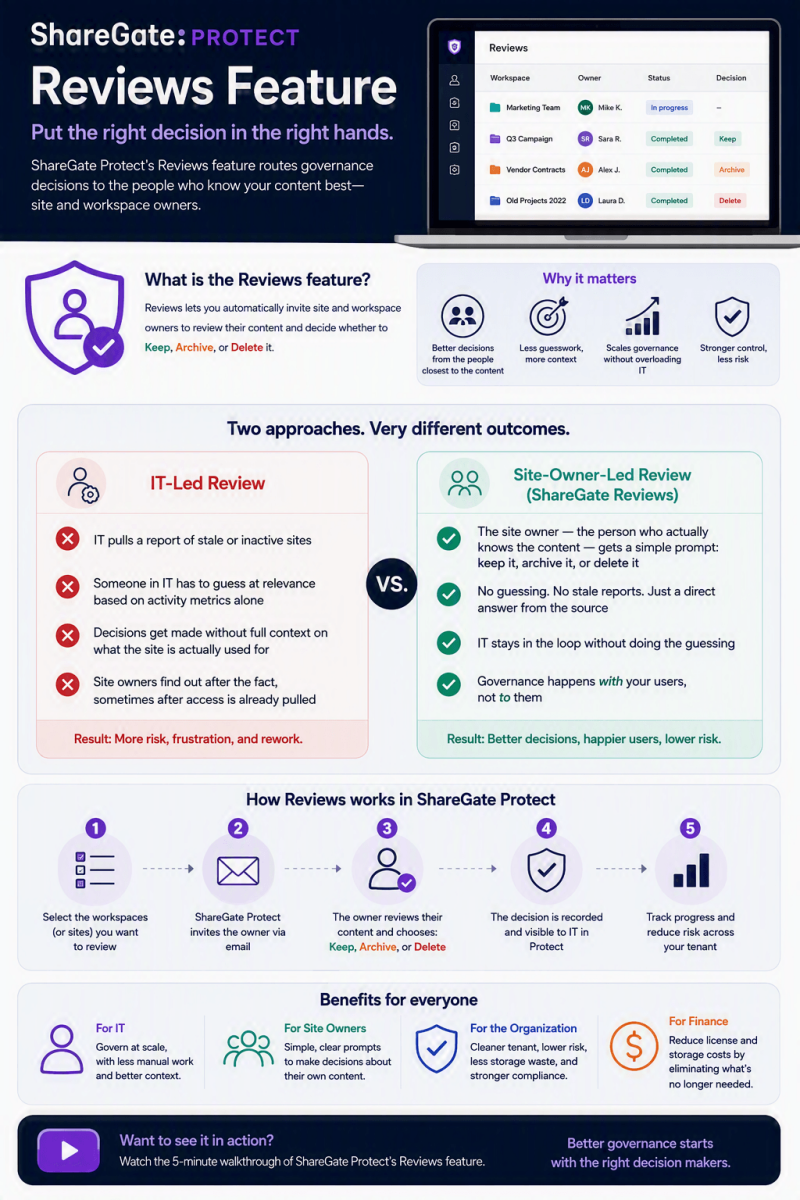
ShareGate Protect’s Reviews feature helps IT teams systematically validate and remediate access, sharing, and lifecycle risks by involving workspace owners and automating recurring checks.
ShareGate Protect is an operational governance tool for Microsoft 365. It provides a tenant-wide view of access, workspace health, oversharing, guest access, inactive/orphaned workspaces, ownership gaps, and related risks across SharePoint, Teams, Groups, and OneDrive. It supports bulk remediation with an audit trail and repeatable processes.
The Reviews capability originated as a practical way to handle the challenges of external collaboration:
- Full visibility into external sharing links and guest access per team/group (without heavy scripting or multi-admin-center hunting).
- Ability for IT to revoke links or remove guests directly.
- Collaboration with group/team owners (who best know business context) via notifications (email or Teams/chatbot) asking them to confirm or clean up sharing and guests.
- Scheduling/automation of review cycles (e.g., every 90 days), with custom frequencies possible via sensitivity tags.
- Progress tracking, results review, follow-ups for incomplete reviews, and full action logging for audits/compliance.
Current Protect focuses on seeing risks clearly, fixing them in place, and supporting ongoing governance cycles. Reviews conceptually live on through assessment-driven insights, owner involvement (where available or forthcoming), and planned enhancements.
Core Value of the Reviews Feature
Reviews address fundamental Microsoft 365 challenges that pure admin-center or PowerShell approaches struggle with at scale:
- Security and least-privilege enforcement: External links (“Anyone,” organization-wide, etc.) and lingering guests create exposure. Reviews force validation that access is still needed, reducing data-leak and oversharing risk—especially critical before Copilot or other AI tools surface content broadly.
- Distributed ownership and reduced IT burden: Business owners understand context better than central IT. Automating prompts and providing a simple interface for owners to clean up their own workspaces scales governance without constant admin intervention.
- Repeatability and compliance: Scheduled cycles + full logging create auditable, ongoing processes suitable for internal policies, GDPR-style requirements, or audits. Impact metrics and activity logs help prove progress.
- Lifecycle hygiene and cost control: Tied to inactivity detection, reviews help identify and clean unused workspaces, reducing storage, license waste, and sprawl.
- Operational efficiency: No custom scripts, no hopping between admin centers. Visibility + action + tracking in one experience. Bulk actions and recommendations accelerate cleanup.
- AI/Copilot readiness: Clean permissions and reduced oversharing ensure AI tools only reach appropriate content.
- Quantifiable outcomes: Supports measuring risk reduction, cost/license savings, and governance maturity over time.
In short, Reviews turn one-time cleanups into sustainable, owner-engaged governance rather than reactive firefighting.
How to Use Reviews / Related Capabilities (Practical Guidance) - Exact UI and availability depend on your Protect version and whether legacy policies are still accessible or the new assessment/policy system is fully active.
General workflow based on documented capabilities:
- Connect and assess:
- Access Protect via ShareGate Home.
- Ensure a global/privileged role admin has consented to the required Microsoft 365 permission sets (read for assessment; additional for remediation). Users typically need an Assessor role in Entra ID.
- Protect crawls the tenant (initial scan + ongoing refreshes, often ~24 hours for most data; sharing links can take longer in large tenants). Data is metadata-focused (SOC 2 Type II; read-only by default until write permissions granted).
- Discover risks via Governance Risk Assessment / Home:
- View unified snapshot: oversharing, guest access, inactive/orphaned workspaces, ownership gaps, sharing links by type, broad permissions, sensitivity labels, licenses, storage, etc.
- Drill into pre-built reports or insights (categorized e.g., Prevent oversharing, Control sprawl, Reduce costs, Improve Copilot results).
- Use filters, object lists, trend graphs, and potential-risk/suggestions context.
- AI-assisted reporting: describe needs in plain language to generate custom reports.
- Initiate or schedule reviews (where policies/Delegated Reviews available):
- For external sharing/guest reviews: Set cadence (e.g., 90 days), start date; optionally customize by sensitivity tag.
- Trigger owner notifications (email/Teams) for specific workspaces or automatically.
- Owners review listed links/guests and can revoke/delete via a simple interface.
- Admins can also act directly (revoke links, remove guests) without being owners.
- Track completion status, send reminders, view results, and consult the activity log.
- Remediate:
- In-context or bulk actions from reports/assessment (revoke links, adjust privacy/membership where supported, clean inactive items).
- Preview changes; everything is logged.
- Tag items for owner review when business context is needed.
- For inactive workspaces: Review metadata (guests still present? owners? activity?) and decide to archive, delete, or re-purpose (archiving temporarily paused in some transitions).
- Monitor, report, and iterate:
- Use activity logs for full history (who did what, when).
- Export reports or generate impact/ROI-style views.
- Refine based on insights and recommendations.
- Re-run assessments or cycles regularly.
Best practices:
- Start with a full assessment to baseline risk.
- Prioritize high-risk items (public groups, “Anyone” links, guests in sensitive workspaces, long-inactive items with guests).
- Pilot reviews with a subset of owners before broad automation.
- Combine with sensitivity labels, tenant sharing settings, and Microsoft tools (Entra Access Reviews, Purview) for layered defense—ShareGate focuses on actionable operational governance rather than replacing those.
- Grant write/remediation permissions deliberately; keep most usage read-only initially.
- Educate owners on why reviews matter (security + their own productivity).
- Track metrics: reduction in external links/guests, inactive workspace cleanup volume, time saved vs. manual processes.
- For large tenants, allow extra time for sharing-link crawls and consider phased rollouts.
Prerequisites and access notes:
- Active ShareGate Protect subscription.
- Proper consent and Assessor role assignment.
- Notifications may require allowlisting sharegate.com if greylisting/anti-spam is in use.
- Data residency options (e.g., North America or Europe) available at assessment setup.
- Limitations exist (check current known-limitations docs); GCC environments have restrictions.
Limitations and Considerations
- Feature set evolved; confirm current status of policies, end-user reviews, and Delegated Reviews in your tenant/docs, as transitions can create temporary gaps.
- Relies on accurate ownership data and owner responsiveness.
- Does not silently auto-strip permissions—actions are explicit and logged.
- Complements (does not fully replace) Microsoft Purview, Entra Access Reviews, or native admin centers.
- Cost is typically contact-sales / user-based with all Protect features included (no feature tiers).
Getting Started and Further Resources
- Review official ShareGate Protect overview and Governance Risk Assessment help articles.
- Check the “Important changes to legacy management features” article for transition details.
- Explore product pages for oversharing, cost optimization, and Copilot readiness solutions.
- Contact ShareGate support or request a demo/partner walkthrough for live guidance tailored to your environment.
- Monitor release notes for the improved policy system and Delegated Reviews.
In summary
The Reviews feature (and its successors in the modern Protect experience) delivers high value by making governance collaborative, repeatable, and actionable. It reduces risk exposure, distributes workload intelligently, supports compliance evidence, controls costs, and prepares environments for AI—all while minimizing the need for custom scripting or fragmented tools. Organizations that implement regular review cycles typically see cleaner tenants, fewer surprises, and more sustainable Microsoft 365 operations. Always verify the latest capabilities directly in your ShareGate Protect instance or official documentation, as the product continues to evolve.