

SharePoint Mentor Curated Articles
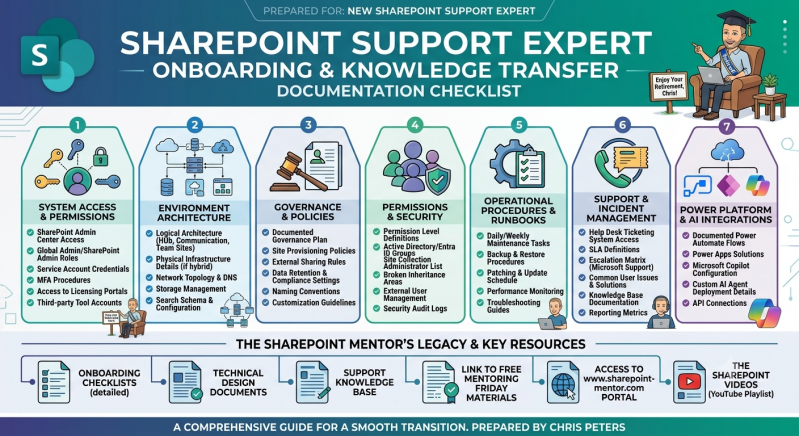
Executive Summary & Purpose
The objective of this document is to ensure a seamless operational transition. It codifies all core responsibilities, structural environments, governance protocols, and legacy assets required for an incoming SharePoint Support Expert to successfully manage, secure, and maintain the enterprise environment without interruption.
Core Onboarding Pillars & Technical Checklists
Pillar 1: System Access & Permissions
This area documents all administrative access pathways, baseline credentials, and authentication mechanisms required to assume platform control.
-
SharePoint Admin Center Access: Dedicated URLs, connection procedures, and requirements for global site administration interfaces.
-
Global Admin/SharePoint Admin Roles: Detailed parameters defining the scopes of authority, administrative group mappings, and privilege boundaries.
-
Service Account Credentials: Inventory of all non-interactive system accounts, automation profiles, and background application service identifiers.
-
MFA Procedures: Multi-Factor Authentication protocols, recovery steps, validation tokens, and security device configurations.
-
Access to Licensing Portals: Instructions for accessing administrative billing portals to view, allocate, and audit Microsoft 365 licensing scopes.
-
Third-party Tool Accounts: Access methods and administration rules for external integrated software, migration tools, or auditing plugins.
Pillar 2: Environment Architecture
This segment covers the structural layout, topological maps, and physical/logical configurations of the enterprise digital workspace.
-
Logical Architecture: Detailed documentation of modern Hub Sites, Communication Sites, Team Sites, and their structural hierarchies.
-
Physical Infrastructure Details: Complete mapping of local data gateways, hybrid structural servers, cross-network relays, and cloud connections.
-
Network Topology & DNS: Configuration settings for custom domains, specialized DNS records, routing firewalls, and proxy exceptions.
-
Storage Management: Tenant capacity boundaries, site storage quota models, early warning rules, and archiving behaviors.
-
Search Schema & Configuration: Managed properties, crawled properties, structural result sources, query definitions, and search experience enhancements.
Pillar 3: Governance & Policies
This contains the operational guardrails, organizational boundaries, and standard procedures that ensure long-term environment stability.
-
Documented Governance Plan: Strategic manuals addressing organizational boundaries, platform compliance, and the change-control framework.
-
Site Provisioning Policies: Workflows, request lifecycles, automated scripts, and structural approvals governing new workspace creation.
-
External Sharing Rules: Restrictions on anonymous guest sharing, allowed external domains, and expiration settings for shared links.
-
Data Retention & Compliance Settings: Discovery policies, formal sensitivity labels, document lifecycle management rules, and legal holds.
-
Naming Conventions: Strict guidelines governing naming structures for newly created site URLs, titles, and Microsoft 365 Groups.
-
Customization Guidelines: Policies dictating what constitutes supported platform custom solutions versus unauthorized scripts or tools.
Pillar 4: Permissions & Security
This covers the day-to-day mechanisms for locking down content, evaluating access profiles, and managing compliance scopes.
-
Permission Level Definitions: Detailed mapping of custom, unique, and out-of-the-box user permissions roles.
-
Active Directory/Entra ID Groups: Synchronization models between structural on-premises security groups and modern dynamic cloud groups.
-
Site Collection Administrator List: Active logs identifying individuals with overarching access rights to top-level site segments.
-
Broken Inheritance Areas: A precise log of sensitive resource folders, documents, or library areas utilizing unique, non-inherited security parameters.
-
External User Management: Lifecycle rules for non-employee accounts, regular guest access sweeps, and account disabling practices.
-
Security Audit Logs: Processes for running tracking queries, viewing administrator activity, and generating forensic security reports.
Pillar 5: Operational Procedures & Runbooks
This section outlines the scheduled maintenance, recovery operations, and stability checks required to sustain normal platform health.
-
Daily/Weekly Maintenance Tasks: Regular health checklists, error-log reviews, and environmental status verifications.
-
Backup & Restore Procedures: Disaster recovery models, restoration validation cycles, structural version history parameters, and recycle bin lifetimes.
-
Patching & Update Schedule: Processes for monitoring standard Microsoft 365 cloud updates, preview tier adjustments, and feature rollouts.
-
Performance Monitoring: Core telemetry setups, user latency benchmarks, page optimization metrics, and service availability checks.
-
Troubleshooting Guides: Logged playbooks detailing root-cause analysis steps for known environmental bugs and network speed degradations.
Pillar 6: Support & Incident Management
This deals with standard operating procedures for taking intake tickets, resolving user complaints, and reporting on support metrics.
-
Help Desk Ticketing System Access: Ticket queue configuration steps, categories, routing matrices, and agent assignments.
-
SLA Definitions: Agreement tiers outlining expected ticket response milestones, resolution times, and target priority classifications.
-
Escalation Matrix (Microsoft Support): Pathways for filing Premier/Unified enterprise support tickets with Microsoft tier-3 engineers.
-
Common User Issues & Solutions: Quick-fix steps for common issues like file syncing errors, lost permissions, or missing items.
-
Knowledge Base Documentation: Access to internal technical wikis containing historical case studies and customized local resolution guides.
-
Reporting Metrics: Standard key performance indicators (KPIs) regarding intake ticket volumes, resolution times, and satisfaction scores.
Pillar 7: Power Platform & AI Integrations
This encompasses modern technical expansions, automatic cloud flows, low-code apps, and AI infrastructure parameters.
-
Documented Power Automate Flows: Architectural flows, triggers, system credentials, and actions supporting business automation.
-
Power Apps Solutions: Layout parameters, data collection points, and code files for custom forms and dedicated enterprise apps.
-
Microsoft Copilot Configuration: Scope parameters for enterprise semantic search indexing, grounding guidelines, and data protections.
-
Custom AI Agent Deployment Details: Prompt rules, structural interfaces, API scopes, and operational code for custom-built AI agents.
-
API Connections: Webhook points, gateway setups, and secure authentication targets for cross-platform system integrations.
Legacy Hub & Strategic Knowledge Capital
Beyond foundational operational checklists, the incoming Support Expert is granted full administrative access to the established legacy ecosystem. These core resources provide strategic context and educational support for the platform:
-
Detailed Onboarding Checklists: Chronological task lists, milestone logs, and step-by-step handoff scripts.
-
Technical Design Documents: System architecture prints, modern visual diagrams, and baseline platform configuration matrices.
-
Support Knowledge Base: The comprehensive database housing historical ticket resolutions and operational answers.
-
Free Mentoring Friday Training Materials: Visual slide decks, basic curriculum guides, and documentation used for public beginner training events.
-
Consultancy Portal Access (sharepoint-mentor.com): Direct entry to the public web hub housing modern governance blogs, tools, and mentor resources.
-
"The SharePoint Videos" YouTube Playlist: The definitive structural video training catalog for rapid onboarding and training support.