SharePoint Mentor Curated Articles

This document provides a structured overview of the SharePoint Tenant Support Team within a large enterprise organization.
It details the team’s leadership, organizational structure, typical daily operations, and key interfaces with other SharePoint support teams and end users. The content is designed to illustrate operational flow, collaboration models, and service delivery responsibilities.
1. Team Leadership and Organizational Structure
- Leadership Model - The SharePoint Tenant Support Team is led by a **SharePoint Tenant Administrator / Team Manager**. This role is responsible for:
- Strategic oversight of the Microsoft 365 SharePoint tenant.
- Ensuring compliance with organizational governance policies, security standards, and service level agreements (SLAs).
- Performance management, resource allocation, and continuous improvement initiatives.
- Escalation point for high-impact incidents affecting tenant-wide services.
- The Team Manager reports to the broader Collaboration Services or Microsoft 365 Operations leadership. Weekly leadership syncs are held with peer managers from related teams (e.g., Microsoft Teams, OneDrive, and Exchange support).
- Team Organization - The team is structured in a tiered, matrix model to balance operational support with specialized expertise:
- Tier 1 Support (Generalist Analysts – 40% of team): Handle initial triage, standard configuration requests, and user guidance.
- Tier 2 Support (Advanced Administrators – 40% of team): Manage complex troubleshooting, PowerShell scripting, tenant settings, and permissions governance.
- Specialists (20% of team): Focused roles including:
- Governance & Compliance Specialist
- Search & Information Architecture Specialist
- Automation & Development Specialist (Power Automate, SPFx)
- Reporting & Analytics Specialist
- Team size typically ranges from 8–15 members depending on organizational scale. Daily operations are supported by a shared ticketing system (e.g., ServiceNow or Microsoft Planner integrated with Teams), a centralized knowledge base, and monitoring dashboards (Microsoft 365 Admin Center, SharePoint Admin Center, and Power BI reports).
2. A Typical Day in the Life (Monday–Friday Schedule)
- Team Stand-up Meeting - The day begins with a virtual stand-up led by the Team Manager or designated Lead. Team members review:
- Open high-priority tickets.
- Overnight incidents or tenant health alerts.
- Scheduled maintenance or change requests.
- Cross-team dependencies.
- Ticket Triage and Initial Response - Tier 1 analysts process incoming requests via the helpdesk queue. Common tasks include:
- User access and permission requests.
- Site provisioning or template application.
- Basic troubleshooting (e.g., document library sync issues, search result problems).
- Deep-Dive Resolution and Project Work - Tier 2 and specialists address escalated items, such as:
- Tenant-level configuration changes.
- Custom solution deployment or troubleshooting.
- Data loss prevention policy adjustments.
- Performance optimization or migration planning.
- Informal Knowledge Sharing - Team members are encouraged to document resolutions in the knowledge base.
- Collaborative Interfaces and Meetings
- Proactive Work and Reporting - Activities include:
- Tenant health reviews and proactive remediation.
- Monthly reporting on SLA compliance, ticket volume, and trends.
- Training sessions for end users or junior staff.
- Preparation for upcoming changes (e.g., Microsoft feature rollouts).
End of Day - The Team Manager reviews daily metrics and prepares a brief summary for leadership if needed. On-call rotation ensures after-hours coverage for critical incidents.
3. Interfaces with Other SharePoint Support Teams and Users
- The Tenant Support Team serves as the central authority for tenant-wide configuration while collaborating extensively with distributed support groups.
- Internal Interfaces – Other SharePoint Support Teams
- Site Collection / Departmental Support Teams: Tenant Support provides guidance on governance boundaries, approves cross-site features, and handles escalations when departmental admins cannot resolve issues (e.g., hub site connectivity or shared content type problems). Regular bi-weekly sync meetings ensure alignment.
- SharePoint Development Team: Tenant Support reviews and approves custom solutions for deployment, ensures compatibility with tenant settings, and assists with API permission requests.
- Microsoft 365 Platform Operations: Joint troubleshooting for underlying service issues affecting SharePoint (e.g., authentication, storage quotas, or hybrid connectivity).
- External Interfaces – End Users and Business Stakeholders
- Primary Channel: Users submit requests through the corporate helpdesk, which routes SharePoint-specific tickets to the Tenant Support queue.
- Internal Interfaces – Other SharePoint Support Teams
- Communication Methods:
- Self-service portal with FAQs and how-to guides.
- Scheduled office hours or “SharePoint Clinic” sessions.
- Direct collaboration via Microsoft Teams channels for major projects.
- Examples of Interaction:
- A business unit requests a new communication site with specific branding and retention policies → Tenant Support reviews against governance standards, provisions the site, and trains the site owner.
- A user experiences widespread search failures → Tenant Support coordinates with the Search Specialist and communicates status updates to affected users while resolving the issue.
- Executive sponsor requests tenant-wide reporting on storage usage → Tenant Support generates and delivers customized Power BI reports.
- Governance Touchpoints:
- All significant changes follow a formal change advisory board (CAB) process involving representatives from Security, Compliance, and other infrastructure teams.
4. Key Performance Indicators and Continuous Improvement
Success is measured by:
- Ticket resolution SLA adherence (e.g., 95% within target times).
- Tenant availability and performance metrics.
- User satisfaction scores from post-resolution surveys.
- Reduction in recurring issues through proactive governance.
The team conducts quarterly retrospectives to refine processes and incorporate Microsoft platform updates.
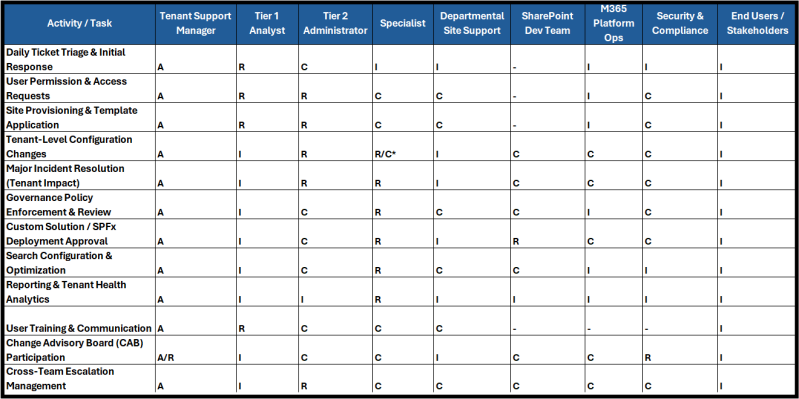
RACI Matrix for SharePoint Tenant Support Team Roles
- RACI (Responsible, Accountable, Consulted, Informed) matrix for key roles associated with the SharePoint Tenant Support Team. The matrix clarifies responsibilities across common operational, governance, and collaborative activities.
- Roles Included in the Matrix
- Tenant Support Manager (SharePoint Tenant Administrator / Team Lead)
- Tier 1 Analyst (Generalist Support)
- Tier 2 Administrator (Advanced Support)
- Specialist (Governance & Compliance, Search, Automation & Development, Reporting & Analytics)
- Departmental Site Support (Site Collection / Business Unit Admins)
- SharePoint Development Team
- M365 Platform Operations
- Security & Compliance Team
- End Users / Business Stakeholders
- Roles Included in the Matrix
- Legend
- R = Responsible (performs the task)
- A = Accountable (ultimately owns the outcome; only one “A” per activity)
- C = Consulted (must be consulted before decision/action)
- I = Informed (kept updated on progress/outcome)
- - = Not Involved
Multiple Specialists may be involved depending on the nature of the change (e.g., Governance Specialist for policy-related items).
Key Notes on the RACI Matrix
- The **Tenant Support Manager maintains overall accountability for most tenant-related activities to ensure governance, consistency, and alignment with organizational standards.
- Tier 1 Analysts focus on high-volume, routine user-facing tasks.
- Tier 2 Administrators and **Specialists** handle technical depth and specialized domains.
- External teams Departmental Support, Development, M365 Operations, and Security & Compliance) are engaged primarily for consultation or information sharing to maintain clear boundaries between tenant-wide and site-level responsibilities.
- This matrix should be reviewed quarterly or following major organizational or Microsoft 365 platform changes to ensure continued relevance.