

SharePoint Mentor Curated Articles
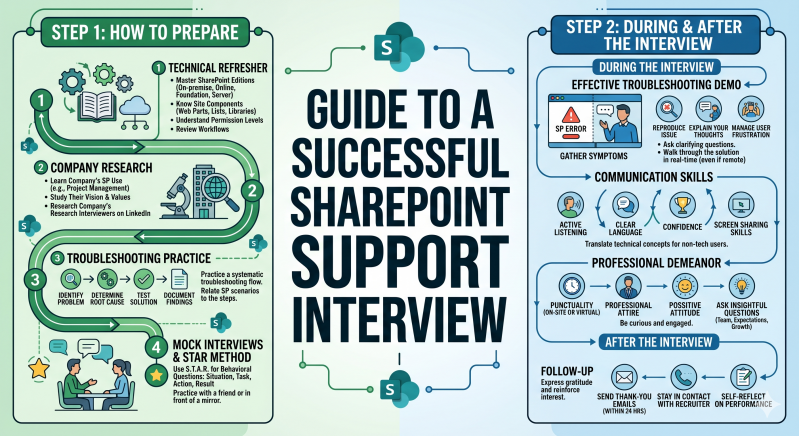
Landing a SharePoint support role requires a blend of technical depth, administrative discipline, and high-level soft skills. Because SharePoint is often the "connective tissue" of an organization’s data, interviewers look for candidates who can solve immediate errors while keeping long-term governance in mind.
Phase 1: Technical & Strategic Preparation
Before the interview, you must refresh your knowledge of the SharePoint ecosystem. Don't just focus on "where to click"; focus on the why and the impact.
1. Master the Core Pillars
Be prepared to speak in detail about these four high-traffic areas:
-
Permissions & Security: Understand the inheritance model, the difference between SharePoint groups and Microsoft 365 groups, and the risks of "broken inheritance."
-
Site Architecture: Know when to recommend a Communication Site versus a Team Site and the benefits of a Hub Site structure over legacy sub-sites.
-
Content Management: Be ready to discuss Metadata (Columns) vs. Folders, versioning settings, and document library limits.
-
Troubleshooting: Have a mental "decision tree" for common issues like sync errors, "Access Denied" messages, and missing files.
2. Understand the Modern Ecosystem
SharePoint rarely lives in a vacuum. You should be able to discuss:
-
Microsoft 365 Integration: How SharePoint interacts with Teams and OneDrive.
-
Power Platform: Basic knowledge of how Power Automate (flows) and Power Apps integrate with SharePoint lists.
-
The "Modern" Experience: Be able to explain the advantages of modern pages and web parts over classic functionality.
3. Governance and Compliance
Support isn't just about fixing things; it’s about preventing future mess. Review concepts like Retention Policies, External Sharing settings, and DLP (Data Loss Prevention).
Phase 2: The Interview Performance
During the interview, your goal is to demonstrate that you are a reliable partner for both the IT team and the end-users.
1. The "Diagnostic Mindset"
When asked a technical troubleshooting question, do not just give the answer. Walk them through your process:
-
Step 1: Scope the Issue. (Is this happening to one user or everyone? One site or all sites?)
-
Step 2: Reproduce. (Can I see the error myself?)
-
Step 3: Isolate. (Is it a browser issue, a permission issue, or a tenant-wide service health issue?)
-
Step 4: Communicate. (How do I explain the timeline for a fix to the user?)
2. Use the STAR Method for Behavioral Questions
SharePoint support often involves "difficult" users or complex migrations. When asked about past experiences, use Situation, Task, Action, and Result:
-
Example: "Tell me about a time you handled a major permission mess."
-
Focus on how you identified the problem, the specific steps you took to audit and clean up the permissions, and the positive outcome (e.g., improved security compliance).
3. Translate "Tech" to "Human"
A key part of SharePoint support is training. The interviewer may ask you to explain a concept like "Document Libraries" as if you were talking to a non-technical manager. Practice simplifying your language without being patronizing.
Phase 3: Strategic Closing
The questions you ask at the end of the interview are just as important as the ones you answer. They show you are thinking about the long-term success of their environment.
Questions to Ask the Interviewer:
-
"How does the organization currently handle SharePoint governance and 'site sprawl'?"
-
"What is the most common support ticket your team currently receives regarding SharePoint?"
-
"Are there plans to integrate more AI tools, like Microsoft Copilot, into your SharePoint environment in the near future?"
-
"How does the team balance self-service site creation with security requirements?"
Phase 4: The Professional Follow-Up
Within 24 hours, send a brief, professional thank-you email.
-
The "Value Add": Mention one specific technical challenge they discussed during the interview and briefly reiterate how your skills can help solve it.
-
Example: "I particularly enjoyed our discussion regarding your upcoming migration to a Hub Site architecture; I’m confident my experience with site structural planning would be a great asset to that project."