SharePoint Mentor Curated Articles
SharePoint Online AI Readiness: Best Practices for Content Preparation
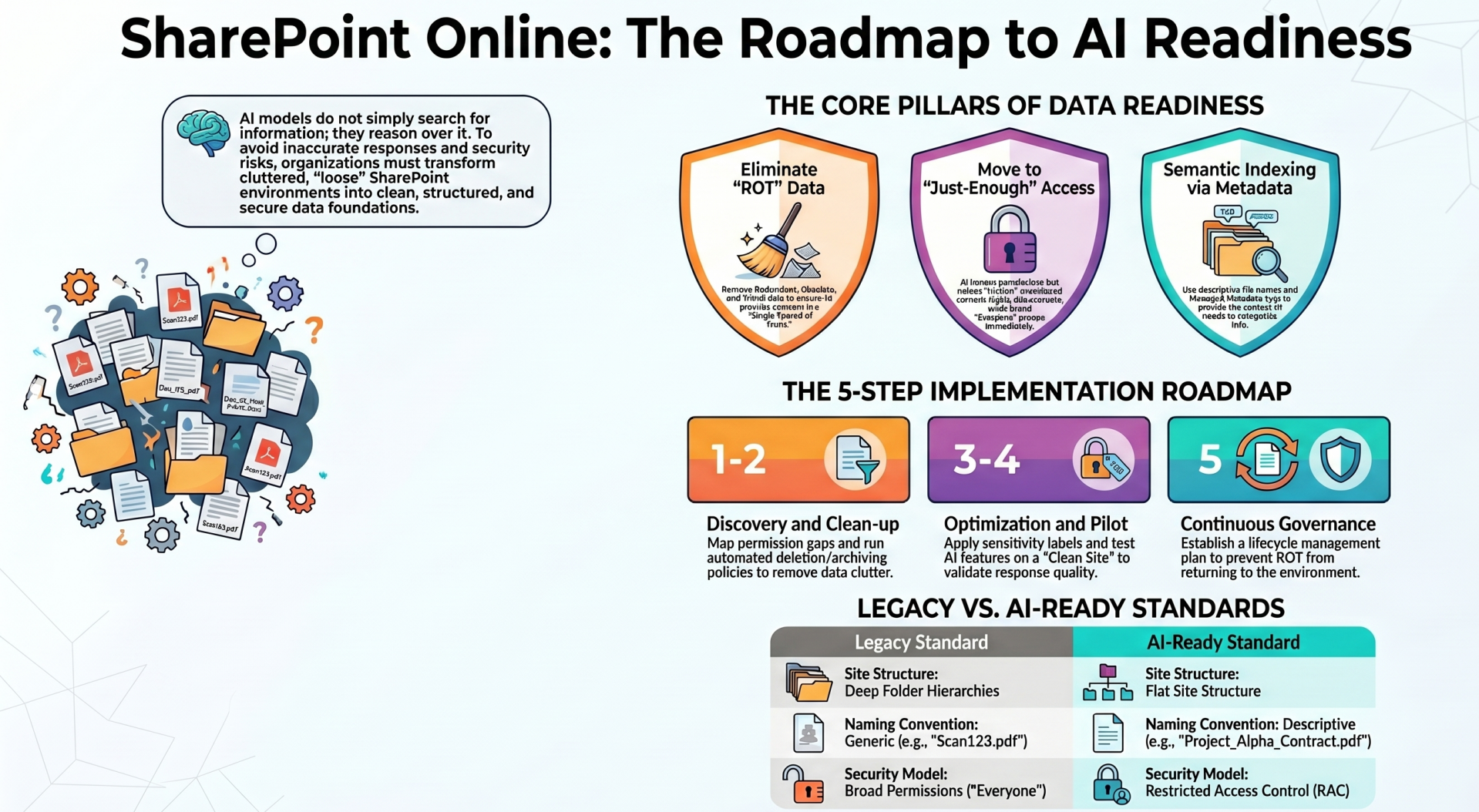
The successful deployment of Microsoft AI solutions, in SharePoint Online (SPO) environment is directly dependent on the quality, structure, and security of the underlying data. AI models do not just "search" for information; they "reason" over it. Therefore, an environment cluttered with outdated information or characterized by loose permissions will inevitably lead to inaccurate AI responses and potential security risks.
1. Data Hygiene: Eliminating ROT
AI performance is governed by the principle of "Garbage In, Generative AI Out." Redundant, Obsolete, and Trivial (ROT) data must be addressed to ensure the AI "grounds" its answers in the Single Source of Truth.

2. Security and Permissions: The "Just-Enough" Access Model
AI does not bypass permissions; it honors them. However, it makes "hidden" content (files shared with "Everyone") highly discoverable through natural language queries.
- Audit Oversharing: Use the SharePoint Admin Center to identify sites with "Everyone except external users" or broad "Member" groups.
- Restricted Access Control (RAC): For sensitive sites, apply RAC policies to ensure that even if a file is found, only a specific subset of people can interact with it via AI.
- Modernize IA: Move away from deep folder hierarchies toward a flat site structure, which simplifies permission management and improves AI indexing.
3. Information Architecture and Metadata
While AI is skilled at reading unstructured text, metadata provides the essential context that helps the Semantic Index categorize information correctly.
- Key IA Requirements:
- Consistent Tagging: Use Managed Metadata (Term Store) for department, project, and document type tags.
- Descriptive Naming: Ensure file names are descriptive. "Project_Alpha_Contract_V2.pdf" is significantly better for AI grounding than "Scan1234.pdf."
- Hub Site Association: Group related sites under Hubs. This provides a logical boundary that AI can use to scope searches.
4. Sensitivity Labels and Data Protection
Microsoft Purview Information Protection (MPIP) labels are the "DNA" of your data security. When AI generates content based on a labeled file, it can automatically inherit the sensitivity label of the source material.
- Apply Labels: Ensure "Confidential" and "Highly Confidential" labels are applied to sensitive content.
- Data Loss Prevention (DLP): Configure DLP policies to prevent AI from processing or exporting data that contains PII (Personally Identifiable Information).
5. The Readiness Roadmap
- Discovery: Use SharePoint assessment tools to map current data volumes and permission gaps.
- Clean-up: Run automated deletion/archiving policies.
- Optimization: Enhance metadata and finalize the Information Architecture.
- Pilot: Deploy AI features to a "Clean Site" first to validate response quality.
- Governance: Establish a continuous lifecycle for content to prevent ROT from returning.
By focusing on these structural foundations, organizations can move from simple AI experimentation to a robust, secure, and highly productive enterprise AI environment.
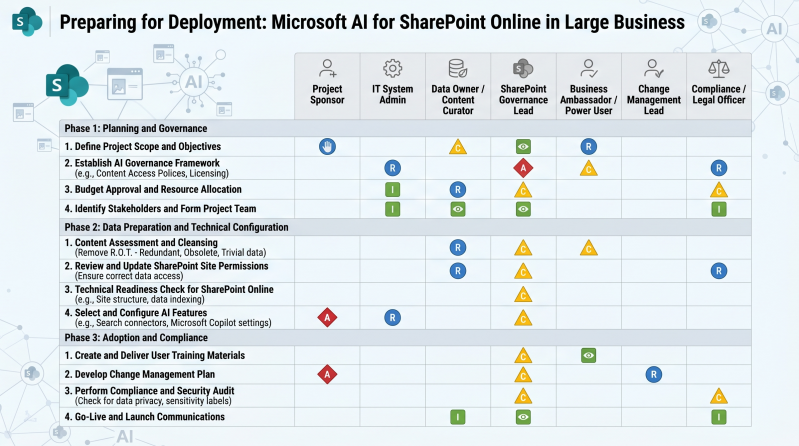
RACI EXAMPLE