

SharePoint Mentor Curated Articles

Deep Dive: Scenarios of Unauthorized Access to SharePoint Online Sites
SharePoint Online, part of Microsoft 365, is a powerful platform for collaboration, document management, and data sharing. However, its accessibility and integration features can lead to unauthorized access if not properly managed. Unauthorized access refers to situations where individuals gain entry to a site, documents, or data without explicit permission, often through exploits, misconfigurations, or human error.
This article explores common scenarios based on real-world incidents and expert analyses, drawing from security reports and best practices. While SharePoint Online benefits from Microsoft's cloud security, risks primarily stem from user configurations, external sharing, and integrated services like Teams.
Note: Unlike on-premises SharePoint, Online versions are patched automatically by Microsoft, reducing direct vulnerability exploits. However, related ecosystem weaknesses (e.g., via Teams or APIs) can still enable access.
Common Scenarios of Unauthorized Access
Unauthorized access to SharePoint Online often occurs through a combination of technical flaws, user mistakes, and malicious intent. Below are key scenarios, categorized for clarity.
1. Misconfigured Permissions and Over-Privileging
- One of the most prevalent issues is granting excessive or incorrect permissions, allowing users more access than needed. This can happen during site setup, group management, or inheritance breaks.
- Scenario Details:
- Administrators or site owners assign "Full Control" or "Edit" permissions to broad groups, such as "Everyone" or department-wide teams, without auditing. If a user's account is compromised or if group memberships are outdated (e.g., after an employee departure), attackers can exploit this to view, edit, or delete sensitive files. Custom permission levels can also mislead, appearing restrictive but granting unintended access.
- Hidden document libraries created by attackers (after initial compromise) can serve as exfiltration points, where stolen data is stored undetected.
- Real-World Example:
- In organizations relying on default settings, site members can add others to groups without owner approval, escalating privileges subtly. This has led to breaches where former employees retain access via unrevoked group ties.
- Impact: Data exposure, accidental deletions, or insider exploitation.
2. External Sharing and Link Mismanagement
- SharePoint Online's sharing features enable collaboration with outsiders, but weak controls can expose data.
- Scenario Details:
- Users share links set to "Anyone" (anonymous access), allowing anyone with the link to view or edit without authentication.
- Overlooked expiration dates or permissions (e.g., allowing edits) compound risks.
- Guest accounts from external shares may persist with broader access than intended, especially if defaults allow guests to reshare.
- If a shared link is forwarded or posted publicly, unauthorized parties gain entry.
- Real-World Example:
- In supply chain scenarios, sharing with vendors exposes documents if the vendor's site is breached.
- Anonymous links have facilitated data leaks in high-profile cases, where links were guessed or intercepted.
- Impact: Widespread exposure, especially for sensitive files like financials or IP.
3. Account Compromises and Phishing
- Attackers target user credentials to access SharePoint via legitimate logins.
- Scenario Details:
- Phishing attacks trick users into revealing passwords, often bypassing single-factor authentication. Once compromised, attackers use the account to access sites, download files, or escalate via integrated tools like Teams. A technique involves extracting encrypted authentication tokens from Teams on Windows, granting access to SharePoint files without re-authentication.
- Compromised admin accounts amplify damage, allowing site-wide changes.
- Real-World Example: In 2025 incidents, hackers used stolen tokens to access chats, emails, and SharePoint, blending with normal activity.
This mirrors broader Microsoft 365 breaches where phishing led to lateral movement. - Impact: Credential theft, data exfiltration, or ransomware injection.
4. Vulnerability Exploits in Related Ecosystems
- While SharePoint Online is cloud-managed, vulnerabilities in on-premises hybrids or connected apps can indirectly affect it.
- Scenario Details: Chained exploits, like those in on-premises SharePoint (e.g., CVE-2025-53770 for deserialization, enabling RCE and auth bypass), can target hybrid setups where Online syncs with on-prem.
- Attackers upload web shells, steal machine keys, and execute code, leading to persistence. Ransomware like Warlock has exploited these to encrypt files.
- For pure Online, risks come from API apps with excessive scopes or unpatched integrations.
- Real-World Example: July 2025 exploits by groups like Storm-2603 targeted on-prem SharePoint, affecting linked Online data in government agencies (e.g., NIH, nuclear security).
- Impact: Full system takeover, data theft, or encryption.
5. Insider Threats and Negligent Actions
Internal users can cause access issues through malice or error.
- Scenario Details: Disgruntled employees share sensitive data before leaving, or negligent users add unauthorized members to sites.
- BYOD devices without controls increase risks if devices are lost or compromised.
- Real-World Example: Oversharing in collaborative environments has led to IP theft by insiders.
- Impact: Targeted leaks or accidental exposures.
6. Migration and Integration Risks
During data migrations or app integrations, temporary exposures occur.
- Scenario Details: Data in transit or stored temporarily during migration lacks encryption, allowing intercepts. Third-party apps with API access can be over-privileged.
Real-World Example: Migration tools without access limits have exposed data in transit. - Impact: Interim breaches during transitions.
Case Studies
July 2025 SharePoint Breaches: A zero-day vulnerability (CVE-2025-53770) allowed unauthenticated RCE on on-premises servers, affecting over 75 companies. Attackers stole data and deployed ransomware like Warlock. While primarily on-prem, hybrid environments exposed Online-linked files, impacting entities like the U.S. NIH.
- Teams Token Extraction (October 2025): Hackers extracted tokens from Windows Teams clients, accessing SharePoint Online files without passwords. This enabled silent data theft across multiple organizations.
- Permission Overshare Incidents: In 2025 audits, companies like those reported by Lepide found 40% of breaches stemmed from excessive admin privileges, leading to full site compromises.
Prevention and Best Practices
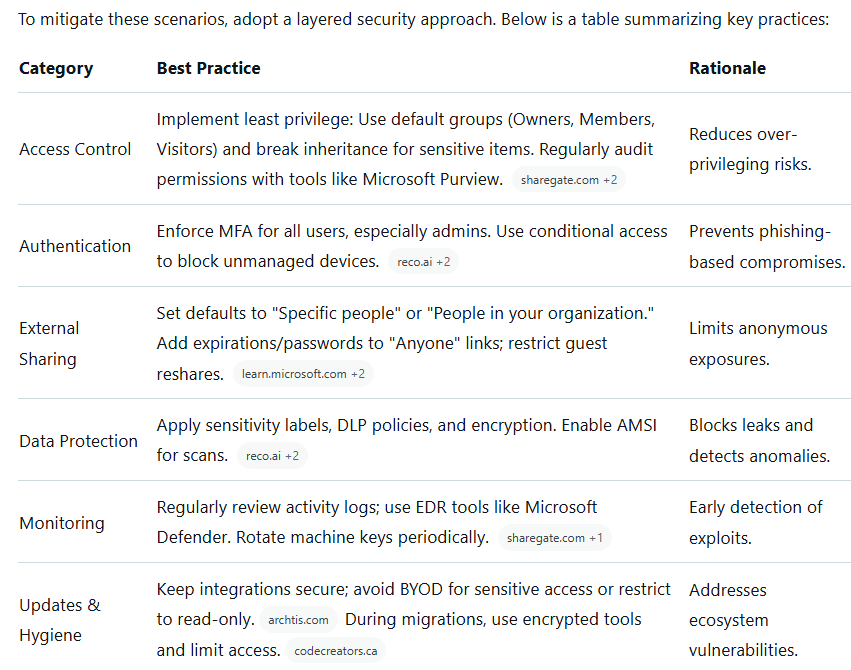
Conclusion
- Unauthorized access to SharePoint Online often results from preventable issues like misconfigurations and weak sharing practices, amplified by ecosystem exploits.
- By understanding these scenarios and applying best practices, organizations can significantly reduce risks.
- Regular training, audits, and Microsoft's built-in tools are essential for maintaining a secure environment.