

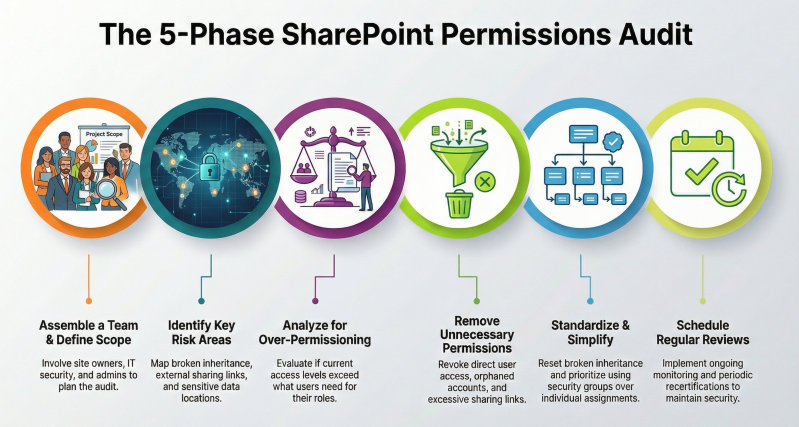
Checklist for Conducting a Formal SharePoint Online Permissions Audit and Cleanup
This checklist provides a structured approach to identifying, analyzing, and addressing permissions in SharePoint Online. It draws from established best practices to ensure compliance with the principle of least privilege, minimize security risks, and streamline management. The process is divided into phases: preparation, identification, analysis, cleanup, and ongoing best practices following significant organizational changes, involving site owners, administrators, and security teams.
1. Preparation Phase
- Establish the audit scope, including all site collections, team sites, communication sites, subsites, hubs, lists, libraries, folders, and individual items.
- Assemble a cross-functional team, comprising global administrators, site owners, data owners, and IT security personnel, to define roles such as approvers for access requests and auditors for sensitive content.
- Gather necessary tools and resources, such as the SharePoint Online Management Shell for PowerShell scripting, third-party solutions (e.g., Sharegate for permissions matrix reports, Orchestra for centralized dashboards, Varonis DatAdvantage for sensitive data visibility), and Microsoft audit logs for tracking changes.
- Document current governance policies, including storage limits, search visibility settings, and data protection features like recycle bins and backups, to serve as a baseline for comparison.
- Plan for user education, including training sessions on responsible sharing and permission protocols to prevent future issues.
2. Identification Phase: Items to Identify
- Map the permissions hierarchy, including site collections, subsites, lists, libraries, folders, and individual items, noting where inheritance is active or broken.
- Catalog all groups, such as default SharePoint groups (Owners, Members, Visitors), Microsoft 365 groups, Entra ID security groups, and custom groups, along with their memberships and assigned permission levels (e.g., Full Control, Edit, Contribute, Read).
- List all users with access, distinguishing between internal users, external guests, direct individual assignments, and those with explicit permissions; include orphaned or former employee accounts.
- Identify permission levels in use, including default levels (e.g., View Only, Limited Access) and any custom levels created for specific roles, documenting their purpose and scope.
- Locate sharing mechanisms, such as shareable links (e.g., "Anyone with the link," "Specific people"), external sharing settings, anonymous access configurations, and expiration dates for guest access.
- Pinpoint sensitive data locations using classification tools, including content with personally identifiable information (PII), confidential files, or items protected by sensitivity labels (e.g., Restricted, Confidential).
- Review access requests configurations, including enabled requests, designated approvers, pending or approved requests, and associated audit logs for permission changes.
- Detect site sprawl, including inactive or redundant sites, groups, and teams with lingering permissions or external access.
3. Analysis Phase: Practices to Analyze
- Evaluate compliance with the principle of least privilege by comparing assigned permissions against user roles and job requirements, identifying instances of over-permissioning (e.g., Edit access where Read suffices).
- Assess group usage and complexity, checking for inconsistencies (e.g., users with access via shares but not in group rosters) and opportunities to consolidate or standardize groups.
- Examine inheritance effectiveness, analyzing risks from broken inheritance (e.g., increased management overhead) and determining if resets are feasible without impacting functionality.
- Review external sharing and anonymous access for security vulnerabilities, such as oversharing via forwardable links or unnecessary guest permissions, and verify alignment with organizational policies.
- Analyze stale data and access patterns, identifying unused content, outdated memberships, and potential data leakage risks through audit logs and usage metrics.
- Generate reports using tools like PowerShell scripts (e.g., Get-SPOSiteUser) or permissions matrices to visualize access levels, group memberships, and changes over time for comprehensive insights.
4. Cleanup Phase
- Remove unnecessary permissions, including direct user assignments, orphaned accounts, and excessive access levels, prioritizing group-based management for efficiency.
- Reset broken inheritance where appropriate using scripts (e.g., Set-SPOListInheritance -ResetInheritance) to simplify structures and enforce consistency.
- Revoke or restrict external sharing by updating settings to "Specific people" or "People in your organization," adding expiration dates (e.g., 30 days), and disabling anonymous links for sensitive sites.
- Archive or delete stale data and inactive sites using lifecycle policies or tools like Varonis Data Transport Engine, ensuring compliance with retention guidelines.
- Update custom permission levels and sensitivity labels to align with analyzed needs, documenting all changes for future audits.
- Implement access request workflows with logging for approvals and denials, disabling native requests on non-external sites if using advanced tools.
5. Ongoing Best Practices
- Adhere to the principle of least privilege by assigning minimal access and managing permissions at the highest level (e.g., site or library) to avoid unnecessary breaks.
- Prioritize group-based permissions over individual assignments, using Active Directory groups for internal management and SharePoint groups only for external sharing.
- Schedule regular reviews and recertifications of permissions, groups, and access, involving data owners and using automated tools for alerts on violations.
- Document all permission structures, custom levels, and cleanup actions to maintain transparency and facilitate future audits.
- Monitor compliance through audit logs, usage metrics, and sensitivity labels to ensure ongoing security and prevent sprawl.