

SharePoint Mentor Curated Articles
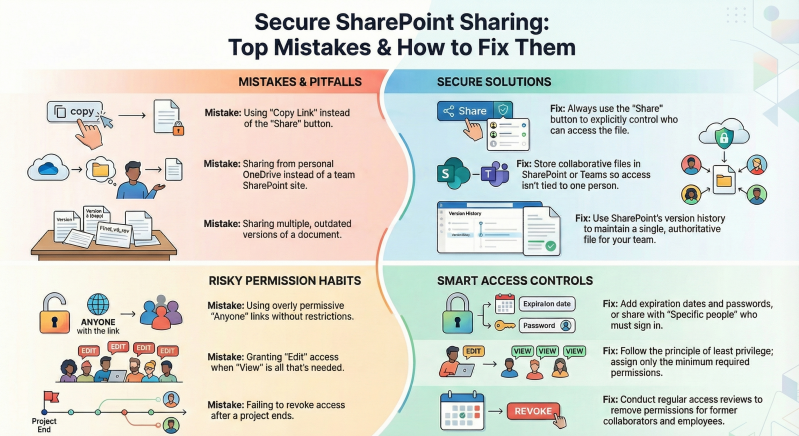
SharePoint Online facilitates effective collaboration through robust sharing capabilities, but improper practices can lead to security vulnerabilities, data exposure, and operational inefficiencies.
Below is a compilation of the 10 most common sharing mistakes, drawn from expert analyses and best practices as of 2026, along with recommended strategies to avoid them.
- Using "Copy Link" instead of the "Share" button This defaults to the existing permissions of the file or library, potentially granting broader access than intended. Avoidance: Always use the "Share" button to specify recipients and permission levels explicitly.
- Sharing files from personal OneDrive instead of SharePoint/Teams Access becomes tied to the individual owner, complicating team collaboration and persistence if the owner departs. Avoidance: Store collaborative documents in SharePoint sites or Teams channels and share from there.
- Sharing outdated or multiple versions of documents Teams end up working on incorrect files, leading to confusion and errors. Avoidance: Maintain a single authoritative version in SharePoint, utilizing version history for revisions.
- Overly permissive external sharing (e.g., "Anyone" links without restrictions) Links can be forwarded indefinitely, risking unauthorized access to sensitive data. Avoidance: Prefer "Specific people" links requiring authentication; if using "Anyone" links, add expiration dates and passwords.
- Granting excessive permissions (violating least privilege principle) Users receive more access than needed, increasing risks of accidental or malicious changes. Avoidance: Assign the minimum required permissions (e.g., View instead of Edit) and review regularly.
- Frequently breaking permission inheritance This creates fragmented, hard-to-manage unique permissions across files and folders. Avoidance: Manage access at the site or library level whenever possible; limit breaks to necessary cases.
- Not setting expiration dates on shared links Access persists indefinitely, even after collaboration ends. Avoidance: Configure default expiration in the SharePoint Admin Center and apply it per share.
- Disabling external sharing entirely This drives users to unregulated tools (shadow IT), reducing visibility and control. Avoidance: Enable controlled external sharing with domain restrictions and authentication requirements.
- Failing to review and revoke access periodically Former collaborators or employees retain access, accumulating risks over time. Avoidance: Conduct regular access reviews using SharePoint tools or Microsoft Purview reports.
- Ignoring domain restrictions for external sharing occurs with untrusted domains, exposing data to higher risks. Avoidance: In the SharePoint Admin Center, whitelist trusted domains or blacklist high-risk ones (e.g., personal email providers).
Implementing these practices enhances security while preserving collaboration efficiency. Administrators should configure tenant- and site-level settings in the SharePoint Admin Center, supplemented by user training and periodic audits. For sensitive environments, integrate Data Loss Prevention policies and sensitivity labels.