

SharePoint Mentor Curated Articles
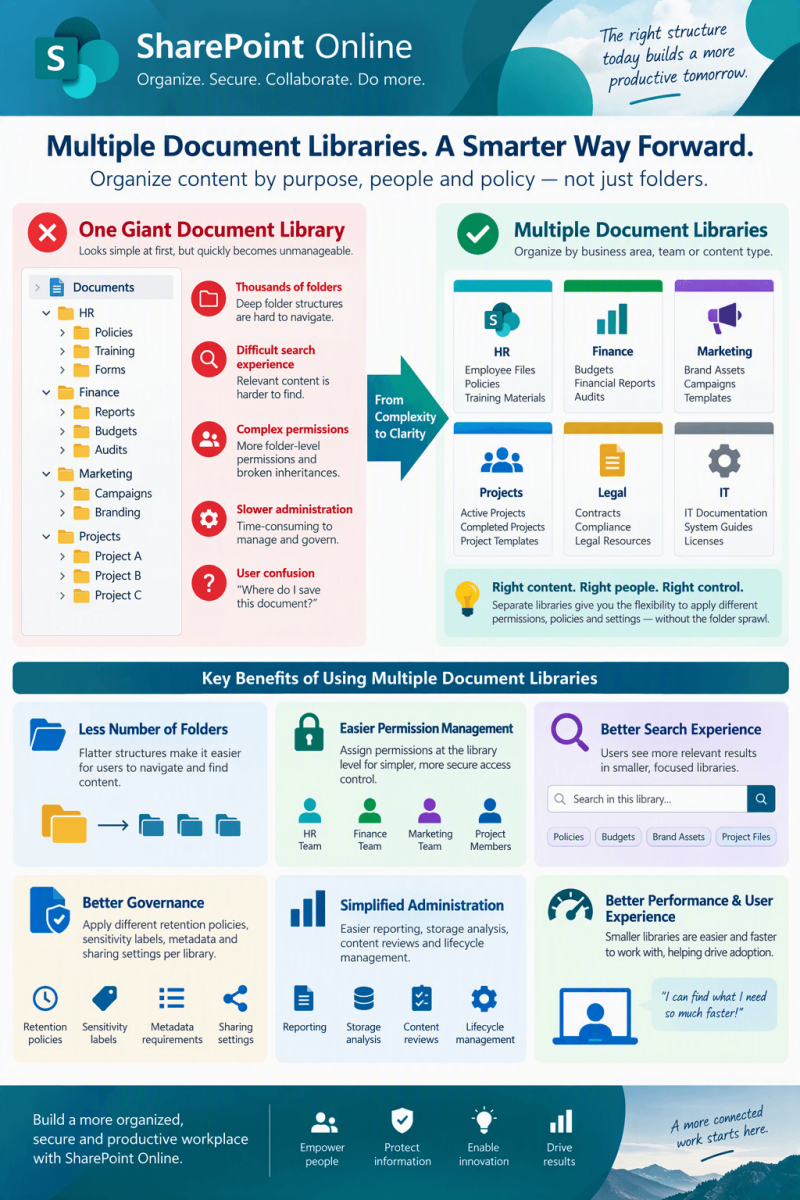
WHY MANY LIBRARIES ARE BETTER THAN ONE BIG LIBRARY?
A practical guide to structuring SharePoint Online content for clarity, security, governance, and growth
- ORGANIZE - By separating content by purpose
- GOVERN - By applying focused rules and ownership
- DISCOVER - By giving users clearer destinations
Core idea: SharePoint site does not need to place every document in the default Documents library. Multiple purpose-built libraries can create a cleaner and more manageable content architecture when each library has a clear reason to exist.
Executive Summary
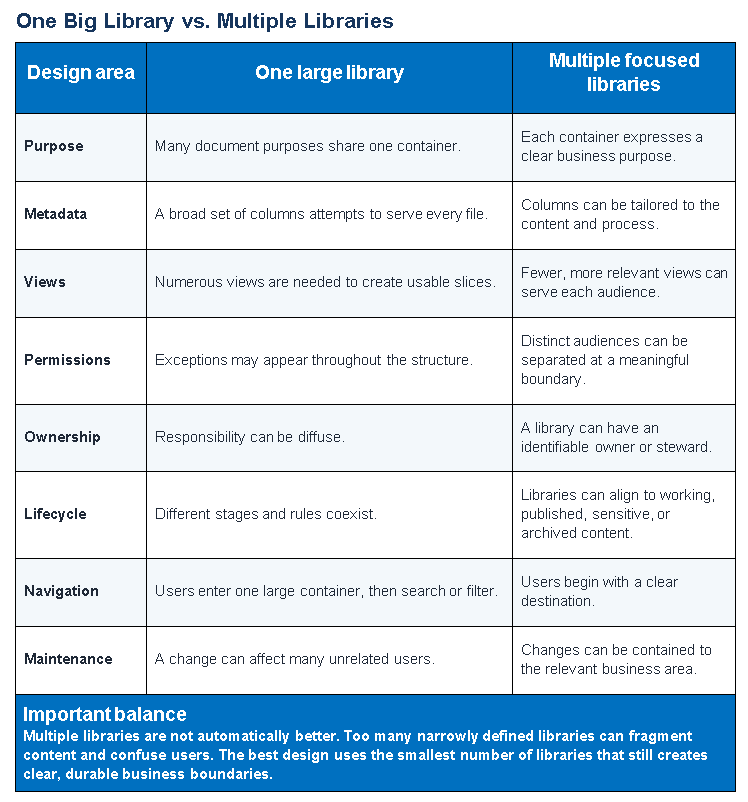
A single large document library may look simple at first, but simplicity at the storage level can create complexity for users and site owners. As content grows, unrelated document types compete for the same columns, views, permissions, navigation, retention needs, and ownership model. The result can be a library that is harder to understand and govern.
A multi-library design separates content into logical containers based on business purpose. Each library can then have focused metadata, views, permissions, policies, and user guidance. The objective is not to create a library for every small category. It is to create meaningful boundaries that make the site easier to use and manage.
Design principle
Use a new library when the content has a meaningfully different purpose, audience, security model, lifecycle, ownership group, or user experience. Keep content together when those characteristics are substantially the same.

Why One Large Library Becomes Difficult
- Users must distinguish many document types inside one container, often through complex filtering or folder structures.
- Columns that are important to one business process may be irrelevant to another, creating noisy forms and incomplete metadata.
- Permission exceptions can accumulate and become difficult to explain, review, and maintain.
- Views multiply as teams attempt to make the same library work for different audiences and tasks.
- Ownership becomes ambiguous because no single team clearly owns the complete content set.
- Lifecycle rules and working practices may conflict when active collaboration, controlled records, templates, and published material coexist.
The Business Benefits of Multiple Libraries
1. Clearer user experience
Library names can communicate purpose directly, such as Project Deliverables, Policies, Templates, Contracts, or Team Working Documents. Users choose a destination before they browse, which reduces visual noise.
2. Focused metadata
Each library can present only the columns, content types, and required information relevant to its documents. This improves consistency without forcing every file through a universal form.
3. Simpler views
Views can support the actual work performed in that library. A contracts library might organize by client, expiration, or status, while a project library might organize by project, phase, and owner.
4. More understandable security
When a whole content category has a distinct audience, library-level permissions can provide a clearer boundary than repeated exceptions deep inside a large structure.
5. Better governance
Ownership, naming conventions, review schedules, retention expectations, and publishing rules can be documented per library.
6. Easier change management
A focused library can evolve without disrupting unrelated content. Teams can refine columns, views, automation, and guidance within a controlled scope.
7. Stronger navigation and training
Libraries can be surfaced through site navigation, Quick Links, pages, and Teams tabs using familiar business language.
8. Improved reporting context
When libraries represent recognizable business functions, reporting can be interpreted in context and responsibilities are easier to assign.
When to Create a Separate Library
Decision factor
Evidence that separation may help
Purpose
The documents support a distinct process or outcome.
Audience
A meaningfully different group creates, uses, or manages the content.
Security
The content requires a different access model that should be easy to explain and audit.
Metadata
The content needs different columns, content types, or required fields.
Lifecycle
The content follows different review, approval, publishing, retention, or disposal practices.
Ownership
A different business owner is accountable for quality and upkeep.
Experience
Users need distinct views, navigation, automation, or integrations.
Recommended Planning Approach
1. Inventory content
Identify document types, current volumes, business processes, audiences, sensitive content, owners, and common user complaints.
2. Group by business purpose
Cluster documents that share a purpose, audience, metadata model, lifecycle, and owner. Avoid basing the design only on the current folder tree.
3. Define library boundaries
Create a short purpose statement for each proposed library. If two libraries have nearly identical statements and controls, consider combining them.
4. Design metadata and content types
Choose only the fields needed to find, manage, and govern the content. Reuse standardized site columns when consistency across libraries is valuable.
5. Design views and navigation
Provide a useful default view, audience-specific views where needed, and clear links from the site home page or navigation.
6. Set ownership and governance
Assign an accountable owner and document who handles access, metadata quality, stale content, policy changes, and periodic reviews.
7. Pilot before migration
Test the structure with representative users and real documents. Confirm that destinations, labels, views, and forms are understandable.
8. Migrate and improve
Move content in manageable groups, validate access and metadata, communicate the new structure, and adjust based on adoption feedback.
Example Site Structure
Library
Purpose
Possible organizing fields
Team Working Documents
Day-to-day collaborative files
Project, document type, status, owner
Policies and Procedures
Controlled guidance for the organization
Policy area, owner, effective date, review date
Templates
Approved reusable starting documents
Template category, business function, version
Contracts
Commercial and legal documents
Client, contract type, status, renewal date
Published Deliverables
Final materials intended for broad use
Audience, publication date, product or service
Governance Checklist
- Every library has a plain-language name and a one-sentence purpose.
- An accountable owner and backup owner are documented.
- Access is based on groups and is reviewed periodically.
- Required metadata is limited to information that provides real value.
- Default and public views are useful, named clearly, and maintained.
- Content types, naming conventions, and templates are documented where needed.
- Review, publishing, retention, and archive expectations are understood.
- Navigation exposes the right libraries without overwhelming users.
- Automation and integrations have a named support owner.
- Users know where to place new content and where to ask for help.
Common Mistakes to Avoid
Creating a library for every small category
Prefer metadata or a view when purpose, audience, governance, and lifecycle are the same.
Recreating the file share exactly
Use the migration as an opportunity to simplify the structure and introduce business-friendly metadata.
Using unique permissions extensively
Favor understandable group-based boundaries. Avoid scattered exceptions that are hard to review.
Naming libraries for technical administrators
Use language that makes sense to the people who create and consume the content.
Ignoring the landing experience
A sound architecture still needs clear site navigation, contextual pages, and helpful links.
Overloading forms with required fields
Require only high-value metadata and use defaults, content types, or automation where appropriate.
Migrating without ownership
Do not create a library unless someone is responsible for its structure, quality, permissions, and lifecycle.
Decision Guide
Keep content in the same library when
The documents share a purpose, audience, security model, metadata, lifecycle, and owner. Use columns, content types, and views to create useful perspectives.
Create a separate library when
There is a durable difference in purpose, audience, security, metadata, lifecycle, ownership, or user experience. The separation should make the destination and governance easier to understand.
Reconsider the site boundary when
The proposed libraries represent substantially different business communities, ownership models, or information environments. A separate site may provide a clearer long-term architecture.
Conclusion
The goal of SharePoint information architecture is not to maximize or minimize the number of libraries. It is to give content a structure that users can understand and owners can sustain. One large library can be appropriate for a cohesive set of documents. Multiple libraries are usually more effective when meaningful business boundaries exist.
A successful design is intentional: each library has a purpose, a clear audience, focused metadata, useful views, appropriate access, and accountable ownership. When those elements are in place, the site becomes easier to navigate, govern, support, and evolve.