

SharePoint Mentor Curated Articles
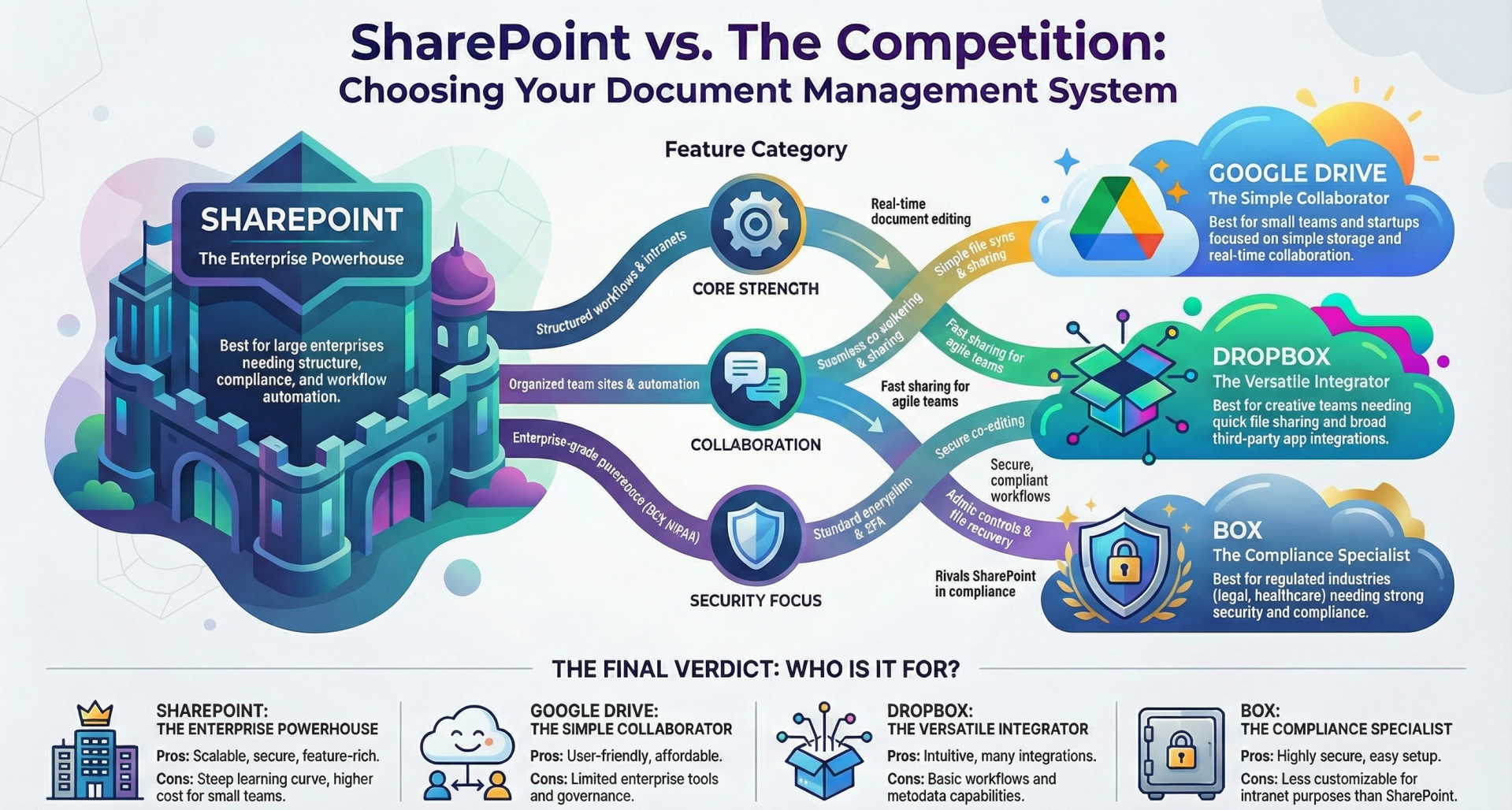
How does SharePoint Compare with Other Document Management & Collaboration Systems?
SharePoint, is a robust enterprise-level document management system integrated with Microsoft 365, emphasizing structured content organization, workflows, and collaboration for teams and organizations. It stands out from consumer-oriented tools by offering advanced features like metadata tagging, version control, compliance tools, and automation, making it suitable for regulated industries and large-scale operations.
In contrast, popular DMS options like Google Drive, Dropbox, Box, and OneDrive prioritize simplicity, quick file sharing, and accessibility. Let's break down the comparisons across key aspects.
Features
SharePoint provides comprehensive document libraries, check-in/check-out functionality, metadata support, and workflow automation via tools like Power Automate, allowing for custom sites, intranets, and AI integrations for enhanced search and content creation. It excels in structured document management, version tracking, and enterprise search, but its interface can feel complex for beginners.
- Google Drive: Focuses on cloud storage with real-time editing in Docs, Sheets, and Slides, version history, and basic folder organization. It lacks advanced metadata, workflows, or customization, making it more of a file-sharing tool than a full DMS.
- Dropbox: Offers smart sync, file recovery (up to 180 days in business plans), and Dropbox Paper for note-taking and collaboration. It's strong in simple storage and third-party app integrations but falls short on workflows, metadata, and intranet features.
- Box: Emphasizes content lifecycle management, granular controls, and compliance-focused features like e-signatures and retention policies, similar to SharePoint but with a simpler UI for creative or legal teams.
- OneDrive: Primarily for personal file storage with seamless Office integration and syncing, but it lacks SharePoint's team-oriented libraries and workflows. It's often used alongside SharePoint for individual access to shared files.
SharePoint is ideal for complex needs, while the others suit basic storage and quick access.
Collaboration
SharePoint supports real-time co-authoring, granular permissions, notifications, and integration with Microsoft Teams for team sites and project management, enabling approval flows and automated tasks. It's geared toward organized, enterprise collaboration.
- Google Drive: Enables seamless real-time editing and sharing via links, with strong integration into Google Workspace for chats and meetings, but without advanced governance.
- Dropbox: Provides real-time editing through Paper and easy link sharing, suitable for fast-moving teams, but limited in automation and team portals.
- Box: Offers secure sharing and co-editing, with a focus on compliance in collaborative workflows, making it good for regulated sectors.
- OneDrive: Supports individual sharing and co-authoring via Office apps, but it's more personal; for team collaboration, it defers to SharePoint or Teams.
SharePoint edges out for structured team environments, while Google Drive and Dropbox win for simplicity.
Security and Compliance
SharePoint offers enterprise-grade features like Data Loss Prevention (DLP), encryption, audit trails, retention policies, and compliance with standards such as GDPR, HIPAA, and ISO, ideal for sensitive data in industries like healthcare or finance.
- Google Drive: Includes encryption, access controls, and two-factor authentication, but it's less robust for enterprise compliance without add-ons.
- Dropbox: Features encryption, two-factor authentication, and file recovery, with business plans adding admin controls, but it lacks SharePoint's depth in governance.
- Box: Strong in granular security, compliance certifications, and features for legal/finance, often rivaling SharePoint in regulated environments.
- OneDrive: Aligns with Microsoft's security standards, including encryption and compliance, but as a personal tool, it's not as governance-focused as SharePoint.
SharePoint and Box lead in security for enterprises, while others suffice for general use.
Integration
SharePoint seamlessly connects with Microsoft 365 (e.g., Teams, Outlook, Power BI), plus third-party apps like Salesforce via APIs and Power Platform.
- Google Drive: Integrates deeply with Google Workspace (Gmail, Docs) and some third-party tools, but limited outside that ecosystem.
- Dropbox: Supports over 300 integrations (e.g., Slack, Zoom, Google Workspace, Salesforce), making it versatile for mixed environments.
- Box: Focuses on secure integrations with enterprise tools, including custom APIs for workflows.
- OneDrive: Ties into Microsoft 365 like SharePoint, with strong Office app support.
Ecosystem loyalty often dictates the best fit—Microsoft for SharePoint/OneDrive, Google for Drive.
Pricing (as of 2025 data; check providers for updates)
SharePoint starts at $5–$6/user/month (e.g., Plan 1 or Microsoft 365 Business Basic, with 1 TB/user), no free tier, but scales with bundles.
- Google Drive: Free 15 GB; business plans from $6/user/month (Business Starter, 30 GB+).
- Dropbox: Free 2 GB; business from $15/user/month (Standard, 5 TB shared).
- Box: Typically starts around $10–$15/user/month for business plans, with emphasis on compliance features (exact pricing varies).
- OneDrive: Free 5 GB personal; business via Microsoft 365 from $6/user/month (1 TB/user).
Google Drive and Dropbox offer free tiers, appealing to small users, while SharePoint's value shines in bundled enterprise plans.
Suitability
- SharePoint: Best for medium to large enterprises needing structure, compliance, and Microsoft integration (e.g., corporations like Coca-Cola).
- Pros: Scalable, secure, feature rich.
- Cons: Steeper learning curve, higher cost for small teams.
- Google Drive: Ideal for startups, small businesses, or Google users focused on simplicity and real-time edits.
- Pros: User-friendly, affordable.
- Cons: Limited enterprise tools.
- Dropbox: Suits startups, creative teams, or mid-sized businesses for quick sharing.
- Pros: Intuitive, versatile integrations.
- Cons: Basic workflows.
- Box: Great for compliance-heavy sectors like legal or healthcare.
- Pros: Secure, easy setup.
- Cons: Less customizable than SharePoint.
- OneDrive: Fits individuals or small Microsoft-based teams for personal storage.
- Pros: Seamless with Office.
- Cons: Not a full team DMS.
Ultimately, choose SharePoint if your needs involve advanced governance and scale; opt for alternatives like Google Drive or Dropbox for ease and cost savings in less complex scenarios.