

SharePoint Mentor Curated Articles
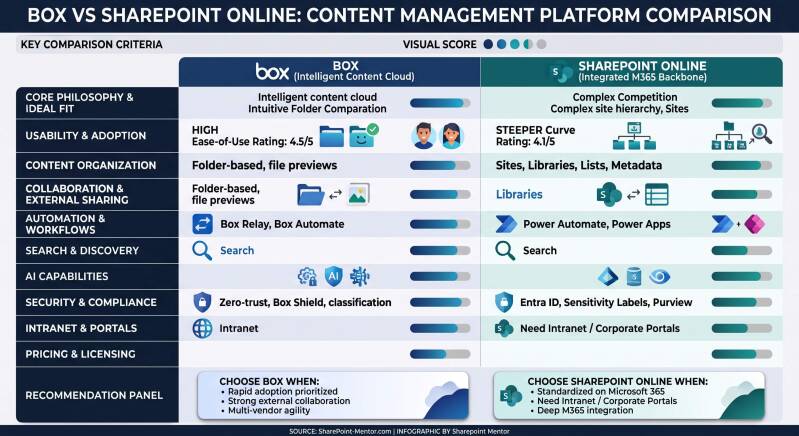
Box and SharePoint Online are both enterprise-grade platforms for content management, collaboration, and file sharing, but they follow different philosophies and excel in different scenarios.
Core Philosophy and Ideal Fit
- Box: Positioned as a best-of-breed “Intelligent Content Cloud.” It serves as a neutral, centralized hub that works well across multi-vendor environments (Salesforce, Slack, Google Workspace, Microsoft 365, etc.). It prioritizes simplicity, secure external collaboration, and content-centric workflows. Strong for organizations that want a focused content platform without deep commitment to one ecosystem.
- SharePoint Online: An integrated content and collaboration platform that powers the Microsoft 365 ecosystem. It functions as both a document management system and a foundation for team sites, communication sites, and corporate intranets. Ideal for organizations already standardized on Microsoft 365 (Teams, OneDrive, Outlook, Power Platform, Copilot).
Features for Content Management
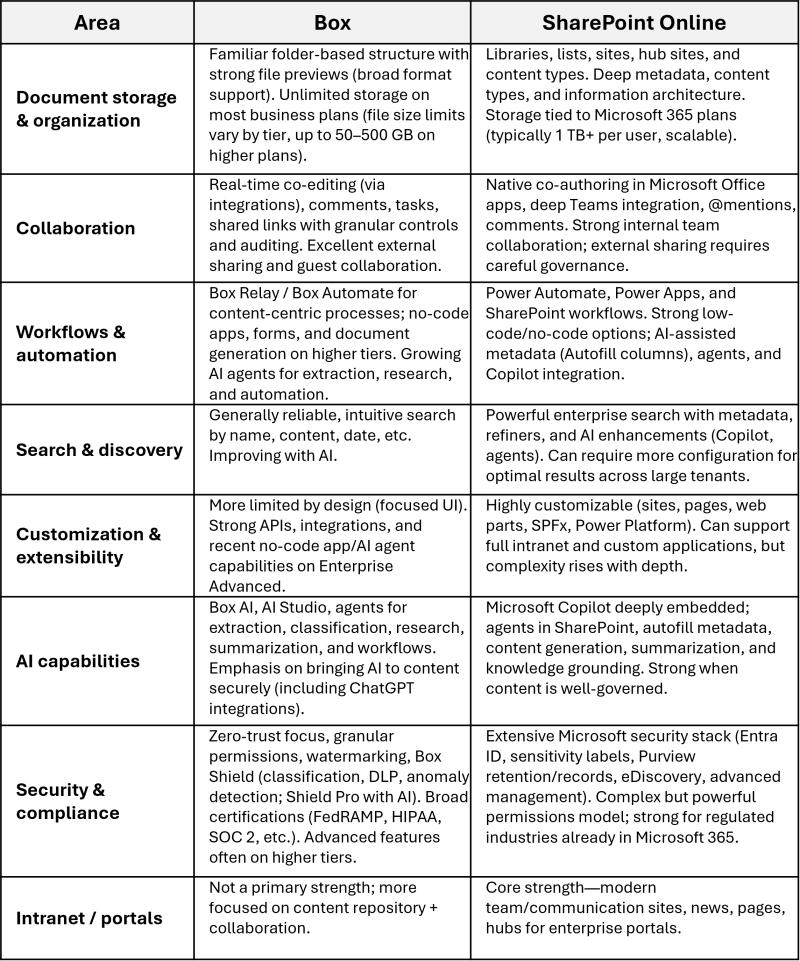
Both support version history, permissions, metadata, search, retention/lifecycle policies, and collaboration. Key differences:
Usability
- Box consistently ranks higher for ease of use. Users and reviews highlight a clean, intuitive, folder-centric interface with a shorter learning curve. Setup and day-to-day adoption tend to be simpler, especially for non-technical users and external collaborators. Admin experience is generally more straightforward for core content management.
- SharePoint Online is more powerful but has a steeper learning curve. The interface (sites, libraries, lists, navigation between them) can feel complex or unintuitive, particularly for new or non-technical users. Navigation and permission management often require more training and good information architecture. Recent UI refreshes and Copilot/AI features are improving the experience, but it remains enterprise-oriented and can involve higher admin overhead.
User ratings (approximate across review sites) typically show Box edging out on ease of use (around 4.5 vs. 4.1) while both score solidly on overall functionality.
Other Considerations
- Integrations: SharePoint wins for seamless native Microsoft 365 experience. Box is stronger as a platform-agnostic hub with broad third-party connections.
- Pricing: SharePoint is often more cost-effective when already licensing Microsoft 365 (included in many plans starting around $5–6/user/month). Box starts higher (Business plans typically $15–20+/user/month) with advanced AI/security features on premium tiers.
- Scalability & governance: Both handle enterprise scale. SharePoint offers deeper built-in governance tools for sprawling content; Box emphasizes secure external collaboration and content protection.
Summary Recommendation
- Choose Box when ease of use, rapid adoption, strong external collaboration, multi-vendor flexibility, and a focused intelligent content platform are priorities.
- Choose SharePoint Online when the organization is (or plans to be) deeply invested in Microsoft 365, needs intranet/portal capabilities, extensive customization, and tight integration with Teams, Office apps, and the broader Microsoft security/governance stack.